Mage Pro release notes
September 17, 2026
Explore more data, understand pipeline health, and take action with less context switching. This release expands AI Sidekick, previews, monitoring, callbacks, imports, and pipeline authoring across Mage Pro.
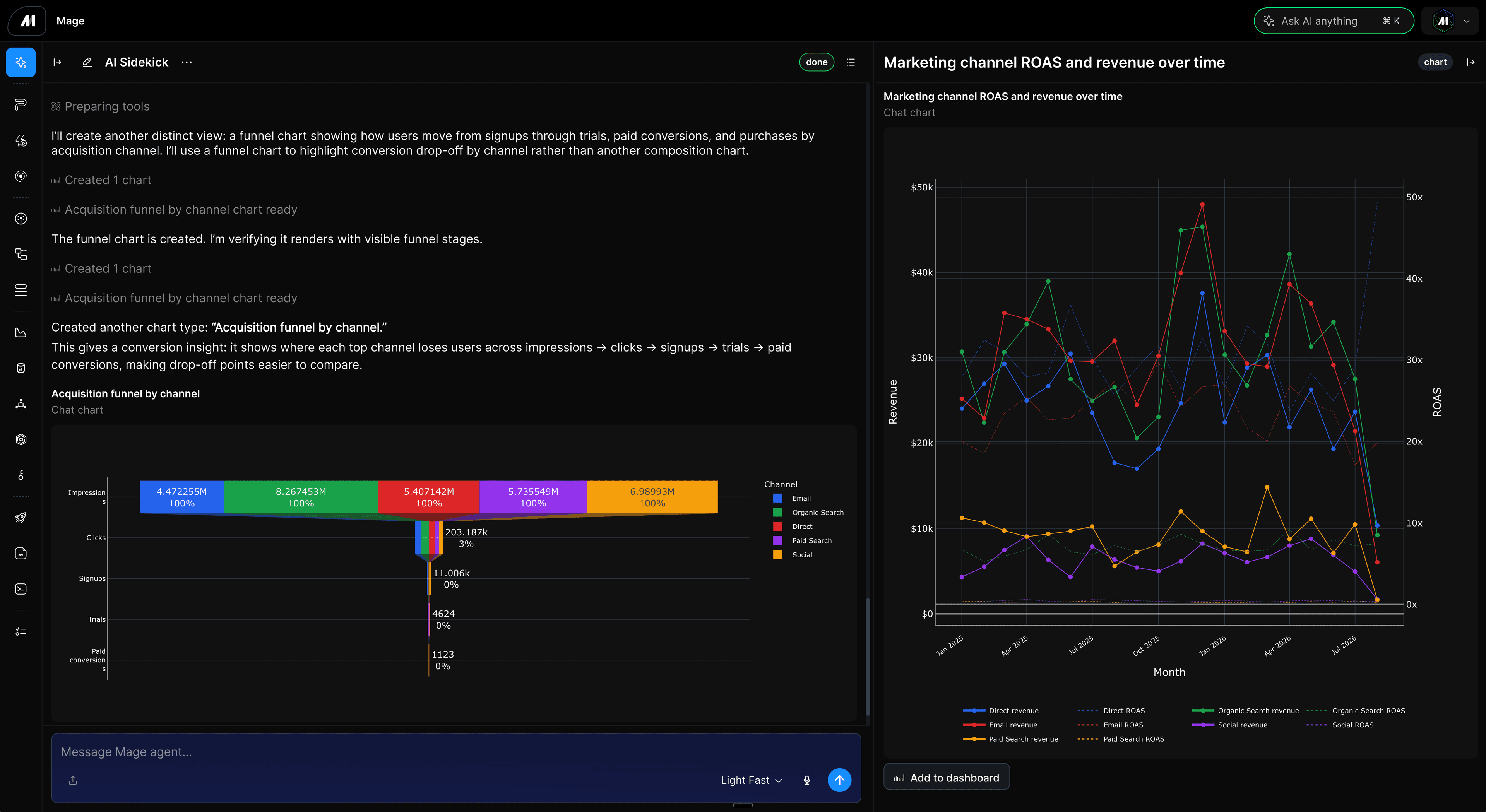
Mage Pro Release Notes
Highlights
- AI Sidekick: Makes Sidekick more interactive and reliable with pending input flows, richer page context, chart artifacts, saved-agent endpoint streaming, multi-run data previews, clearer tool activity, faster session lists, improved prewarming, and more stable chat restoration.
- Data exploration and previews: Expands Explore data across block outputs and sources with multi-run previews, JSON previews, Delta Lake S3, SQL Server, BigQuery, DuckDB, dynamic outputs, and safer preview contracts.
- Dashboards and monitoring: Improves dashboard charts with durable Data Preview datasets, faster chart reloads, better axis readability, chart layout fixes, configurable monitoring timeframes, runtime trend charts, log-source filters, and adjustable log columns.
- Streaming pipeline monitoring: Adds streaming health observability so teams can monitor streaming pipeline health more directly alongside existing logs and runtime diagnostics.
- Pipeline callbacks: Adds pipeline-level callback blocks so teams can attach follow-up actions to pipeline outcomes without modeling that logic as ordinary pipeline work.
- Bulk pipeline and project import: Lets teams upload one ZIP containing a pipeline, multiple pipelines, or a full Mage project with conflict handling, protected-file safeguards, rollback, and per-item status.
- Pipeline authoring and navigation: Adds a real template browser, standardized right-click actions, better pipeline empty states, pipeline files in new tabs, config files in editor modals, stronger tag validation, and clearer run-status actions.
- Integrations: Improves paid media connector fields, TikTok pagination, integration config editing, MSSQL metadata and previews, integration documentation in Sidekick, Data Integration editor Sidekick navigation, source template switching, pending integration action states, and destination table selection.
- Account, settings, and security: Adds password reset, unifies settings navigation and security surfaces, improves profile settings alignment, fixes API token expiry timezone handling, and strengthens tag limits across pipelines and triggers.
New capabilities
AI Sidekick
- Handle interactive work: Support pending Sidekick interactions, reusable pending input, explicit approval wiring, and clearer preparing/tool activity states while work is running.
- Use richer page context: Add semantic page selections, frontend path hints, and source summaries so Sidekick can carry the right project and data context forward.
- Preview and chart data from chat: Render Sidekick chart artifacts in chat, open live data preview artifacts from Sidekick turns, support multi-run output previews, preserve chart follow-up continuity, and keep chart artifacts scoped to the right source.
- Run saved agents more directly: Stream endpoint runs from the editable request payload, keep final output available after reload, and execute saved-agent chat in the current Sidekick turn with the assigned context and action allowlist.
- Recover and restore chats more reliably: Improve prewarm pooling, chat switching latency, transcript paint readiness, session restoration, turn detail hydration, startup recovery, and active-turn reload behavior.
- Make Sidekick activity easier to read: Refine tool labels, compact tool rows, collapse failed tool details by default, show full user messages in manifest detail, and keep final answer activity boundaries clearer.
Learn more: Explore AI Sidekick | Read the AI Sidekick docs
Data exploration and data previews
- Explore more sources and outputs: Unify Explore data across outputs and sources, expand IO explore provider coverage, and keep single-output exploration scoped to one run.
- Preview more data formats: Add multi-run data output previews, JSON block output previews, Delta Lake S3 previews, SQL Server and MSSQL previews, BigQuery previews, DuckDB destination exploration, and dynamic output preview source references.
- Improve preview reliability: Harden data preview contracts, prevent charts from using preview windows, ignore sample outputs in pipeline output previews, avoid rich output reads during candidate discovery, and guard large downloads by memory estimate.
- Give users better preview controls: Add block output column visibility controls, remove default row-count assumptions, and improve table and source-state handling around integration sample data.
Learn more: Explore Data Explorer | Read the Data Explorer docs
Dashboards, charts, and monitoring
- Use durable chart data: Back dashboard charts with Data Preview datasets, cache rendered chart JSON, and use a single update path for chart refreshes.
- Improve chart readability: Refine Sidekick chart axes, dense label placement, inner chart borders, dashboard row height after reorder, and chart artifact panel switching.
- Add operational views: Add configurable overview monitoring timeframes, pipeline and block runtime trends, longest-active-run charts, log-source filters, and adjustable log columns.
- Document analytics workflows: Add and sync docs for analytics dashboards and Data Explorer so users can adopt the new surfaces more easily.
Learn more: Explore Analytics dashboards | Read the Analytics docs
Streaming pipeline monitoring
- Monitor streaming health: Add streaming health observability so teams can see when streaming pipelines need attention.
- Troubleshoot streaming runs faster: Pair streaming health signals with improved log source filtering, log layout, and diagnostics to make long-running streaming workloads easier to inspect.
Learn more: Explore monitoring and alerting | Read the streaming pipeline docs
Pipeline callbacks
- Attach callbacks to pipeline outcomes: Support pipeline-level callback blocks so teams can trigger follow-up actions after pipeline events.
- Keep callback logic explicit: Model callback behavior separately from ordinary pipeline authoring so operational follow-up work is easier to find and maintain.
Learn more: Read the callback blocks docs
Bulk pipeline and project import
- Import more from one archive: Upload one ZIP that contains a single pipeline, multiple pipelines, exported pipeline folders, or one full Mage project.
- Resolve conflicts before writing: Detect name and file conflicts up front, support overwrite, rename, skip, and cancel flows where appropriate, and report validation or import status per pipeline.
- Protect existing work: Roll back failed writes, keep successful sibling pipelines, protect environment files from project upload, and restore changed project files if a project import fails.
Learn more: Read the pipeline import docs
Pipeline authoring, files, and run controls
- Create from templates more naturally: Replace the template picker with a full template browser and improve the new pipeline creation flow.
- Work faster in pipeline pages: Standardize right-click actions, open pipeline files in new tabs, open pipeline config files in editor modals, improve file browser hierarchy, and keep the file editor vertically usable.
- Manage runs and triggers more confidently: Add retry incomplete blocks to run-status menus, fix trigger run delete confirmations, validate tag lengths across pipelines and triggers, show all available tags in pipeline filters, and improve trigger active-run popups.
- Improve page polish: Fix blank pipeline pages after first login, M-logo home navigation, pipeline description column width, long breadcrumbs, sidebar collapse clicks, block run sorting, and pipeline runs menus after client navigation.
Learn more: Explore pipeline templates | Read the template library docs | Read the pipeline trigger docs | Read the runtime variables docs
Integrations
- Improve connector setup and editing: Fix paid media connector field gaps, integration config edits, source template switching, destination table selection, and pending statuses for integration actions.
- Expand preview support: Improve MSSQL and SQL Server preview routing, BigQuery destination previews, BigQuery Explore project inference, and file-backed integration config access for viewers.
- Improve connector correctness: Stop TikTok empty deleted-page pagination, fix MSSQL metadata catalog casing, and add opt-in handling for newly discovered stream fields.
- Improve Data Integration editor flows: Fix Sidekick navigation from the Data Integration editor and repair related SVG rendering errors.
- Surface docs in context: Show integration documentation in Sidekick so users can access setup guidance while configuring or troubleshooting a connector.
Learn more: Read the data integrations docs
Account, settings, and platform behavior
- Improve account access: Add password reset and refine security-related settings navigation.
- Harden API and policy behavior: Fix Mage Pro API token expiry timezone handling and improve API error panel copy and drag bounds.
- Improve workspace and Kubernetes feedback: Improve workspace-management breadcrumb navigation, disabled Workspace Manager search, Kubernetes executor hostname errors, transient Kubernetes job creation, and PVC volume configuration serialization.
- Modernize platform dependencies: Upgrade SQLAlchemy to 2.0 while preserving product-facing behavior.
Improvements
- Sidekick performance and scale: Speed up session lists, reduce live delta pressure, bound state-stream backfills, prewarm chats more truthfully, simplify streamed endpoint output, and keep startup caches from going stale.
- Sidekick charting and data tools: Improve chart artifact hydration, chart data pool behavior, output previewability checks, and follow-up source continuity.
- Pipeline and editor polish: Clean up block color selection, standardize action bands, simplify naming dialogs, restore reliable block deep links, improve trigger detail run tables, and improve code/update readbacks.
- Logs and troubleshooting: Improve log tail layout, page refresh behavior, source filtering, stack trace grouping, streaming health visibility, and log column customization.
- Documentation: Sync Mage AI docs into Mage Pro, move private docs out of public docs, and add guidance for remote blocks and Sidekick project instructions.
Reliability and fixes
- Fixed Sidekick session and stream state: Resolve stale row selections, stale live journals, user stream readiness, new-chat composer promotion, final answer hydration, chat restore regressions, queued message steering, and selected-session restore scoping.
- Fixed Sidekick tool and runtime contracts: Harden block tool contracts, runtime detail reconciliation, MCP tool contracts, parent-scoped resource contracts, AI block creation, endpoint output handling, and stream payload overrides.
- Fixed data preview edge cases: Correct multi-run JSON previews, Polars serialization, BigQuery previews, SQL Server previews, dynamic output refs, and preview artifact reload loading.
- Fixed dashboard and chart regressions: Repair chart preview hydration, chart label placement, dashboard row height, and chart artifact panel switching.
- Fixed integration and connector issues: Repair integration config resets, source template switching, destination preview behavior, MSSQL metadata casing, Data Integration editor Sidekick navigation, SVG rendering, and TikTok pagination.
- Fixed UI and navigation issues: Repair pipeline editor deep links, pipeline runs menus, file browser hierarchy, editor vertical expansion, pipeline empty state CTAs, home navigation blank states, and profile setting input alignment.
Release metadata
- Image tag: 20260917-1000-py3.12
- Release ID: 20260917-1000
- Repository: mage-ai/mage-pro
- Date: September 17, 2026
- Start commit:
741a84c7a50e - End commit:
3734a1b61829
Questions or feedback? Check workspace Settings for help links, or contact Mage support.