Mage Pro release notes
August 10, 2026
AI Sidekick can work with richer pipeline context, while data exploration, visualizations, connections, templates, and execution controls stay in the same Mage Pro workspace.
Mage Pro Release Notes
Release ID: 20260810-0000 Image tag: 20260810-0000-py3.12 Release date: 2026-08-10 Repository: mage-ai/mage-pro
Highlights
- AI Sidekick: Makes Sidekick faster and more capable with continuous Markdown streaming, smoother live answers, voice dictation, file and zipped-folder uploads, removable context chips, docs search, data previews, chart artifacts, cached transcripts, prewarmed runtimes, and stronger retry and recovery handling.
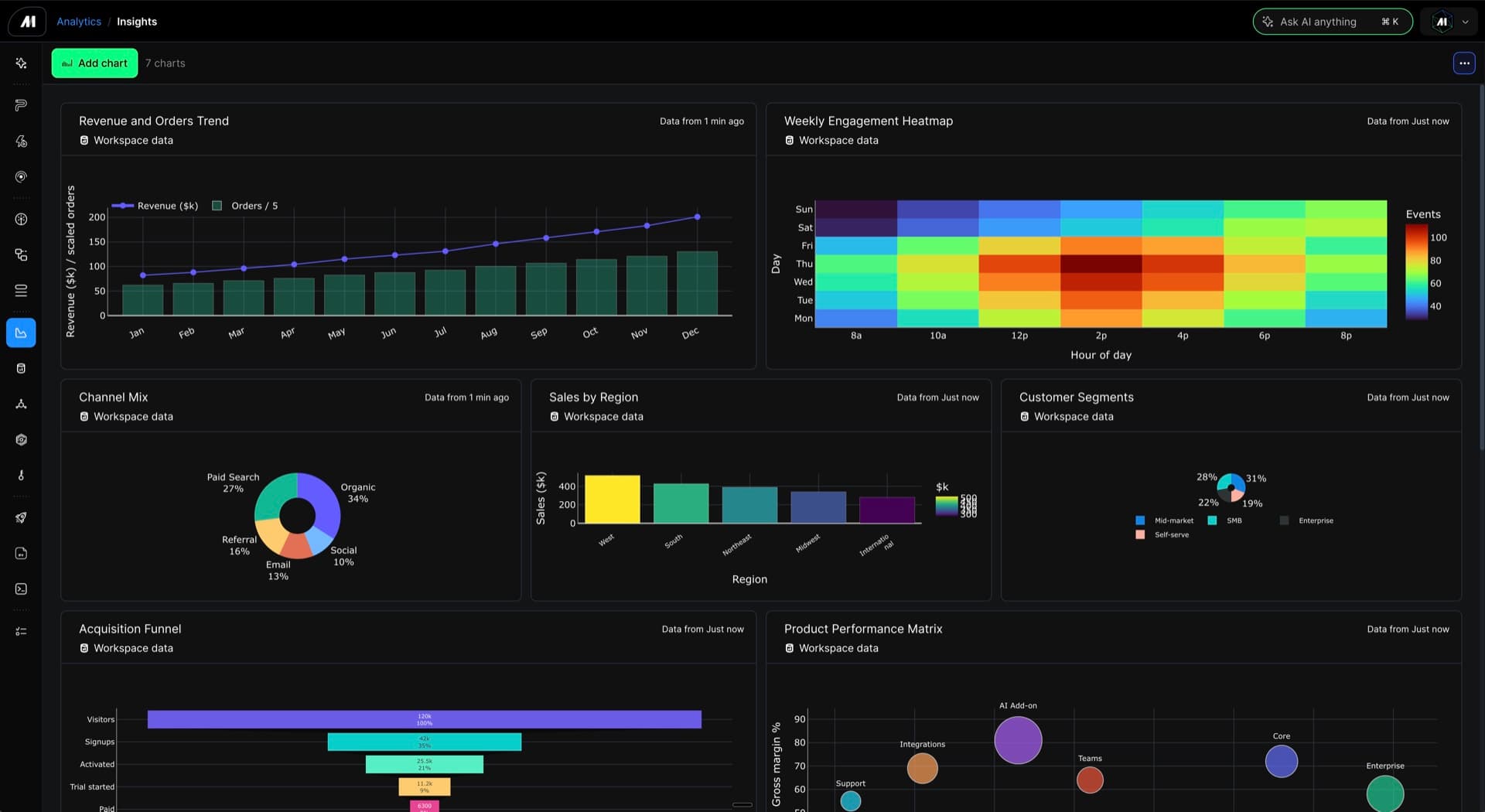
- Analytics Dashboard and visualization: Adds AI-generated visualization dashboard charts, universal chart data views, dashboard chart rendering from full block outputs, dashboard empty-state fixes, and monitoring overview action polish.
- Data exploration: Introduces a Data Explorer entrypoint, exploration UI for existing connections, virtual preview tables, Parquet and remote SQL preview adapters, cancellation handling, and improved row-count behavior.
- Data connection UI: Adds UI for managing
io_configprofiles, improves first integration config template loading, expands connection testing across IO classes, and adds SQL source stream row counts. - Alert management UI: Restores alert settings with managed notification schemas, adds managed notification delivery support, clarifies trigger timing and plan language, and keeps alert and trigger controls readable.
- Template library by industry: Adds a managed pipeline template catalog so teams can browse industry-oriented templates and start new pipelines from curated examples.
- Pipeline operations and scheduling: Adds pipeline priority, automatic retry settings, retry actions, cancellation cascades, guarded trigger deletion, clearer runtime variable editing, and Kubernetes execution diagnostics.
- Pipeline authoring and graph experience: Improves graph layout, graph workspace controls, relationship labels, dynamic child dependency handling, pipeline downloads, notebook sticky headers, file browser shortcuts, and editor polish.
- Workspace, deployment, and configuration: Improves workspace configuration recovery, organization OAuth deployment credentials, dependency-install warning handling, production routing alignment, and workspace pod diagnostics.
- Integrations and data quality: Expands IO connection testing, SQL source stream row counts, integration template loading reliability, upstream-failure protection for integration exports, and dbt dynamic block execution coverage.
New capabilities
AI Sidekick
- Stream answers more naturally: Render Markdown continuously while Sidekick responds, smooth live response updates, keep final answers ordered, collapse completed work once the answer is ready, and hand off final AI chat answers more reliably.
- Start and continue chats faster: Reuse app-server sessions, prewarm new chats, reduce send-path and thread latency, cache transcript turns, and keep Sidekick open across navigation.
- Use richer inputs: Dictate prompts by voice, attach files, upload browser-zipped folders, preserve file attachments in messages, and sync Sidekick file edits into open editors.
- Control Sidekick behavior: Configure speed and effort settings, use clearer workflow step labels, and see more human-readable activity names.
- Carry the right context forward: Use removable context chips, page context readers, editor context capture, dashboard context chips, and reusable invocation context without leaking stale context into later answers.
- Recover interrupted work: Harden turn ownership, stream recovery, stopped and cancelled state, retry context budgets, worker prewarms, session cleanup, and proxy authentication.
- Inspect Sidekick work: Track subagent detail, tool success events, structured tool activity, cached transcript panes, and retained chat history with fewer reload and spinner issues.
Sidekick data exploration and artifacts
- Preview data from chat: Discover data previews through Sidekick, complete preview flows, open preview artifacts automatically, and avoid hidden preview hydration work until the user opens it.
- Render charts from Sidekick: Generate chart views from block outputs, use full block-output data when rendering charts, and show universal chart data views for Sidekick charts.
- Keep generated previews safe and accurate: Prevent synthetic preview leaks, refine cancellation and row-count handling, and scope pipeline artifacts to the active context.
- Search product documentation from Sidekick: Use read-only Mage docs search and production-safe docs routing so Sidekick can ground answers in the relevant docs.
Data Explorer and data preview
- Explore existing connections: Open a Data Explorer UI for existing connections and launch exploration directly from an AI entrypoint.
- Preview more data shapes: Use virtual data preview tables, Parquet previews, remote SQL preview adapters, and shared preview contracts.
- Discover preview inventory faster: Speed up broad Data Explorer and Sidekick discovery paths while avoiding unnecessary pipeline output hydration.
- Understand preview results better: Improve result-table alignment, row counts, and cancellation behavior.
Pipeline operations, triggers, and scheduling
- Prioritize pipeline execution: Set pipeline priority through the API, settings UI, and scheduler so important workloads can be ordered intentionally.
- Retry and cascade run actions: Retry incomplete block runs, retry selected integration streams, configure automatic retry settings, and cascade cancellation through dependent pipeline and AI-assisted work.
- Manage triggers more safely: Guard bulk trigger deletion, keep trigger plan details visible, validate whitespace-only runtime variable fields, and make runtime variable JSON editing resizable.
- Diagnose Kubernetes execution: Show scheduling failure reasons and Kubernetes resource-usage summaries in executor logs and run surfaces.
- Navigate runs more easily: Add pipeline run navigation controls and keep trigger and run table columns readable with improved truncation and layout behavior.
Pipeline authoring, graph, and editor experience
- Browse templates by industry: Explore a managed pipeline template catalog organized around industry use cases and create new pipelines from curated examples.
- Work with larger graphs more comfortably: Improve GraphWorkspace automatic layout, add Shift-wheel panning, extract reusable graph UI, add overflow cues, and fix graph edge labels and layering.
- Understand pipeline relationships: Add no-Postgres relationship projection, clearer relationship labels, graph open-route fixes, and dependency metadata for dynamic children.
- Use dynamic child outputs reliably: Enforce generated dynamic child dependencies, fix reduced-output propagation, sort reduce-output paths correctly, and cover live dynamic child output behavior.
- Manage pipeline files, settings, and blocks: Add project shortcuts in the file browser, include add-on block files in pipeline downloads, show confirmation after saving pipeline settings, and improve block deletion/removal flows.
- Improve editor polish: Add notebook block sticky headers, stabilize header breadcrumbs, improve pipeline search wrapping, and keep viewer code editors read-only.
Workspace, deployment, and configuration
- Manage IO profiles from the UI: Add controls for creating and managing
io_configprofiles from Mage Pro. - Recover workspace state more reliably: Fix stale workspace configuration after updates, show pod diagnostics in workspace management, and make workspace cleanup best-effort.
- Improve deployment credential handling: Fix organization OAuth deployment credentials and use warning-level behavior when dependency installation fails during deployment.
- See Git configuration guidance: Show a legacy Git settings banner when workspaces need clearer guidance for older Git configuration flows.
- Keep production routing aligned: Preserve Mage Pro API base paths and keep app-server and Sidekick production paths consistent.
- Improve account, access, and email behavior: Fix MFA verification redirects, detached current-user policy and presentation issues, and managed email content parity.
Integrations and data quality
- Test more connection types consistently: Support
test_connectionacross IO classes so connection checks are more uniform. - Inspect SQL source streams: Add row counts for SQL source streams to help users understand available source data.
- Load integration configuration reliably: Fix the first integration config template load and prevent integration exports from continuing after upstream failures.
- Restore viewer configuration behavior: Keep integration pipeline configuration available for viewer workflows where supported.
- Keep dbt dynamic blocks covered: Add execution-contract coverage for dbt dynamic block behavior.
- Retry integration streams directly: Retry selected integration streams without rerunning unrelated work.
Improvements
- Sidekick performance and scale: Reduce request storms, prewarm runtimes before send, bound app-server child reconciliation, improve streaming render performance, and tune interactive runtime defaults.
- Sidekick UI polish: Improve composer controls, soft-wrap autosizing, chat padding, panel width behavior, rename input surfaces, stopped-run sidebars, message overflow, context-chip icons, and tool activity display.
- Dashboard and monitoring polish: Improve monitoring overview actions, reorder dashboard navigation groups, fix dashboard empty states, and use latest block-run outputs for dashboard charts.
- Product updates and navigation polish: Add the product updates page, route the app home experience into AI chat, improve post-login pipeline loading, and stabilize header breadcrumb navigation.
- Trigger and runtime variable UX: Clarify missing schedule interval errors, trigger schedule timing copy, trigger plan load language, runtime variable validation, and table-name truncation.
- Terminal workflow polish: Restore direct terminal command environment handling and improve terminal autocomplete dismissal and app-server terminal status behavior.
- Pipeline graph and navigation polish: Fix pipeline side navigation stacking, hover outlines, graph toolbar noise, graph edge labels, filter toggle behavior, and pipeline search loading state.
- Logs, widgets, and error polish: Fix log search tail-toggle scrolling, hide noisy widget preview budget warnings, and use updated error popups for legacy error paths.
- Release and image workflow hygiene: Keep frontend export, static export hydration, and image build routing aligned for the release image.
- Database and migration diagnostics: Improve migration recovery diagnostics and release database connections before integration record-count work.
- Frontend consistency: Enforce core frontend typography, reset header breadcrumb architecture, and apply UI copy-economy guidance across product surfaces.
Reliability and fixes
- Fixed Sidekick stream recovery: Harden Sidekick stream parsing, turn ownership, interrupted-run recovery, retry context handling, and stale prewarm fallback behavior.
- Fixed Sidekick routing and authentication: Repair transcription routes, local broker route fallback, proxy reuse, provider errors, model proxy session auth, service-tier mapping, and app-server parity.
- Fixed Sidekick session stability: Resolve chat list flicker, stale chat spinners, queued-message session auth, transcript parser bounds, retained pane restoration, and stale active-run cleanup.
- Fixed Sidekick tool and artifact handling: Harden block and chart tool contracts, fix Mage tool schemas, preserve tool success events, scope artifacts, and avoid broad hidden data hydration.
- Fixed Data Explorer and preview behavior: Correct preview row counts, cancellation, result-table alignment, missing dependency tables, and synthetic preview leakage.
- Fixed pipeline execution and graph issues: Repair block execution state across kernel restart, pipeline graph routes, relationship labels, dynamic output propagation, and graph-edge layering.
- Fixed trigger and settings validation: Reject whitespace-only SLA and runtime variable values, keep trigger primary columns readable, and keep plan detail panels visible.
- Fixed workspace and deployment edge cases: Recover stale workspace config after updates, improve pod diagnostics after recovery, preserve base paths, and protect integration exports from upstream failures.
- Fixed UI regressions: Restore centered AI chat suggestions, improve Ask AI header behavior, correct code-copy contrast, repair pipeline nav hover spacing, and keep pipeline search loading scoped.
- Fixed account and policy behavior: Repair MFA redirect flow, detached user presentation, and current-user policy checks.
Documentation
- AI Sidekick
- Dashboards and visualizations
- Data integrations
- IO configuration and connection profiles
- Pipeline triggers
- Runtime variables
- Template library
- Alerting and notifications
Release metadata
- Image tag: 20260810-0000-py3.12
- Release ID: 20260810-0000
- Repository: mage-ai/mage-pro
- Date: August 10, 2026
- Start commit:
09e4041de278 - End commit:
741a84c7a50
Questions or feedback? Check workspace Settings for help links, or contact Mage support.