How to migrate an approved SAP PO handoff with code and AI
TLDR
Keep the approval process in SAP PO and rebuild the purchase request handoff with explicit approval evidence, receiver receipts, and controlled replay.
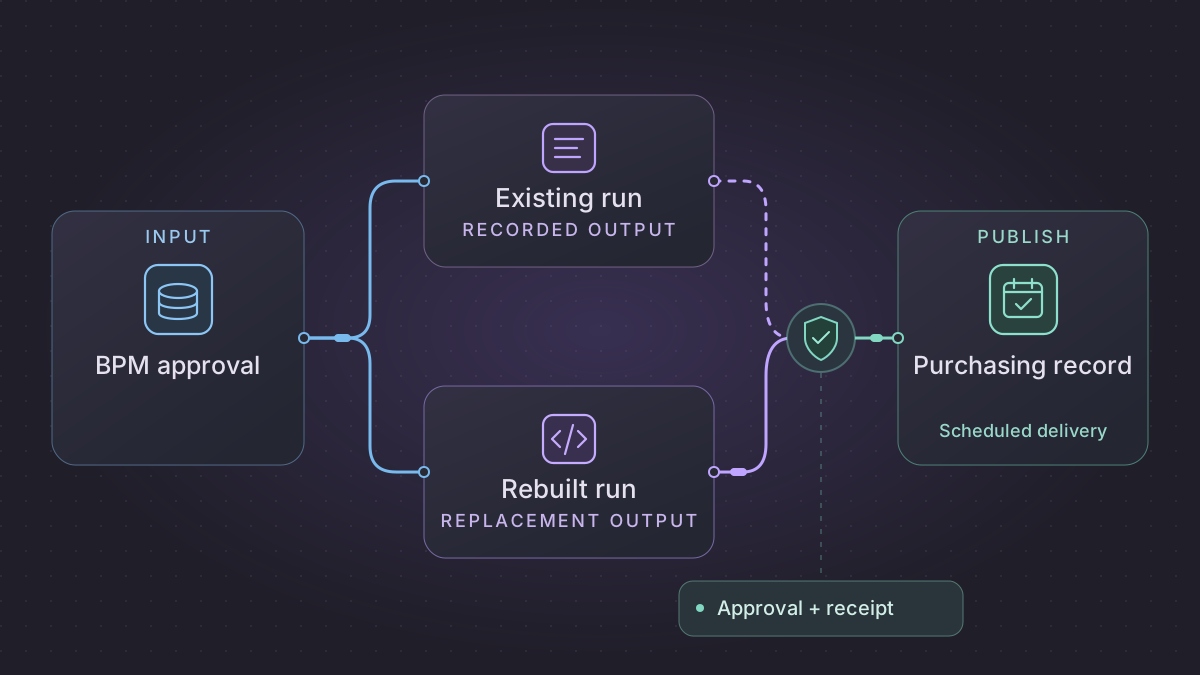
Migrate a selected SAP Process Orchestration (SAP PO) handoff by defining the point at which approval ends and delivery begins. In this example SAP PO retains purchasing approval. A replacement worker delivers approved request versions to purchasing and proves which version was applied.
When is a migrated SAP PO approval ready for release?
A purchase request looks approved in SAP PO but its payload has changed. Compare the active request revision and payload digest with the recorded SAP approval and destination receipt.
Recovery. Queue delivery only for an active approval bound to that exact revision and digest. Hold rejected, expired or revised requests for SAP's decision. After an uncertain send, reconcile the same delivery key before allowing another attempt.
Cutover check. Compare SAP process state and revision digest against the successor ledger and purchasing receiver. P10 revision 2 must yield one receipt; expired P11, rejected P12 and unapproved P13 revision 2 must yield zero effects before new delivery routing is enabled.
Build a delivery adapter that accepts only revision-bound SAP approvals
The sample inputs and expected results in this walkthrough are synthetic.
Collect one approved, one rejected, one waiting and one expired process instance. Use BPM process details and the relevant task instance's history, deadlines, owners and context. Compare the task output to the exact payload released by the deployed SAP process. Task lifecycle completion can include a rejection or other path. Use the business outcome and modeled transition as the delivery gate. NetWeaver Administrator evidence is useful for controlled comparison. Use an approved SAP service or event to transfer the runtime decision to the successor. SAP BPM task monitoring and context · Exporting SAP process details
| SAP event or evidence | Adapter decision | Required record |
|---|---|---|
| Waiting or expired approval task | No delivery. Age and escalate from SAP's deadline/monitoring data under the approved policy. | process_id, task_id, task_version, request_revision, outcome, deadline, evidence_ref |
| Completed task with rejection | No delivery. Retain business outcome, version and approved redacted reason. | One result for the approved audit audience. |
| Approval of current revision | Validate the event and compare exact payload digest. Claim one delivery key for this revision and destination. | process_id, request_revision, approved_digest, destination_id, delivery_key, approval_evidence_ref |
| Approval for an older revision | Hold. Query the authoritative current request and decision. | Record the version conflict and owner without releasing either payload anew. |
| Destination timeout or callback | Check the receiving system by the same delivery key and verify the accepted revision/hash. | Separate attempts, transport response and business receipt. |
Separate the SAP evidence reader, approval projection and delivery worker. Give the reader only the scopes it needs. It cannot grant approvals. Accept events idempotently and retain a pointer to the reviewed SAP decision. Use an ordered feed or reconcile the latest SAP state before delivery if stale updates could revive an older authorization. When gating and output occur in different systems, document the precise boundary at which approval is confirmed and the owner who decides what to do if the request changes during delivery. Use a scheduled job to find missing evidence, long-running deliveries and callback discrepancies. Compare outcome and receipt distributions between the legacy and successor routes, including approved items that were never sent.
Test the decision and delivery boundaries together
Use P10 revision 2 with approval for digest H2, then repeat the exact approved event. Expect one destination receipt. P11 revision 1 expires and P12 revision 2 is rejected. Both yield zero delivery effects. P13 has approval for revision 1/H1 and then a current revision 2/H2 without approval. The successor must not send revision 2 on that evidence. Inject a timeout after P10 reaches the destination and require status reconciliation instead of a second business effect. Before routing new outbound deliveries, inventory in-flight instances and preserve their owner, payload revision and old publisher receipt.
Draw the approval boundary
Inventory the BPM process model, human tasks, gateways, process context, and interface invoked after approval. Record the Enterprise Services Repository mapping and adapter or channel configuration for the purchasing handoff. Find in-flight instances and distinguish awaiting approval, approved, rejected, cancelled, and delivered. SAP describes Process Orchestration as a combination of integration and BPM capabilities and documents the human task model. Process Orchestration · Modeling processes with Process Composer
Ask the process owner which SAP event or record is authoritative for approval. Define the minimum evidence needed by delivery, such as request ID, approved version, approval ID, and timestamp. Confirm how resubmitted versions and cancellations are represented. Record which open cases remain entirely with the old process and which approved cases can enter the replacement delivery.
Rebuild the approved handoff
- Read from an approved event channel or outbox that carries the exact approved version. Check that the approved version matches the payload version and preserve the evidence alongside the target reference.
- Map the required fields to the purchasing request schema with test cases for amount precision, currency, and delivery site. Keep the human approval and access checks in their original system.
- Upsert or deliver once per approved version according to the receiver contract. Record both the application receipt and its associated version. If a response is lost, query the destination by the agreed key before resending.
Implementation runbook
Export the routing plus the actual human workflow
For a SAP PO installation with BPM, identify the Java integration and BPM versions plus the deployed process version. Use ESR and Integration Directory exports to get XML schemas, mappings, routing and channels. For the process itself pull the version-controlled NetWeaver Developer Studio development component (DC), including the Process Composer model, task definitions, process context, BRM rules and forms or service dependencies. Match the checked-out source to the deployed process. A process model image or BPMN alone does not establish current approver assignments, predicates, timeout settings, data mappings or effective destinations. SAP PO components · SAP Process Composer development and deployment
In NetWeaver Administrator's BPM process monitoring, select representative completed, rejected and waiting instances and export details as ZIP where supported. Keep logs and attachments inside controlled storage. Compare input context, actual roles, approvals, task identifiers, timestamps, deadlines, escalation, service calls and final process state. Capture pending work in a cutover inventory without importing the runtime database into a new engine. SAP export of process-instance details · SAP BPM monitoring and archiving
Keep approval in SAP and migrate only authorized delivery
Read the source process and task IDs, approval state, approver role, decision time, deadline and exact payload revision through an approved SAP interface. Persist the inbound evidence with a version and source reference. An approval attached to a superseded payload cannot release a later revision. If SAP reports that a task expired or was rejected, retain that outcome with its reason and stop delivery. Leave task ownership, approval authorization, and expiry behavior in the existing SAP process.
Build a downstream delivery ledger keyed by source instance, request revision and destination. Enqueue one publish action only after confirming the current SAP approval and payload hash. A compare-and-set on the stored version prevents stale state from changing the delivery. In a separate scheduled reconciliation, report age and missing receipts to the owner. Query the destination after an uncertain result before retrying the same delivery key.
For an acceptance case, use P10 revision 2 with a valid SAP approval and a duplicate approval event. Expect one publish action and one destination receipt. P11 expired in SAP and stays blocked. P12 revision 2 was rejected and never posts. For P13, inject approval of revision 1 followed by an unapproved revision 2. Hold revision 2 and reconcile the SAP state. Cut over the outbound consumer once the old publisher’s in-flight actions and destination receipts are accounted for.
Run the acceptance logic locally
Run this self-contained fixture with Python 3. It uses synthetic inputs and no vendor connection. For migration signoff, repeat the same checks against a sandbox on your selected replacement.
outbox = {}

def queue_delivery(process, revision, payload_hash, approval):
    if approval != ("approved", revision, payload_hash):
        return "hold"
    key = (process, revision)
    previous = outbox.setdefault(key, payload_hash)
    if previous != payload_hash:
        raise ValueError("A published revision cannot change payload")
    return "queued"

approved = ("approved", 2, "hash-2")
assert queue_delivery("P10", 2, "hash-2", approved) == "queued"
assert queue_delivery("P10", 2, "hash-2", approved) == "queued"
assert queue_delivery("P11", 1, "hash-1", ("expired", 1, "hash-1")) == "hold"
assert queue_delivery("P12", 2, "hash-2", ("rejected", 2, "hash-2")) == "hold"
assert queue_delivery("P13", 2, "hash-2", ("approved", 1, "hash-1")) == "hold"
assert outbox == {("P10", 2): "hash-2"}
Test approval and delivery separately
Create request PR17 version 1 for USD 50 and mark it pending. It should generate no purchasing write. Approve version 1 under fixture approval A8 and expect one purchasing record and one stored receipt. Replay the approved event and expect no additional write. Prepare version 2 for USD 80 without approval and verify version 1 stays in purchasing. Add a mismatched approval record pointing at version 1 and assert version 2 stays held. Test a missing receipt after a destination write and confirm the worker checks receiver state before retrying.
Prompts you can copy
Given this redacted BPM diagram and purchasing field mapping, list human approvals, gateways, side effects, and where the delivery service starts. Propose an approval evidence contract that ties each approval to an exact request version. Label uncertain transitions.
Draft fixture tests for pending, rejected, approved, resubmitted, and replayed request versions. Mock purchasing and assert the worker refuses to send any version without matching approval evidence.
Automate the handoff and switch
Run delivery on approved events. Schedule a separate task to reconcile outstanding approved requests and missing receipts, with a per-request lock and bounded retry. Alert the process owner on approval-version mismatches and the purchasing owner on unresolved receipts. During parallel validation, use a separate receiver so no purchase requests are duplicated. Cut over at an agreed boundary for new approvals, leave existing instances on their assigned path, and confirm both teams can match each delivered request to its approval record.
Need help with the migration?
Explore SAP Process Orchestration migration services or browse all DIY migration guides.