We rebuild the selected feed
We map the source accounts and transformations, then deliver a replacement into your agreed warehouse destination.
Our campaign dashboards depend on Adverity. Can you move one marketing feed to Mage and prove the spend and conversions still match before we switch?
Mage
Yes. We’ll rebuild the selected feed, run it alongside Adverity, and compare the numbers your dashboard uses.
Start with one feed and the report that depends on it.
Overview
Keep campaign reporting dependable while we take on the selected feed and its operating checks.
We map the source accounts and transformations, then deliver a replacement into your agreed warehouse destination.
We monitor the schedule, check account coverage, and route discrepancies that need a decision.
Your report owner approves metric definitions, comparisons, and the cutover.
Your dashboards depend on ad accounts, Adverity datastreams, and the rules that turn source data into campaign metrics. We rebuild one feed, compare it at the grain your reports use, and plan the switch with your team.
Map one Adverity feed. Inventory the accounts, fields, mappings, enrichments, schedule, and destination the report depends on.
Rebuild into a separate destination. Recreate the source pulls and agreed rules in a development dataset. Keep the current report serving during validation.
| Field | Adverity | Mage |
|---|---|---|
| Campaign keys | Match | Match |
| Spend | Match | Match |
| Coverage | Complete | Complete |
Compare the numbers at the reporting grain. Check campaign keys, spend by currency, conversions, and the formulas your dashboard uses. Review any differences with the report owner.
Switch the report after approval. Agree the reporting cutoff, late-data refresh, and rollback path before promoting the replacement.
Map one workflow, rebuild it with help from an AI assistant, and check the output before you switch.
Learn to migrate Adverity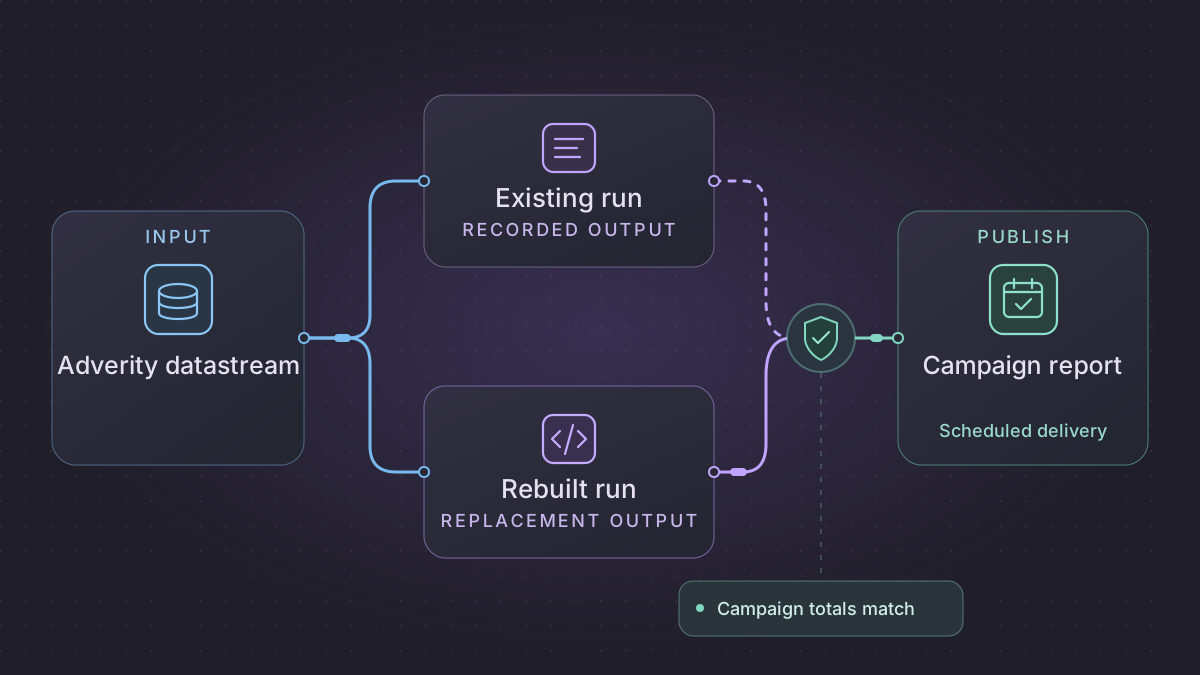
We monitor the agreed delivery and keep late corrections within the reporting window they affect.
Accounts checked · Report refreshed
Keep the last approved report available
Hold a refresh when an account is missing. Replay the affected dates and verify them before publishing.
Campaign totals match
Check metric definitions as well as totals
Match account time zones, currencies, attribution rules, and ratio calculations before comparing results.
Plan for history and late arrivals
Agree how much history to retain and how far back to refresh each source as figures settle.
Explore the approved campaign data in your warehouse and keep using the reports your team relies on.
Ask a question and explore the data behind the answer.
Choose where your data work runs and who can see or change it.
Runs where you need it
Team spaces
Access you control
Your systems
Run in the cloud or on your own systems.
Your team
Set access for each team and approve changes before they go live.
Our support
Get help with questions, changes, and problems as your needs evolve.
Tell us which Adverity datastream feeds it, where the data lands, and which metrics must match. We’ll assess the rebuild and operating scope.