How to migrate an Adverity marketing data pipeline
TLDR
Migrate one Adverity datastream by freezing the incumbent report, rebuilding into a shadow dataset, and checking account coverage, campaign totals, and safe replay before cutover.
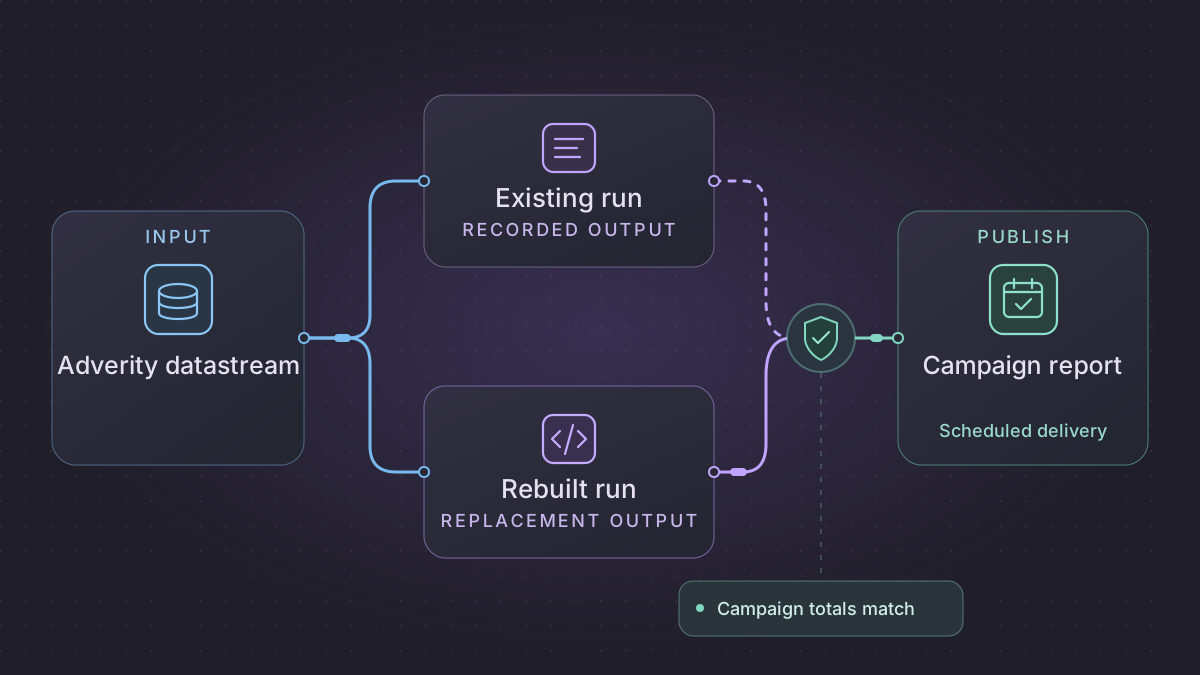
To migrate an Adverity marketing feed, inventory one datastream, its transformations, its destination settings, and the report it serves. Freeze the incumbent output and rebuild the same feed into a separate dataset. Compare keys and measures at the grain the report actually uses, then prove that a late correction can be replayed safely before switching the downstream report.
Can you cut over when the rebuilt Adverity feed has more rows?
Yes, when the extra rows represent a non-overlapping breakdown and roll up to the same approved results. Sum only additive measures. For unique reach and other non-additive metrics, recompute at the report grain using the agreed method. Compare the same source accounts, reporting dates, campaign IDs, currencies, and metric definitions. Check uniqueness at each feed's declared grain before aggregating. Then compare campaign-day key coverage, additive totals, and derived metrics. If account coverage, a key, or a measure differs without an approved explanation, keep the current report serving while you investigate.
For example, two device rows can contain 50 completions out of 100 impressions and 90 out of 900. They reconcile to one campaign row with 140 completions and 1,000 impressions. Under this example's agreed denominator, the campaign rate is 14%. Averaging the two device rates gives 30%. Use the incumbent formula and denominator when checking parity. Treat a change to the metric definition as a separate decision for the report owner.
Diagnose the incumbent feed in Adverity
Use the Activity page and datastream overview to follow one reporting window through Fetch, Transform & Monitor, and Load. A Collected status confirms collection from the source. Check the destination load separately, along with the actual warehouse table the report reads. Verify that the intended destination is enabled for the datastream. Adverity Activity page · Fetch and load troubleshooting
| What you see | What to inspect | What to do |
|---|---|---|
| Fetch fails or an account is missing | Account authorization, report type, requested fields, date range, and connector status | Restore the intended source scope and fetch the affected window again. Mark a verified empty response explicitly. |
| Raw extract has the expected data but the report fields differ | Preview raw and transformed extracts. Compare field mapping, enrichments, filters, and grouping in their applied order. | Preserve both versions, isolate the first step that changes the values, and check the intended rule with the report owner. |
| Transformed extract matches but the report is stale | Destination state, write mode, date partition, keys, and downstream refresh | Resolve the failed load or downstream refresh. Test the rerun against an isolated destination before replaying into production. |
Save the extract and destination evidence before restarting a run. Adverity's Restart removes the previous extract and its Re-load action can overwrite destination data. Adverity task actions For BigQuery, record the overwrite and daily split settings. If the optional load state table is enabled, match the transfer ID, date range, and finished status, then check the table and partition the report reads. Adverity extracts · Adverity BigQuery destination
Freeze a reporting contract
- Inputs. Record the datastream, source accounts, report type, dimensions, selected fields, account time zone, and any applicable attribution windows. The Google Ads and Facebook Ads connectors use the authorized account's time zone. Match source settings before comparing a calendar day. Google Ads connector · Facebook Ads connector
- Output. Save a stable Adverity extract ID and the downstream warehouse snapshot for the same reporting window. Record the reporting grain, expected account coverage, field types, native currencies, metric numerators and denominators, and delivery time. Keep source account IDs and campaign IDs as keys. Preserve labels as attributes. Adverity Management API extract flow
- History. Separate the reporting date, any source modification time, and the time the extract ran. An extract timestamp shows when a fetch took place. Establish how the source signals a revised result, how far back it can be fetched, and which already approved warehouse or export history must be retained. Adverity historical data limits
Rebuild one campaign feed with Python and SQL
- Fetch each expected account into an immutable landing area. Record report date, extract or request ID, source scope, completion status, and the exact revision you will compare. Keep a receipt for a complete response with zero rows. Hold a batch when an expected response is missing, failed, or incomplete.
- Normalize types and field names with a versioned mapping. Carry source, account, campaign, date, currency, and any detail dimensions through the landing and staging tables. Use decimal or integer money units and preserve the currency. Google Ads API cost fields can be in micros. Convert using the documented unit and the reporting contract before comparing spend. Google Ads API guidance
- Validate unique keys at the source detail grain. Aggregate the rebuilt data and incumbent data to the same report grain. For a rate defined as completions divided by impressions, aggregate the two measures first and divide using the agreed rule for a zero denominator. Compare per-key differences before rolling up totals, since offsetting errors can hide at the account or report level.
- Stage a bounded lookback for late source corrections. Atomically replace a date only when the source confirms a complete snapshot and the date passes the report checks. For a sparse incremental feed, merge by the agreed key and apply deletions only when the source provides evidence for them. Keep other dates and the last approved result available while a candidate fails validation.
This query creates the comparison grain for one staged revision. Run the equivalent grouping on the frozen incumbent output, then join both sides on all key columns. Report keys missing on either side as well as measures that differ.
SELECT report_date, source, account_id, campaign_id, currency,
       SUM(spend_minor_units) AS spend_minor_units,
       SUM(impressions) AS impressions,
       SUM(completions) AS completions
FROM staged_campaign_detail
WHERE extract_revision = :revision
GROUP BY report_date, source, account_id, campaign_id, currency
Run the campaign parity and replay lab
Save the Adverity campaign parity lab and run it with Python 3. The lab uses synthetic Google Ads and Meta Ads rows and a local SQLite database. The lab assigns increasing integer revisions per reporting date. Its reference controls are fixed separately from the grouping query. Real migration validation requires authorized extracts, destination receipts, and approval from the report owner.
python3 adverity-report-parity.py
| Scenario | Expected result |
|---|---|
| Finer replacement grain | Three detail rows match two approved campaign rows and 30,000 USD cents for the date. The Google campaign rate is 14%. |
| One account is missing | Hold the candidate. An explicitly completed account with zero rows can pass on a complete date. |
| Repeated detail key or unapproved amount change | Hold the candidate and preserve the approved result. |
| Approved late correction | Publish 32,000 USD cents for the affected date. The next date stays at 9,000 USD cents. |
| Exact replay, modified replay, or stale revision | Reuse the receipt for the exact replay. Hold changed source data or changed approved controls under the same revision, and hold an older revision. |
Cut over without breaking the downstream report
Run both feeds into separate destinations for the agreed comparison window. Include a full date, an explicitly empty account, a partial fetch, and a late source correction. Check the warehouse table, downstream transformations, and dashboard refresh separately. Record missing keys, duplicates, currency totals, metric differences, and destination receipts alongside the exact compared revisions.
Ask the report owner to approve the matched output and any intended definition change. Save the last approved output and serving configuration. Switch the dashboard or warehouse view at the agreed boundary. If coverage drops or a material difference appears, route readers back to the saved approved version, reconcile the affected dates, and retry after a fresh check.
Use an AI coding assistant with the contract and checks
Give the assistant a sanitized datastream contract, a frozen incumbent export, a matching candidate extract, the warehouse schema, and the lab. Ask it to propose the mapping, flag missing fields, and produce a reconciliation query and results for review. Keep source credentials in the execution environment and review the output before cutover.
Compare these marketing exports at report date, source, account, campaign,
and currency. Check raw uniqueness at each declared grain first. Report
missing accounts and keys, additive differences, and derived rates from the
agreed numerators and denominators. Keep a missing account separate from a
verified empty response. Run the parity lab and show which cases pass.
Propose a cutover check and a rollback step for this destination.
Need help with the migration?
Explore Adverity migration services or browse all DIY migration guides.