How to migrate a Google Cloud Dataflow batch job
TLDR
Start with one bounded Dataflow batch. Inventory the Beam logic and runner settings, verify outputs locally, then prove volume and runtime on the target engine.
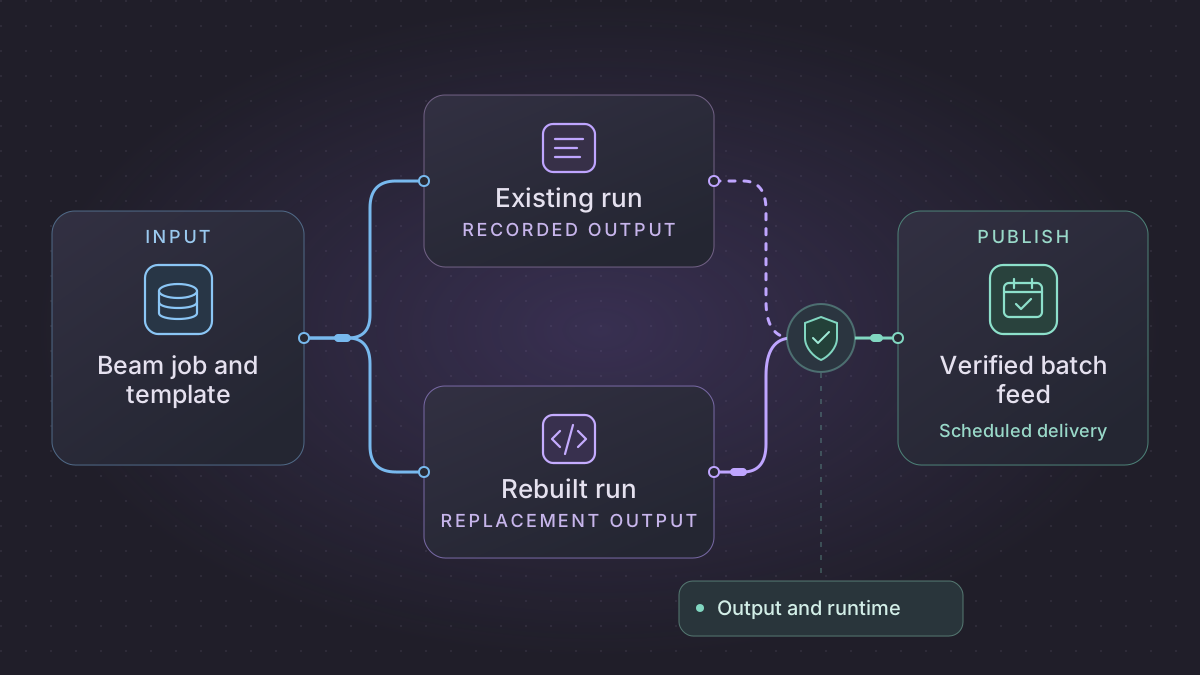
To migrate a Google Cloud Dataflow job, start with a bounded feed whose output and delivery window are known. Capture the Beam code or template and the parameters from a successful launch. Decide whether to keep Beam on an appropriate runner or simplify one bounded transform into SQL or Python, then prove both output parity and runtime at the expected volume.
How should a Dataflow sink handle an accumulating late pane?
A late event produces a second total for a window. Check the deployed trigger, allowed lateness and accumulation mode before interpreting that pane as a revision or an increment.
Recovery. For the fixture's accumulating mode, replace the window total with the newer verified revision. If the deployed mode differs, reproduce its sink contract separately. Keep the committed total for events beyond the agreed cutoff.
Cutover check. Replay the same event and watermark sequence on both paths and compare full window keys, pane results and consumer-visible totals. The example requires 425 then 475 for one window, with 475 still visible after a beyond-cutoff event.
Build and validate one Beam aggregation from launch to sink
Start with the exact Flex Template image digest or the classic-template artifacts, observed launch parameters, Beam transforms and sink options. The synthetic example aggregates fixed five-minute event-time windows by region and amount. Use a bounded raw capture to validate the transform before shadowing its streaming path. Dataflow template launch and artifacts
| Beam or Dataflow boundary | Concrete contract |
|---|---|
| Pub/Sub source or file manifest | Preserve event ID, raw source position, event timestamp, observed time, input format and reject policy. Keep source receipt or capture identity separate from the business event ID. |
| Parse/normalize and side inputs | Parse event_id, event_time_utc, region, amount_minor with an approved region dictionary version. Route invalid region, invalid amount and missing timestamp to tagged rejects with original coordinates. |
| Window, trigger and combine | Test the actual window boundary, watermark and accumulation mode. The example uses five-minute windows, an on-time firing and explicit late firing with one minute of allowed lateness. |
| Sink and reporting view | For accumulating panes, write the complete window total as a new revision at (region, window_start, window_end). Use sink-supported idempotence or a controlled owner that accepts only newer aggregate revisions. Store the revision and source evidence. |
Reproduce accumulated panes and the sink effect
In Beam's Python SDK, the window and trigger configuration for the example is illustrated below. The preceding PCollection must already have the source event timestamp attached and contain keyed valid rows. Use the SDK and runner pinned by the deployed job, then test the trigger and accumulation support on the intended runner. Beam windowing and triggers
import apache_beam as beam
from apache_beam.transforms import trigger, window

totals = (
    keyed_events
    | beam.WindowInto(
        window.FixedWindows(300),
        trigger=trigger.AfterWatermark(late=trigger.AfterCount(1)),
        accumulation_mode=trigger.AccumulationMode.ACCUMULATING,
        allowed_lateness=60,
    )
    | beam.CombinePerKey(sum)
)
Use TestStream with event-time NORTH 250 at 00:01 and NORTH 175 at 00:03. After watermark 00:05, the first total is 425 for [00:00,00:05). Add NORTH 50 at event-time 00:04 while the watermark is 00:05:20. The late firing updates that same key to 475. Add an event at event-time 00:05 and verify it belongs to the next window. Advance beyond 00:06 and exercise a further old event. It must leave the agreed committed total unchanged. A plain sum of the two published accumulating panes would report 900. Verify that the actual consumer reads 475. Beam TestStream
Also replay the same event ID and force a sink response loss. Before replaying a write, check the stable revision and digest or destination receipt. An internal processing guarantee does not prove that custom external writes are deduplicated. Do not treat an independently restarted runner's pane index as globally monotonic. Use a controlled publisher generation and a stable revision strategy for each window. Dataflow processing guarantees and side effects
Shadow and transfer with retained windows
For the bounded version, pin source files and the side-input snapshot, then compare per-region totals and rejects at the full window key. For the streaming version, use separate old and shadow subscriptions and prevent the shadow from publishing to the production sink. Compare accepted/rejected events, watermark and backlog, and exact pane and sink behavior around the allowed-lateness boundary. Decide how to handle old windows that may emit a partial result during drain before assigning the replacement publisher. At cutover record subscription or replay boundaries and window generations, and keep a correction path for intentionally replayed data. Dataflow Pub/Sub reader · Dataflow drain behavior
Implementation runbook
Pin the running artifacts and the exact source/sink contract
gcloud dataflow jobs describe "$JOB_ID" --region="$REGION" --full \
  --format=json > dataflow-job.json
# If this run was launched from a Flex Template, use the release's spec URI.
gcloud storage cp "$FLEX_SPEC_URI" ./flex-template.json
A job graph and metadata show what ran. Use the exact Beam source commit, template launch payload and container build to recover the logic. For a Flex Template retain the specification, image digest, launch metadata, SDK version and dependency lock or build. For a classic template retain its staged template/artifacts and launch parameters. List runner options, worker identity, network, region, encryption and staging/temp locations. Record pinned source partitions or Pub/Sub subscription/Kafka offsets, connector methods, sink/write dispositions, failure outputs and metrics. Redact launch parameters and job environment for external analysis. Job describe · Dataflow templates · Flex template packaging
Implement one bounded feed before considering streaming
- Freeze input and dimension versions. Record identity and exact selection before reading. Preserve parsing, key normalizations, window where applicable, null/duplicate lookup behavior, side input snapshot and original join multiplicity. Choose an engine from measured volume and data skew. Keep Beam for distributed shuffles or use SQL for a bounded relational batch with proven resource needs.
- Extract pure
validate_and_keyandaggregatetransforms. In Beam useParDowith tagged rejects, deterministic key encoding,CombinePerKeyfor associative aggregates, and a connector with an explicit sink mode. KeepDoFn.processeffects idempotent. In SQL express the same keys and group using exact amounts. Verify per-key rows, reject reasons and input/output totals before publishing, since equal totals can hide wrong key attribution. Beam programming guide · Exactly-once and side effects - Stage with batch ID and input identities. Pick the final sink's safe publish primitive (merge/replacement or versioned file manifest) and test fail-after-write/retry. For BigQuery verify the actual connector write method, dispositions, error handling, keys and late corrections. Run local Beam
TestPipeline, then representative load/skew and retry runs on the intended runner. Pipeline tests · Beam BigQuery I/O
Migrate a streaming job as its own workstream
- Inventory event timestamp extraction, window type/size, watermarks, triggers, allowed lateness, accumulation, state and timer keys/expiry, processing guarantee, ordering and sink dedupe. Use a deterministic side output for input errors and agree how late beyond cutoff data is measured or reconciled. Each retained window result needs its key, window start/end, whether a pane is a delta or accumulated total, and a stable sink identity. An append of accumulated panes would double-count prior panes.
- For an in-place Dataflow update, use the documented compatibility procedure and explicit transform-name mapping when appropriate. For a different runner define the starting source cursor or replay plan, compare shadow outputs and late panes, and verify whether managed runner state can transfer. Use separate Pub/Sub subscriptions for old and shadow consumers. A shared subscription divides work nondeterministically. For a planned same-subscription handoff, follow source-specific snapshot and drain/cancel guidance and verify which boundary and retained events can be replayed. Dataflow update · Pub/Sub connector
- A Dataflow drain advances the watermark and may emit partial windows. Reconcile the final panes, hold production publishing to one writer, and use an agreed replay/update policy for affected windows. Before cutover compare backlog, event lag/watermark lag, accepted/rejected keys, late-data behavior, sink counts and replay health. Restore the old writer only after reconciling which windows and events the new sink committed. Drain behavior
Worked batch and streaming parity cases
Batch fixture NORTH=250 and 175 cents, WEST=100, UNKNOWN=50. Accepted totals NORTH=425 and WEST=100, with one reject UNKNOWN=50. Assert input 575 equals accepted 525 plus rejected 50 and repeat the exact source manifest without a duplicate partition. Add 80% of rows to NORTH to measure skew on the intended runner. Crash after staging and after publish to exercise both recovery paths.
For a five-minute window [00:00, 00:05), TestStream supplies NORTH +250 at 00:01 and +175 at 00:03. Advance watermark past 00:05. The first pane is 425. If configured with one-minute allowed lateness and accumulating panes, add event +50 at event-time 00:04 while watermark is 00:05:20. Configure an explicit late trigger to emit it and expect an updated aggregate of 475 for the same window. Move watermark past 00:06, then send +100 for the closed window. It must leave the committed total at 475. Test an event exactly at 00:05 belongs to the next window. An accumulating sink should upsert per key/window. Benchmark window/restart behavior separately on the intended runner. Beam TestStream
Prompt for bounded or streaming conversion
Read the pinned Beam source, template spec, observed launch arguments and sink receipts. Produce a transform-by-transform contract with reject and side effect policy. Generate a local parity test, a peak-volume runner check, and a stage-only publication adapter. If streaming, include a TestStream fixture for on-time, late accepted, beyond-cutoff and duplicate events. Assert pane results, sink writes and cutover cursor. Flag unsupported inferences about runner state or exactly-once.
Try an aggregation and reject fixture
Run this Python 3 reference case to set expected business results. The input uses integer cents. An unknown site goes to rejects.
from collections import Counter

known_sites = {"NORTH", "WEST"}
rows = [("NORTH", 250), ("NORTH", 175), ("WEST", 100), ("UNKNOWN", 50)]
totals, rejects = Counter(), []
for site, cents in rows:
    if site in known_sites:
        totals[site] += cents
    else:
        rejects.append((site, cents))
assert dict(totals) == {"NORTH": 425, "WEST": 100}
assert rejects == [("UNKNOWN", 50)]
Use these expected outputs in the replacement transform's tests. Next, run a large partition with a heavily skewed site and inspect elapsed time, resource use, and delivery.
Copy these prompts into your AI assistant
Read this sanitized Beam source, template metadata, and completed job graph. Identify each stage, side input, reject path, and sink guarantee. Flag transforms that depend on the runner or assume streaming behavior. Link each finding to a file or graph node.
Draft a local test and a shadow-run comparator for this batch. Compare accepted and rejected rows, totals by site, and output timing. Include an unknown site, a high-volume key, and replay of the same input manifest. Keep the destination isolated.
Schedule and switch the batch
Pass a partition and immutable input manifest to the scheduler. Allow one writer per partition. Retry temporary failures against the same manifest and leave incomplete outputs in staging. A scheduled chatbot can summarize schema failures and slow partitions from the job log, with an operator deciding what to rerun.
Shadow several partitions, including one peak run. Pause the old trigger after the last accepted output and start the replacement on the next partition. Retain the old launch settings and a publication log so rollback can resume at the first missing output without duplicate writes.
References
Need help with the migration?
Explore Google Cloud Dataflow migration services or browse all DIY migration guides.