How to migrate a Google Cloud Data Fusion batch pipeline
TLDR
Move a Data Fusion batch feed by documenting each plugin, resolving the run's macro values, and recreating file parsing, field mappings, rejects, and target writes in code.
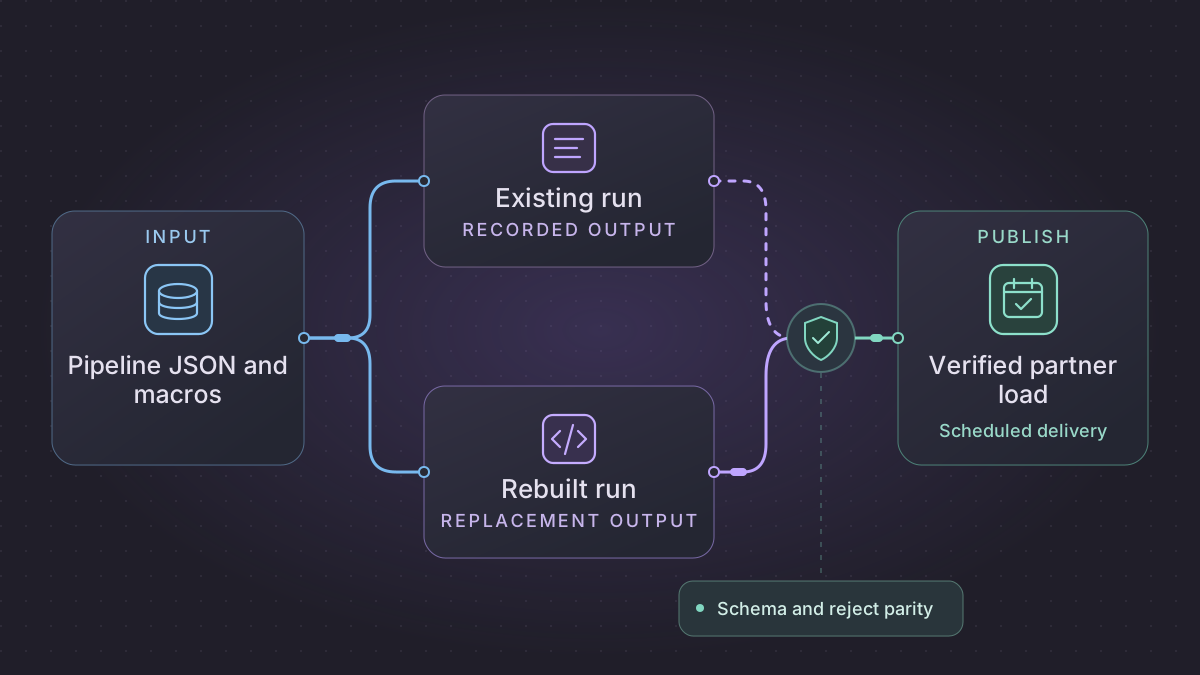
To migrate a Google Cloud Data Fusion batch pipeline, export the pipeline JSON and capture the values its plugins use at run time. Then recreate a single path from source through transform to sink, with the same decisions about missing fields and rejected rows. A JSON configuration describes the graph. Record the effective runtime arguments and connections separately so the replacement can reproduce a deployed run.
When should a Data Fusion feed reject one row or hold the file?
The partner feed resolves to an unexpected file or reports invalid input. Check the exact run's winning macro values, object generation and header before deciding whether a record or the whole run is invalid.
Recovery. Pin the verified generation and quarantine individual bad records when the deployed policy permits. Hold publication for an unresolved macro, unexpected file identity or invalid header. Confirm the existing receipt after an ambiguous commit.
Cutover check. Compare the legacy run's resolved input, accepted key and amount, and reject stage, row number and reason with the shadow batch. The worked case requires C1=425 and two rejects, and replay of the same generation must leave one receipt.
Rebuild a Data Fusion partner feed from resolved stage inputs
Use one published pipeline and one actual RunID. In the example, a Cloud Storage source reads a partner CSV, Wrangler normalizes fields, an error branch writes row rejects, and a BigQuery sink publishes validated orders. Stage labels are illustrative. Replace them with the exact plugin and artifact versions from the deployed JSON and the observed stage inputs from Run details. Cloud Data Fusion export
| Published stage or setting | Concrete replacement |
|---|---|
| Cloud Storage plugin path with macros | Compile one resolved manifest containing partner, business_date, bucket, key, generation, schema_revision. Validate the resolved value before opening the object. |
| CSV read and Wrangler directives | Apply the observed field order, encoding, delimiter, quoting, header and exact transformation order. Strip the customer ID and parse amount in integer cents in this example. Preserve the source record ordinal. |
| Error collector | Record (generation, ordinal, stage, reason) and source locator. Route malformed row versus structurally invalid file to separate outcomes. |
| BigQuery sink and post-run action | Stage a complete accepted batch. Update the declared key or replace only the agreed partition. Save one commit receipt and run the successor only on the observed eligible outcome. |
Make each resolved value attributable
Suppose the source path template uses the business-date and filename macros, a runtime argument supplies business date 2026-01-07, the namespace prefers default.csv, and the Argument Setter assigns partner-a.csv. Record gs://example-fixtures/2026-01-07/partner-a.csv and which setting won for each macro. Record the independently observed Cloud Storage generation, such as 1001. An unresolved macro fails before the reader runs. If an approved runtime argument supplies a value that the Argument Setter does not assign, preserve it. Keep secure arguments as references. Data Fusion macro precedence · Cloud Storage request preconditions
Use this synthetic CSV as the first shadow input:
customer_id,amount_cents
 C1 ,425
,700
C3,oops
Expect stage output C1=425, a missing customer key on record 3 and invalid integer on record 4 when row-level rejection is permitted. The source count is 3 and the accounted row count is 1 accepted plus 2 rejects. Do not add raw invalid amount text into monetary totals. Change the header in a second generation and require a schema hold under the example's file policy. For a correction with C1=450, assign a separate generation and verify the published partition changes from 425 to 450 with no extra C1. The two versions remain attributable to their manifests.
Choose a sink transaction and run the upstream failure case
If replacing a full partition, stage only one complete partner/date and use an approved atomic replacement. If using a BigQuery MERGE, ensure at most one accepted source row per destination key for a matched update, even if the old stage was visually configured as a single path. Resolve duplicate policy before the merge and confirm one receipt per source generation. BigQuery MERGE matching rules
Replay the old upstream success and failure events with the same arguments. Capture triggers separately from the exported pipeline when added after deployment. An upstream failure should preserve the original trigger behavior, for example no new feed run when the trigger accepts success only. Test a timeout after commit. The launcher must rediscover the existing generation receipt. At cutover transfer the old upstream trigger or schedule only after confirming which generation the report sees. Rollback reassigns a missing generation or uses an approved correction rather than overwriting a confirmed version. Cloud Data Fusion orchestration
Implementation runbook
Export the deployed configuration and look up the exact run
In Studio open List, select the deployed pipeline, then export its JSON. Record instance version, namespace, pipeline version/revision and a success and failure run ID. Google documents that the export omits triggers added after deployment. Capture schedules and upstream triggers separately, including upstream status filters and runtime arguments passed to the downstream run. Record runtime profiles and any private connection or runtime identity by name. Export · Orchestration
For the deployed batch program, the documented CDAP request returns run metadata. Set CDAP_ENDPOINT to the instance API endpoint and use a scoped authenticated account. These examples assume namespace, pipeline and run names are URL-safe. Keep secure arguments and raw records private.
run_url="$CDAP_ENDPOINT/v3/namespaces/$NAMESPACE/apps/$PIPELINE/workflows/DataPipelineWorkflow/runs/$RUN_ID"
curl --fail-with-body --silent --show-error \
  -H "Authorization: Bearer $(gcloud auth print-access-token)" \
  "$run_url" > fusion-run.json
Inspect Studio Run details, stage metrics and Cloud Logging by RunID for observed behavior, and source/version provenance separately. The run record may leave gaps in macro resolution. Use controlled sanitized logging or the platform owner to trace argument origin. CDAP batch runs · Cloud Logging
Build a concrete plugin and macro contract
- Inventory stage name, plugin/artifact name and version, plugin type, exposed schema, mapped columns, connections, error collectors, and post-run actions. For Wrangler, capture the ordered directives and a before/after row per directive. For custom plugins, obtain the exact source or JAR and deployment configuration. Observed samples prove behavior where JSON only points to code. A preview can use different data or arguments from the approved run.
- Resolve each macro separately. Argument setter values have highest precedence where assigned, followed by runtime arguments and application, namespace and system preferences. Distinguish resolved file/version and business partition from configuration names. For example, a trigger-supplied
folder=2026-01-07and an Argument Setter'sfile.name=partner-a.csvproduce one input key. Record why each value won. Replace secure macros with runtime secret references and keep a redacted config matrix. Macro precedence - Note whether decoding rejects an entire file or individual records, whether malformed values fail the transform or flow to an error stage, and how the sink writes (append, replace, update). Preserve parse/trim ordering, blank/null policy, locale and decimal precision, all field defaults, and header/quoting/encoding rules. For a scheduled batch, translate the source date and inherited parameters independently of the worker launch time.
Implement the partner file as a small, auditable batch
- Resolve
partner_id, business_date, input object generation, delimiter, schema revisionbefore reading. For Cloud Storage use bucket/key/generation and assert generation on reads or copy to a retained immutable location. Lock the manifest's partner and date and compare source/control totals. Cloud Storage preconditions - Parse bytes with the exact expected encoding and CSV dialect. Reject whole files on wrong schema/header when the legacy pipeline does. Record row-level issues as
generation,row_number,stage,reason. Apply the Wrangler rules in order in an isolated transform. Check count balance across accepted, filtered and rejected outputs and validate numeric sums by currency or partner. - Stage and publish to the approved table partition or versioned path. For BigQuery use a deterministic pre-merge uniqueness rule, since an UPDATE/MERGE that updates a target can fail when multiple source rows match it. Compare accepted keys and values and rejects to the prior pipeline before enabling the new writer. At commit, keep a batch receipt from the exact generation and a stable idempotency key. BigQuery MERGE
- Retry transient I/O with the same pinned generation. A new generation should be a controlled correction, with the old successful output preserved until the replacement passes checks. Capture late inputs, selected argument precedence, exact output IDs and errors in the run ledger. Transfer either the schedule or upstream-run trigger at the first uncovered input boundary. Reconcile committed generations before resuming the old trigger.
Test property resolution and malformed input
Fixture input resolves to gs://example-fixtures/2026-01-07/partner-a.csv for partner A. Its rows are C1 amount 425 cents, blank ID amount 700, and C3 amount “oops”. Under the example's row-level rejection policy expect one accepted row C1=425 and two rejects with row 3 MISSING_CUSTOMER_ID and row 4 INVALID_AMOUNT. Feed the same object generation twice and expect one C1 and one commit receipt. Feed a differently encoded header or unresolved macro and expect a file/configuration error and no publish. Supply a new object generation only after agreeing correction semantics. Also reproduce an upstream success trigger carrying the business date and a failed upstream run that must not launch this feed.
Prompt for an artifact-grounded rewrite
Read this sanitized exported pipeline, plugin contract and RunID evidence. Trace each macro to its winning source and map plugin schemas, ordered Wrangler directives, error outputs and sink mode. Build a local reader/transform/staging implementation for a pinned generation, with expected accepted/reject rows and exact fixture paths. Test an unresolved macro, malformed amount, wrong encoding, duplicate generation and failed upstream. Mark settings missing from the export.
Try a partner file fixture
Run this Python 3 example with a valid row, an empty customer key and an invalid amount. In this illustrative rule, the blank key and invalid amount go to distinct reject codes and totals are integer cents.
import csv
import io

raw = "customer_id,amount_cents\nC1,425\n,700\nC3,oops\n"
accepted, rejects = [], []
for row_number, row in enumerate(csv.DictReader(io.StringIO(raw)), start=2):
    key = row["customer_id"].strip()
    if not key:
        rejects.append((row_number, "missing_customer_id"))
        continue
    try:
        amount = int(row["amount_cents"])
    except ValueError:
        rejects.append((row_number, "invalid_amount"))
        continue
    accepted.append((key, amount))

assert accepted == [("C1", 425)]
assert rejects == [(3, "missing_customer_id"), (4, "invalid_amount")]
Extend it with a malformed amount and a duplicate file delivery. Confirm the parser applies the approved failure or reject rule and the target contains one batch after replay.
Copy these prompts into your AI assistant
Read this sanitized Cloud Data Fusion pipeline JSON and runtime argument example. Return a stage-by-stage table with plugin version, input and output schema, macro references, and rejected-row behavior. Label any rule that requires inspecting a custom plugin or a real run.
Draft a Python and SQL replacement for this partner feed. Take the resolved input path and partner ID as arguments. Include a staging manifest, reject records with source rows, and fixture tests for empty fields, a malformed row, and a repeated file version.
Schedule and cut over the partner load
Keep one active writer per partner and partition. For transient reads, retry using the same input version and batch ID. Block publication if the manifest or schema fails validation. An AI assistant can prepare a daily digest of reject categories and missing partner files from a read-only run report.
Compare representative raw files and a live shadow run. Match accepted keys, decimal totals, rejected reasons, and target delivery timing. Pause the old schedule or upstream trigger at the agreed file boundary. Turn on the replacement after confirming the last committed file identity. Roll back from that same manifest so previously delivered files remain accounted for.
References
Need help with the migration?
Explore Google Cloud Data Fusion migration services or browse all DIY migration guides.