How to migrate an Azure Synapse Analytics pipeline yourself
TLDR
Move a selected Synapse ingestion pipeline while keeping its analytics tables and consumers in place. Inventory pipeline artifacts, rebuild one feed, and compare both versions at the file and partition level.
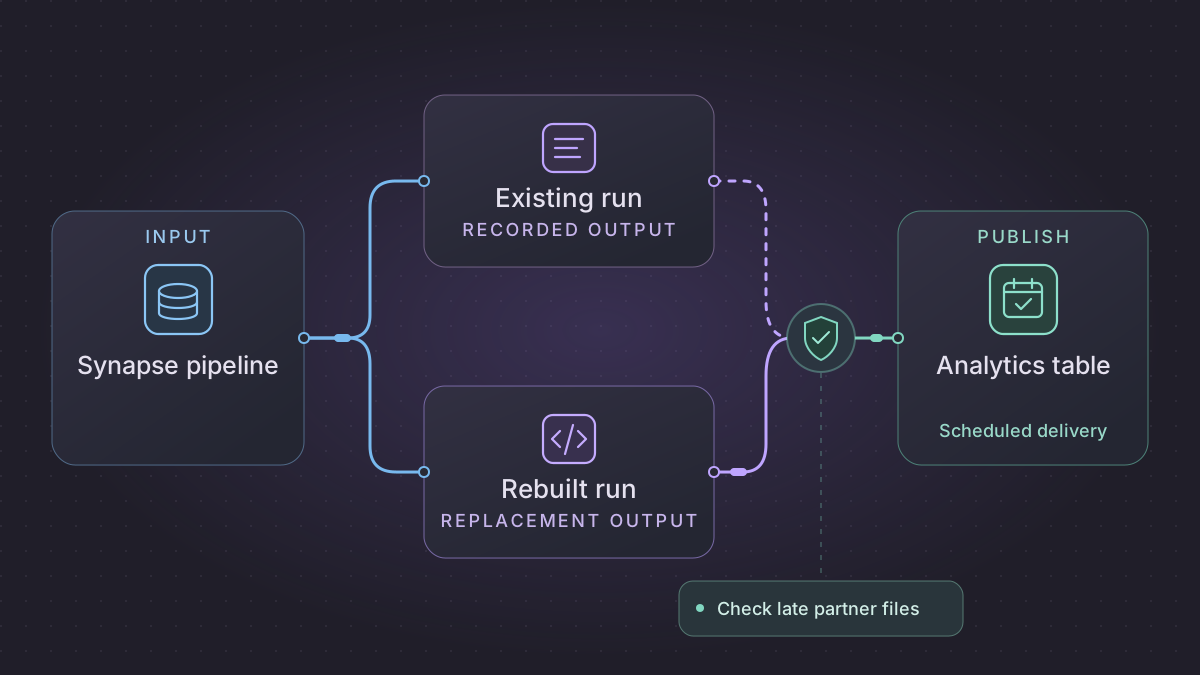
To migrate an Azure Synapse Analytics pipeline, capture its workspace artifacts and its load contract, then rebuild one ingestion path into a shadow table. Keep the existing SQL, Spark, or reporting workloads in place unless they are part of the migration. A replacement is ready when it can handle the same files, failures, and downstream dependencies as the current feed.
When is a Synapse report partition ready to publish?
Copy or a notebook finishes, but the daily report still looks stale. Check the manifest for every required partner file and inspect the version the report actually reads.
Recovery. Keep the previous report while a file is missing or the stage is unverified. Once all pinned inputs and controls pass, activate one date version through the report's actual table or view contract. Use a separate approved version for a correction.
Cutover check. Compare legacy and shadow rows at the report's natural key, counts and amounts by partner, and the visible version. In the fixture, missing B holds publication, complete files total 25.00, and only the corrected date changes to 26.00.
Replace one partner-file load while keeping the analytics contract
The sample inputs and expected results in this walkthrough are synthetic.
Use the published pipeline and the selected report as two ends of the migration. The example is a dedicated SQL pool load in which two partner CSV files complete one date. If the real report uses serverless SQL, keep its approved external table or view contract and versioned files. If a Spark notebook owns the transformation, retain it and migrate its launcher until you can separately prove output parity. Synapse SQL feature comparison
| Legacy evidence | Concrete handoff |
|---|---|
| Schedule and dataset expressions | Enumerate required files by business date, record the resolved ADLS paths, and identify the exact immutable file version or stage copy. |
| Copy mappings and destination types | Map PartnerCode → partner_id, OrderCode → order_id, BusinessDate → business_date, Amount → amount as decimal(12,2). Preserve file ID, row ordinal, and parse dispositions outside the report-facing table. |
| Notebook, procedure or Copy output | Define which artifact prepares one validated date. Require one control record per file with schema version, count, amount, and rejects. |
| Dedicated SQL publish or external view | Keep report columns, grants, date predicate, and acknowledgment behavior. Record active date/version and its prior active version. |
Build a pinned stage and publish exactly one date
Resolve the required input list before load and refuse to publish until both files are available and verified. Create an isolated staging location or table for the manifest. The loader reads only the approved immutable files. For a dedicated SQL CSV stage, the following abbreviated statement illustrates a fail-closed import. Use your configured identity and review delimiter and encoding options against the observed files.
COPY INTO dbo.partner_order_stage
FROM 'https://storage.example.invalid/partner-stage/2026-01-07/g1/'
WITH (FILE_TYPE = 'CSV', FIRSTROW = 2, MAXERRORS = 0);
The illustrative prefix must contain exactly the files in the manifest. Build the isolated stage once per batch or clear only that batch's stage before replay. For a row-level quarantine policy, land or parse raw fields first, explicitly validate types, and record reasons before promoting rows. COPY INTO supported options and error behavior depend on format, so confirm the chosen load against the dedicated pool rather than assuming a CSV reject policy also works for Parquet. Dedicated SQL COPY INTO
Validate required columns and date scope before touching the consumer. Compare counts and amount by partner, check duplicates at the report's natural key, and compare rows at that key. Take the date writer claim, commit the validated replacement through the pool's approved transaction or partition procedure, and record the manifest generation and receipt. For serverless, confirm the consumer actually selects the active files and can see the right Parquet schema and version. A separate JSON receipt does not change an external SQL view. External table behavior
Verify missing files, a correction, and the actual report
Start the January 7 test with only A v1 containing P1=12.50 and P2=7.50. The report remains unchanged. Add B v1 with P3=5.00, then verify three rows and 25.00 in the shadow report. Replaying that manifest leaves one accepted version. A corrected B v2 at 6.00 makes an approved second version with total 26.00 and P3=6.00. January 6 and January 8 remain byte-for-byte or row-for-row unchanged. Test the old report's ready signal separately from SQL load success, and terminate a test after a notebook or Copy finishes but before publication. The restart should find or recreate the isolated stage without appending a second report.
Deploy against an isolated table or prefix first, including the consumer's network, identity and grants. At handoff use one owner of the write and one owner of the ready signal. Save the prior accepted partition or view pointer so rollback can restore the report to a known version without replaying a confirmed file.
Inventory the workspace artifacts
Use the workspace's Git repository to collect the selected pipeline and any child pipelines, datasets, linked services, trigger definitions, notebooks, Spark job definitions, or SQL scripts it calls. Microsoft treats workspace infrastructure and deployable Synapse artifacts as separate steps. Record the workspace and pool dependencies separately, along with the identities, private endpoints, and runtime access needed to read and write. Microsoft's Synapse workspace deployment guide
For the partner feed, map each activity to its input, output, and dependency condition. Record whether a missing or late file causes the pipeline to stop, wait, or proceed with a partial result. Capture what signals that a file set is complete. Identify any published success flag or SQL dependency that a report consumes, and capture the business time zone for the daily batch.
Move one partner-file load
Use an object storage SDK or a read-only file listing to build a manifest for each business date. Record each file name, version or hash, and readiness signal. Parse the files in a versioned Python step, using explicit schemas and decimal precision. Carry source name and row number into the staging table so a rejected record can be traced. Use a load mechanism supported by the existing SQL target and publish only when the agreed completeness and data checks pass.
If the old pipeline invokes a notebook or stored procedure that can stay in place, preserve its parameter contract and call it explicitly from the new job. Record the completion receipt for that action. Choose the exact stage at which you can resume if the process stops, and make retries use the same input manifest and business date.
Implementation runbook
Export the published pipeline and observed activity records
Use the published workspace for live behavior. Retain the workspace repository and exact release revision for notebooks, SQL and script packages. Save a successful and a failed run and the trigger's parameters. Use UTC bounds that bracket activity last-update times.
az synapse pipeline show --workspace-name "$WORKSPACE" --name "$PIPELINE" \
  -o json > pipeline.json
az synapse trigger list --workspace-name "$WORKSPACE" -o json > triggers.json
az synapse pipeline-run show --workspace-name "$WORKSPACE" --run-id "$RUN_ID" \
  -o json > run.json
az synapse activity-run query-by-pipeline-run --workspace-name "$WORKSPACE" \
  --name "$PIPELINE" --run-id "$RUN_ID" --last-updated-after "$AFTER_UTC" \
  --last-updated-before "$BEFORE_UTC" -o json > activities.json
az synapse notebook show --workspace-name "$WORKSPACE" --name "$NOTEBOOK" \
  -o json > notebook.json
Export notebook/Spark artifact only if the pipeline uses it. Capture Spark pool and runtime/library versions, notebook parameter contract, linked services and datasets, Copy mapping and declared schema, SQL procedure source, schedule and runtime identities. Record ADLS paths, storage permissions and private endpoints. Mark each artifact as migrate or retain, along with the specific owner and output. Pipeline and analytics consumers can move independently. Pipeline CLI · Pipeline run · Activity run · Notebook CLI · Workspace deployments
Match the load pattern to the SQL or Spark target
- If the existing consumer reads a dedicated SQL pool, use a supported loader such as COPY INTO to a staging table, then the target's approved transactional DML or controlled partition procedure. Benchmark key distribution, skew, and copy times. Verify sink connector reject options and SQL type/decimal conversion against the old run. Synapse SQL feature comparison
- If the consumer uses serverless SQL, preserve its views/external table contract and publish validated ADLS files under versioned prefixes. Serverless lacks table DML. Verify the active metadata/pointer mechanism used by readers, rather than expecting a JSON manifest by itself to change a SQL view. Test Parquet schema types, name/ordinal mapping in the chosen reader, partition paths, access identity, and mixed-file versions. Serverless SQL overview · External tables
- If a Spark notebook owns the approved transform, keep that notebook call and parameters and replace orchestration around it. Capture an actual notebook/Spark job ID and completion outcome before loading its output. Snapshot source and library versions and verify the partition layout and supported reader format on the target SQL endpoint. Shared Spark/SQL metadata
Implement a complete-file manifest
- Build one work record per business date and expected supplier file. Record expected arrival/deadline, file identity and immutable version or copied content hash, row count, required schema version, completion marker and readiness state. Separate missing, malformed, duplicate and legitimate corrected versions.
- Parse only a pinned complete manifest. Carry file and row provenance through field mapping and numeric coercion. Write to a shadow staging table or isolated ADLS version. Group by business date and partner, compare counts, nulls, sums, duplicate keys and exact row differences. Test old assumptions about quotes, date formatting, and encoding.
- On passing controls, take a writer claim for the date. Publish the target partition or switch the consumer to the validated version using the established SQL/ADLS mechanism, then verify that the report sees the expected rows and completion signal. Persist one release receipt with manifest ID, scope, revision and prior active version. A correction needs a new manifest revision and replacement of the approved date partition rather than appending corrected data.
- At cutover, use one agreed window and report dependency boundary. Pause the old trigger, account for running copy/notebook steps, then transfer the writer and readiness signal. Roll back to the retained prior partition or pipeline only after checking which published version the consumer is reading.
Test missing, replayed and corrected files
Date 2026-01-07 expects A v1 with P1 12.50 and P2 7.50, and B v1 with P3 5.00. A arrives first: stage optional, publication stays blocked. Both pinned files: three rows, 25.00. Repeat B v1 and same manifest: still three rows and one receipt. With an approved correction B v2 for P3 6.00: new active version has three rows, 26.00. Prior 25.00 remains auditable. A different business-date partition's checksum stays unchanged. Kill the replacement after a child notebook succeeds and before publish. Retry finds its completed receipt or recreates the same isolated stage without double load. Check the actual report row values and ready signal as well as the pipeline status.
Prompt for one-feed migration
Trace these sanitized Synapse pipeline, notebook/procedure, trigger and run artifacts into a dependency table with paths and parameter values. Mark retain versus migrate. Generate manifest validation and a parity report scoped to one business date and the existing dedicated SQL, serverless SQL or Spark contract. Test incomplete files, duplicated arrivals, correction and unchanged neighboring date. Identify every downstream consumer and state that must be checked before moving the trigger.
Run the acceptance logic locally
Run this self-contained fixture with Python 3. It uses synthetic inputs and no vendor connection. For migration signoff, repeat the same checks against a sandbox on your selected replacement.
from decimal import Decimal

expected = {"A", "B"}
a = [("P1", "12.50"), ("P2", "7.50")]
b1 = [("P3", "5.00")]
b2 = [("P3", "6.00")]

def stage_partition(files):
    if set(files) != expected:
        raise ValueError("missing or unexpected partner file")
    staged = {}
    for name, (version, rows) in sorted(files.items()):
        for key, raw_amount in rows:
            if key in staged:
                raise ValueError(f"duplicate key {key} in {name}@{version}")
            staged[key] = Decimal(raw_amount)
    return staged

try:
    stage_partition({"A": (1, a)})
except ValueError:
    pass
else:
    raise AssertionError("incomplete input must block publication")

first = stage_partition({"A": (1, a), "B": (1, b1)})
retry = stage_partition({"A": (1, a), "B": (1, b1)})
correction = stage_partition({"A": (1, a), "B": (2, b2)})
assert first == retry
assert len(first) == len(correction) == 3
assert sum(first.values()) == Decimal("25.00")
assert sum(correction.values()) == Decimal("26.00")
assert {key for key in first if first[key] != correction[key]} == {"P3"}
print("PASS: complete manifest, repeatability and isolated correction")
Use AI to map dependencies and make the fixture
Read these redacted Synapse artifacts and one successful run summary. Draw the dependency order from partner file to analytics table. Identify the parameterized paths, expected files, linked services, notebook and SQL calls, and each condition that can publish an incomplete batch.
Draft a Python manifest validator and a SQL reconciliation query. Use a fixture with two daily partner files and one late replacement. Check that a missing file holds publication, a repeated file is processed once, and the intended replacement changes only its business-date partition.
Compare shadow results and move the schedule
For a synthetic business date, give file A the rows P1 amount 12.50 and P2 amount 7.50, and file B the row P3 amount 5.00. With file B missing, expect no publication. With both files present, expect three keys totaling 25.00. Retry the full manifest and confirm the count stays three. If a corrected B replaces P3 with 6.00, expect 26.00 after the agreed correction process. Keep the original and replacement manifests so the change is reviewable.
Schedule a check at the expected delivery time and run the load only when its readiness contract is met. Use one writer per date, alert on missing arrivals, and let the operator replay a named manifest. During parallel runs compare exact row keys, totals, null counts, and the signal consumed by downstream jobs. At cutover, freeze the original trigger after its last approved date and leave its artifacts and checkpoint available for recovery.
Need help with the migration?
Explore Azure Synapse Analytics migration services or browse all DIY migration guides.