How to migrate an Azure Data Factory pipeline yourself
TLDR
Move one Azure Data Factory feed by capturing its mappings, runtime dependencies, and trigger windows. Use AI to draft the replacement, then prove that it writes the same records and can replay a failed window.
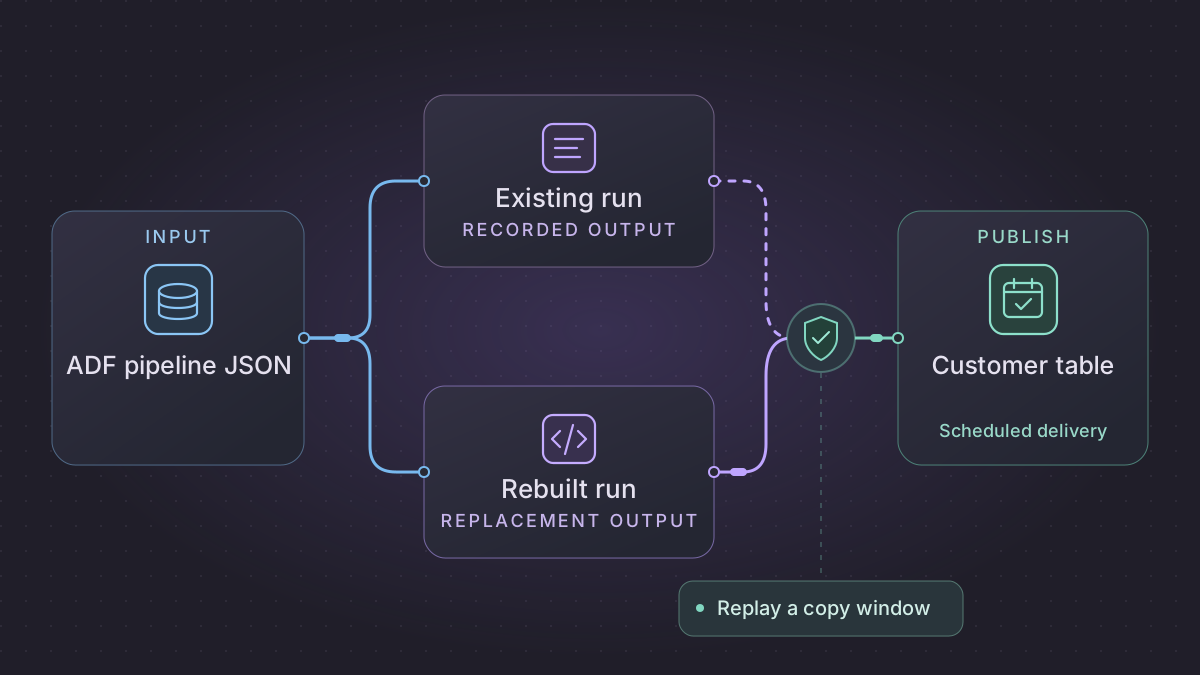
To migrate an Azure Data Factory (ADF) pipeline, export the pipeline definitions and capture what one real trigger window produces. Rebuild the copy and transformations in a versioned job, run it against a separate target, and compare the output before you move the trigger. For a daily customer feed, the first milestone is a replacement that can load the same window twice and produce the same target rows.
When should an Azure Data Factory copy window be held?
A copy window reports incompatible input. Check the deployed mapping, schema and copy error log to tell a malformed row from a missing required column.
Recovery. Under an approved row-reject policy, record the malformed row and stage the remaining rows from the same fixed interval. Hold the window before any sink change if a required column is missing.
Cutover check. Compare ADF and the shadow run for adjacent trigger windows using typed customer keys, versions, amounts, reject dispositions and the completion receipt. A row exactly at the shared boundary belongs only to the later window in this example.
Turn a tumbling-window customer copy into a deployable contract
Start by following one published trigger run into the exact dataset and sink configuration. In this synthetic pipeline, the tumbling trigger passes @trigger().outputs.windowStartTime and @trigger().outputs.windowEndTime to pipeline parameters named fromUtc and toUtc. ADF's Copy activity reads source SQL for that interval, maps four fields, and publishes a current customer table. Have the factory operator verify the selected run's actual input and output parameters. ADF system variables · Tumbling-window triggers
| Published ADF behavior | Replacement boundary |
|---|---|
Tumbling trigger delay, dependencies and maxConcurrency | Register one work item for each immutable UTC window with due time, predecessor policy and maximum concurrent owners. Queue reruns by the same interval. |
| Linked service, dataset path, and source SQL | Give a read-only identity access to the approved snapshot. Resolve any self-hosted integration runtime routing before deploying the worker. Execute with typed timestamps and stable key order. |
Copy translator.mappings | Map CustomerCode → customer_id as trimmed text, ChangeVersion → source_version as integer, CreditLimit → credit_limit as decimal(12,2), and LastChangedUtc → changed_at_utc as timestamp. Write a schema version alongside each batch. |
| Type conversion and incompatible row behavior | Send disallowed precision, malformed decimal, empty required key and missing required column to distinct reasons. A missing column affecting the entire schema is a run hold. A bad row is a reject only under the approved row policy. |
| Copy sink, stored procedure or downstream activity | Merge accepted higher versions and record the receipt. Determine if the old successor runs on success or completion, including when a preceding task fails or is skipped. |
Reproduce a full window
Persist the run key and the fixed input boundary before extraction. The launcher accepts the UTC boundaries and a contract version. Query from a repeatable snapshot for this synthetic source:
SELECT CustomerCode, ChangeVersion, CreditLimit, LastChangedUtc
FROM customer_changes
WHERE LastChangedUtc >= :from_utc AND LastChangedUtc < :to_utc
ORDER BY LastChangedUtc, CustomerCode, ChangeVersion;
If source commit visibility is not ordered by LastChangedUtc, use a source-provided CDC position or a tested overlapping read and dedupe policy. Pin the source snapshot or selected immutable files so a retry cannot silently acquire a new boundary. Stage row coordinates and raw strings, then record the typed values, source identity and dispositions. Compare rows_read = accepted + rejects + explicit_filters before publishing. If the old Copy intentionally skips incompatible rows, retrieve its configured session log and compare reject records as well as success metrics. Copy mappings · Copy incompatible-row logs
Use C01 v3 at 06:00 with credit limit 120.05, C02 v1 at 06:59 with 0.00, C03 v1 exactly 07:00, C04 with 12x and C01 v2 from a late source. The first window admits C01 v3 and C02 v1, rejects C04 and records C01 v2 as superseded. C03 appears only in the next window. Run a second pass with C04's header field absent instead of a single bad value and require a schema failure before any sink change. If an operator reruns a prior window, inspect whether it should regenerate a historical output or change the current table. Those are separate actions.
Shadow the deployed dependency chain
Use a separate target and disable customer-facing notifications during the first runs. Test connectivity from the worker's network under its actual identity, including both the source and any private sink. Capture source, mapping, typed values, skip/fail outcome, and completion receipt for the same ADF window. After comparing adjacent intervals and one operational retry, disable the old trigger at a signed boundary and wait for in-flight copies. Resume the replacement from the first unowned window. Before rollback, use the receipt ledger to distinguish an open window from one the replacement already published.
Capture a pipeline and its real run
Start in the source factory's Git repository if it is available. Otherwise, use Manage → ARM template → Export ARM template in Data Factory Studio. Microsoft also documents the @microsoft/azure-data-factory-utilities package for validating a factory and exporting a template from source definitions. Keep the pipeline, dataset, linked service, trigger, integration runtime, and data flow definitions for the selected feed. Microsoft's ADF template export instructions · Automated publishing
Use the run history to record actual parameter values, activity outputs, retry behavior, and branches taken. Record how the runtime reaches its sources, especially if it uses a self-hosted integration runtime or private endpoints. Give each connection an alias in the working copy, and provide your AI tool with that copy and synthetic rows. Keep credentials in the runner's secret store.
Rebuild the copy and preserve its window
Write a small Python entry point or a SQL job with explicit start and end arguments. Translate Copy activity column mappings and any stored procedures or Mapping Data Flow rules into named transformations. Trace expressions that use pipeline parameters or previous activity outputs back to their inputs. Treat inferred data types and trimmed blank strings as rules to verify with samples.
Stage source rows first, validate types, then merge into the destination on the agreed business key. Use a half-open window such as updated_at >= start AND updated_at < end if that matches the existing job. Persist the completed window only after the destination write succeeds. If records can arrive late, test an overlap plus deduplication or use the source's existing change token.
Implementation runbook
Export deployed artifacts and one observed run
Start from the deployment revision or export from Data Factory Studio's ARM template page. A Git collaboration branch can differ from the live factory. The following CLI calls read the published resources and run metadata. Save a representative successful and failed run, with UTC bounds bracketing their activity log update times.
az datafactory pipeline show --factory-name "$FACTORY" --resource-group "$RG" \
  --name "$PIPELINE" -o json > pipeline.json
az datafactory trigger list --factory-name "$FACTORY" --resource-group "$RG" \
  -o json > triggers.json
az datafactory pipeline-run show --factory-name "$FACTORY" --resource-group "$RG" \
  --run-id "$RUN_ID" -o json > run.json
az datafactory activity-run query-by-pipeline-run --factory-name "$FACTORY" \
  --resource-group "$RG" --run-id "$RUN_ID" --last-updated-after "$AFTER_UTC" \
  --last-updated-before "$BEFORE_UTC" -o json > activities.json
Follow ExecutePipeline child references and copy dataset mappings, linked service references, integration runtime settings, data flow expressions, SQL procedures, run-effective parameters, and monitoring logs. Resolve one complete dynamic path from trigger to sink. For example, capture the trigger window start/end expressions, pipeline parameters, parameterized dataset path and concrete source query. Verify whether the connection uses a self-hosted integration runtime, managed virtual network or private endpoint and test connectivity under the replacement identity. Keep secure inputs and outputs private and have the owner supply shape-only examples. Pipeline CLI · Trigger CLI · Pipeline runs · Activity history
Translate the differences between triggers and activities
- With a tumbling-window trigger, preserve
windowStartTimeandwindowEndTime, delay, concurrency, retry and dependency behavior. A delayed or rerun window retains its original logical interval. Rebuild a predecessor rule if the trigger waits for previous windows. With a schedule trigger, compare actual scheduled time, configured timezone and business date. Implement a separate list of historical windows if they need replay. With storage events, capture container/path filters and choose an event+object version identity rather than mapping events to clock intervals. Tumbling windows · Schedule triggers · Trigger variables - Inventory
dependsOnconditions (Succeeded, Failed, Skipped, Completed), nested If/Switch, child pipeline completion, ForEach parallelism, and any cleanup or notification that can run after failure. Record activity retry, retry interval and timeout per connector, not just per pipeline. - Inspect Copy activity
translator.mappingsand type conversion settings. Record connector output with field names versus ordinals, duplicate/missing columns, precision, null versus blank, date format and skipped incompatible rows. For nested JSON capture the array used for flattening and missing-array behavior. Verify whether the sink inserts, upserts, invokes a procedure, or replaces a partition. The old Copy activity's resume-from-failure support applies in certain binary file-copy scenarios. Prove retry behavior for the chosen tabular destination. Copy mappings · Copy rejects · Copy activity
Implement one incrementally maintained customer table
- Write a launcher taking
window_start_utc, window_end_utc, contract_versionand an immutable source snapshot or CDC end token. Queryupdated_at >= :window_start AND updated_at < :window_endonly where that reproduces observed semantics. For mutable or late records choose CDC or a tested overlapping query and monotonic change version. Use prepared parameters and stable ordering for paged reads. - Stage and map input rows with
customer_id, source_change_version, input_id, reject_reason. Record extraction counts and compare fields with the legacy sample. Validate coercions and required columns before merge. Use the original job's approved treatment of rejected rows: stop publishing or allow only accounted exceptions. - Claim one writer per feed/window. In a database transaction perform a higher-version merge or the approved deterministic window replacement, record the window's target receipt and advance progress. If the progress store is separate, make sink commit discoverable by batch ID and recover from that receipt before reapplying. Move alerts and downstream task dependencies only after the destination can consume the new completion marker.
Worked window and replay case
For 06:00–07:00 UTC feed window, C01 at 06:00 and C02 at 06:59 belong here; C03 exactly 07:00 belongs to the next window. Add C04 at 06:20 with bad decimal text and expect one explicitly recorded reject under a skip-incompatible policy. With C01 v3 already present, an older v2 row cannot overwrite it. A failure after staging leaves zero new target rows and no cursor. A failure after sink commit but before scheduler success leaves one receipt. Retry returns the same receipt and no duplicate customer. Add a skipped dependency and confirm downstream success publication behaves like the captured ADF run. Shadow compare customer key, normalized fields, rejected rows, success timestamps and adjacent windows. Switch between an accepted last old interval and the next verified new interval. Retain a rollback worksheet listing all committed windows before enabling either trigger again.
Prompt for an evidence-backed translation
Given these published ADF artifacts and sanitized run history, produce an expression trace from trigger output through pipeline/dataset parameters to the concrete query and sink paths. Include dependency outcome, Integration Runtime requirements, Copy type mappings, retry and rejection policy. Build a stage-only loader and parity comparison with adjacent windows, a late update, a malformed field, and a crash after sink commit. Cite a property or log entry for each behavior and flag any unsupported guess.
Run the acceptance logic locally
Run this self-contained fixture with Python 3. It uses synthetic inputs and no vendor connection. For migration signoff, repeat the same checks against a sandbox on your selected replacement.
from datetime import datetime
from decimal import Decimal, InvalidOperation

parse_time = datetime.fromisoformat
start, end = map(parse_time, ("2026-01-07T06:00:00+00:00", "2026-01-07T07:00:00+00:00"))
source = [
    ("C01", 2, "2026-01-07T06:00:00+00:00", "10.00"),
    ("C02", 1, "2026-01-07T06:59:00+00:00", "5.50"),
    ("C03", 1, "2026-01-07T07:00:00+00:00", "7.00"),
    ("C04", 1, "2026-01-07T06:20:00+00:00", "bad"),
]
staged, rejects = [], []
for key, version, timestamp, raw_amount in source:
    if not start <= parse_time(timestamp) < end:
        continue
    try:
        amount = Decimal(raw_amount)
        if not amount.is_finite() or amount != amount.quantize(Decimal("0.01")):
            raise InvalidOperation
    except InvalidOperation:
        rejects.append((key, "invalid_decimal"))
        continue
    staged.append((key, version, amount))
assert [row[0] for row in staged] == ["C01", "C02"]
assert rejects == [("C04", "invalid_decimal")]

target = {"C01": (3, Decimal("11.00"))}
for _ in range(2):
    for key, version, amount in staged:
        if key not in target or version > target[key][0]:
            target[key] = version, amount
assert target == {"C01": (3, Decimal("11.00")), "C02": (1, Decimal("5.50"))}
print("PASS: exact window, rejects, stale row and replay")
Give the AI assistant two bounded jobs
From these redacted ADF pipeline, trigger, dataset, and linked-service definitions, list each input and output, dynamic expression, dependency condition, retry, and execution window. Cite the JSON property that supports each entry. Mark anything the definitions cannot tell you.
Draft a Python entry point with explicit start and end arguments and a SQL staging merge keyed by customer_id. Include tests for null values, a record at the end boundary, and a failure before the watermark is recorded. Use mock connections and leave deployment steps for review.
Prove the feed can recover
Use a synthetic window from 06:00 to 07:00 UTC. Give the job C01 at 06:00, C02 at 06:59, and C03 at 07:00. If the chosen rule is a half-open window, the first two IDs should load, and C03 belongs in the next window. Rerun the first window and expect two unique target rows. Compare field values, row counts by window, and rejected records against an ADF run for the same input.
Schedule the replacement at the agreed time and use a single-writer lock per feed. Retry a transient connection failure with the same window and alert on rejected rows or an uncompleted window. During a shadow run, keep the ADF trigger as the production writer. To cut over, stop it, let active runs settle, record the last completed boundary, and start the replacement from there. Keep the ADF definition and its trigger configuration available until the new job has passed an agreed rollback drill.
Need help with the migration?
Explore Azure Data Factory migration services or browse all DIY migration guides.