How to migrate an SSIS package with SQL, Python, and AI
TLDR
Export the SSIS package and its runtime settings, then reproduce the report load and compare accepted rows, lookup rejects, and delivery timing.
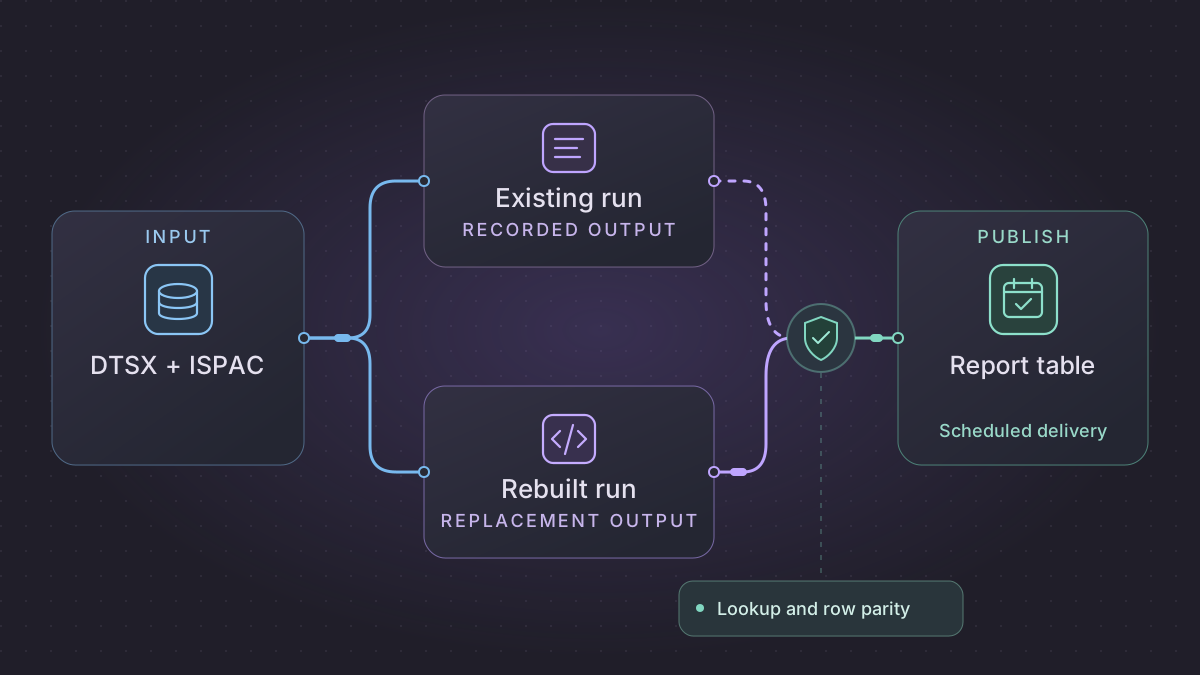
Migrate a SQL Server Integration Services (SSIS) package by inventorying the control flow, data flow, and settings used in the actual run. Start with one scheduled report load. Use SQL for set-based transformations and Python for file intake or calls outside the database, then compare the replacement to the old package before switching the schedule.
How do you retry a migrated SSIS file load without loading a file twice?
An SSIS Foreach sales load stops after one file, or after a second file commits but before Agent sees success. Use the file digest and durable transaction receipt to distinguish committed files from those still needing a load.
Recovery. Process only complete, uncommitted files with the pinned customer snapshot. For committed files, finish any pending archive or downstream delivery without inserting again. Keep a date-complete output hidden until all expected file receipts exist.
Cutover check. Compare SSISDB data-flow path counts with successor staging, exact reject file and data-row ordinals, and accepted sales. The two-file fixture requires 5 input rows, 2 sales totaling 2,000 cents, 3 typed rejects and exactly 2 file receipts after both failures.
Run python3 ssis-file-replay.py after saving the SSIS file replay lab. The synthetic replacement loads two files in separate transactions, preserves bad-row dispositions, and compares against an independent expected snapshot. This standalone case uses a region lookup and names its reject reasons in plain language. One retry follows a simulated pre-commit failure. Another follows a lost acknowledgment after commit. After both retries, the lab reports two accepted rows totaling 2,000 cents, three rejects and two file receipts.
Replace a Foreach file loop with a per-file transaction
Check whether the incumbent package uses checkpoints and which tasks can be replayed. Microsoft documents that checkpoint data is not saved for For Loop and Foreach Loop items. Before retrying a loop, use the destination's committed per-file evidence to distinguish files that need another write from files that already landed. Microsoft SSIS checkpoint behavior
The sample inputs and expected results in this walkthrough are synthetic.
Use the actual Agent execution as the baseline for one scheduled sales load. The example moves two delimited sales files through a customer lookup, an error output, and one SQL destination. Archive and downstream delivery run after database acceptance. Keep a pinned customer dimension snapshot so you can tell a lookup drift from an implementation difference.
Capture component-level evidence from a sandbox execution
Pick the exact execution_id for the deployed package and inspect its non-secret configuration names and path row counts. Ask the database owner to enable Verbose logging for the controlled comparison if it is needed and approved. The data statistics view records repeated buffers, so aggregate the path rows and keep package and component paths in the grouping.
DECLARE @execution_id bigint = 12345; -- substitute the sandbox execution

SELECT object_type, parameter_name, sensitive
FROM SSISDB.catalog.execution_parameter_values
WHERE execution_id = @execution_id
ORDER BY object_type, parameter_name;

SELECT package_name, execution_path, dataflow_path_id_string,
       SUM(rows_sent) AS rows_sent
FROM SSISDB.catalog.execution_data_statistics
WHERE execution_id = @execution_id
GROUP BY package_name, execution_path, dataflow_path_id_string
ORDER BY package_name, execution_path, dataflow_path_id_string;
An empty result from the path query can mean the logging level or permissions do not expose it. Compare the target and rejects from the selected package run regardless. In Designer map path IDs to the source output, accepted Lookup path, no-match path and parse-error path. Capture ErrorCode and ErrorColumn for the redirected rows when exposed and retain the stable business reason separately. Execution parameter values · Data-flow row counts
Implement the file and SQL boundary
| Package component | Replacement data contract | Required behavior |
|---|---|---|
| Foreach File Enumerator | feed_id,business_date,logical_file_id,version,sha256 per manifest entry | Capture both delivery identity and bytes. A matching identity and changed hash goes to correction review. A missing file remains visible. |
| Flat File Source and Data Conversion | Input sale_id,customer_code,amount_text. Stage file_id,row_ordinal,sale_id,customer_code,amount_cents. | Preserve code page, locale, trim and length rules. Keep original values restricted in staging. Redirect malformed currency with the stable source ordinal. |
Lookup against dim_customer | Versioned customer_code → customer_key | Zero matches routes to NO_CUSTOMER, multiple matches to AMBIGUOUS_CUSTOMER for this workflow. Match actual package behavior and collation when building your own. |
| OLE DB Destination | fact_sale keyed by the approved sales key and file_commit keyed by feed and immutable file identity | Start the transaction, claim the unique receipt, insert or update accepted rows, record rejects and commit. Run archive or notification from a separate durable pending operation. |
Use a staging table or loader that accepts an immutable manifest and records the effective customer snapshot ID. When reporting is date-complete rather than file-complete, write committed files to a shadow partition and expose the business-date result after all expected receipts arrive. One rejected row can be a controlled data disposition. A failed database transaction prevents file acceptance. Preserve the legacy failure and warning contract in the scheduler.
Exercise two files and a duplicate lookup
For file A take A1,C1,18.25 and A2,C9,5.00. For file B take B1,C2,1.75, B2,C2,broken and B3,C3,6.25. The pinned dimension has one C1, one C2, two C3 and no C9. Expect two accepted sales totaling 2,000 cents and exact rejects A:2 NO_CUSTOMER, B:2 INVALID_AMOUNT, B:3 AMBIGUOUS_CUSTOMER when ordinals count data rows. Check 5 = 2 accepted + 3 rejected across package paths and staging. Then interrupt after A commits, and interrupt again after B commits but before the scheduler observes success. A retry should finish the missing work with exactly two file receipts and no extra sale, reject or archive entry.
Deploy the extractor and loader as one job with a read-only intake identity and a separate scoped database writer. Pass business_date explicitly and prevent overlapping publication for the same feed and date. Alert on missing input, incomplete receipt set and target count mismatch. Disable the old writer at the agreed business date only after recording the last Agent execution and its exact receipt set. If switching back, ensure the old file loop receives only work outside the replacement's committed set.
Inventory the package and execution settings
Keep the source .dtsx packages or the deployed project .ispac where applicable. For project deployments, record SSISDB environment references and project or package parameters. Capture the scheduler entry, SQL Server Agent job steps when used, execution identity, and retry behavior. Record the installed providers and execution bitness where a connection depends on them. A saved package may leave deployed values outside its source file. Microsoft SSIS deployment guide · SQL Server Agent jobs for packages
Trace precedence constraints, connection managers, Script Tasks, Derived Column expressions, Lookup behavior, and error outputs. Document how lookup misses are handled and whether failed steps leave partial destination writes. Save a run log and the exact input window for a successful run. Remove sensitive parameter values and names that identify customer systems before sharing excerpts with an assistant.
Rebuild the selected data flow
- Stage input rows with a source ID and business date. Record the source boundary and input count. Match the old package's type conversions, trimming, and text encoding on representative records.
- Recreate lookup and transformation rules in SQL. Pin the reference data to the same snapshot during comparison, and produce an explicit rejected-row table with the key and reason. Translate scripts and stored procedures only after inspecting their actual side effects.
- Publish with a transaction and a unique batch key. Commit the batch ledger and report table change together. Run downstream exports only after the committed load passes checks, and record their delivery separately.
Implementation runbook
Retrieve the deployed package, Agent job and effective parameters
For SSISDB project deployment, export the deployed project from SQL Server Management Studio or retrieve its binary stream with the catalog stored procedure. Save the binary result as an .ispac through a binary-capable client; SQL text or CSV output cannot reconstruct the archive. Compare .dtsx, project parameters and connection managers to the source project. For package deployment, retrieve the deployed .dtsx from its actual file system or MSDB location and collect the package's .dtsConfig or other configuration provider separately. Microsoft catalog.get_project · Microsoft deployment models
EXEC SSISDB.catalog.get_project
    @folder_name = N'Finance', @project_name = N'DailyLoads';

EXEC msdb.dbo.sp_help_jobstep
    @job_name = N'Daily Sales Load';
In the Agent job record schedule, proxy/run-as account, step command and success/failure branches, retries and dependency jobs. In SSISDB match executions to environment references, catalog.execution_parameter_values and operational messages. Collect sensitive values as secret references only. Read control flow, event handlers, precedence constraints, component error output (fail, ignore, redirect), variable expressions, lookup cache mode and transaction boundaries. Inventory Script Tasks, Script Components, nonstandard providers and package files called at runtime. SSIS checkpoints can restart a package at control-flow boundaries. Microsoft documents that checkpoint data does not save For Loop or Foreach Loop container items, so retry a partially processed file loop by a destination-side receipt. Microsoft SQL Agent step fields · Catalog views · SSIS checkpoint behavior
Replace one file-to-warehouse loop
- Register each file by immutable object/version and digest with a unique receipt. Translate Foreach and wildcard selection, including input order where it changes the result. Fix the SQL Agent business date for the entire attempt. Use native Decimal types for money and exercise SSIS locale, code page and truncation cases in fixtures.
- Stage with input ordinal, date, business key and raw fields. Replace Conditional Split and Derived Column with explicit decision order and typed expressions. Replace Lookup by a join against the same dimension snapshot. Distinguish no match from duplicate dimension key and implement the package's chosen disposition.
- Compare accepted, rejected and filtered input counts to the source. Do destination writes and completion receipt in one transaction. If multiple destinations cannot share a transaction, use independent sink receipts and retry only unfinished sinks. Schedule after input availability with one writer per date, missed-run/backfill policy and per-file replay.
- In shadow run keep destination private and compare type, key sets, updates/deletes and rejects. Capture the last Agent execution and exact file receipts at cutover. Re-enable the legacy job only after it can resume with an agreed list of consumed files.
Concrete fixture. Files A and B for the same date. A has valid sale A1 at 18.25 and a no-match row. B has B1 at 1.75 and invalid amount B2. After A commits simulate termination. Retry should process B, leave two accepted keys totaling 20.00, and record no-match and invalid amount with exact source ordinals. Force another failure after B's transaction but before orchestration success, then prove both file receipts prevent duplicates. Make the reference table return two keys for a lookup and expect a separate ambiguous-match disposition.
Run the acceptance logic locally
Run this self-contained fixture with Python 3. It uses synthetic inputs and no vendor connection. For migration signoff, repeat the same checks against a sandbox on your selected replacement.
from decimal import Decimal, InvalidOperation

files = {
    "A": [("A1", "R1", "18.25"), ("A2", "unknown", "1.25")],
    "B": [("B1", "R1", "1.75"), ("B2", "R1", "invalid")],
}
reference = {"R1": "West"}
committed = {}

def stage_file(file_id):
    if file_id in committed:
        return
    accepted, rejected = {}, []
    for ordinal, (key, region, raw_amount) in enumerate(files[file_id], 1):
        if region not in reference:
            rejected.append((ordinal, "lookup miss"))
            continue
        try:
            amount = Decimal(raw_amount)
        except InvalidOperation:
            rejected.append((ordinal, "invalid amount"))
            continue
        accepted[key] = amount
    committed[file_id] = accepted, rejected  # one commit in this fixture

stage_file("A")
for _ in range(2):
    for file_id in files:
        stage_file(file_id)
assert sum(sum(accepted.values()) for accepted, _ in committed.values()) == Decimal("20.00")
assert {file_id: pair[1] for file_id, pair in committed.items()} == {
    "A": [(2, "lookup miss")], "B": [(2, "invalid amount")]
}
Test a lookup miss and a rerun
Create an orders fixture with rows 10,C1,40.00, 11,C2,60.00, and 12,C9,15.00. Include only C1 and C2 in the reference fixture. Under a contract that redirects missing customer lookups, expect orders 10 and 11 with a total of 100.00, plus a rejection for order 12. Run the same business date twice and check that the target still has two rows. Force a publish failure before the transaction commits and verify the batch can be rerun without a partial load.
Prompts you can copy
Read these redacted DTSX excerpts and runtime parameter names. Map each Control Flow and Data Flow step to its inputs, outputs, conditions, and error behavior. Identify dependencies that the package export does not prove.
Draft a SQL and Python replacement for this lookup fixture. Add tests for the redirected row, a changed reference snapshot, and a rollback before target commit. Write only to the sample schema.
Schedule it and switch
Schedule the load after upstream data is ready, with a lock per date and bounded retries for transient errors. Compare both versions against separate targets over a normal run, an error run, and a repeat. Review counts, rejects, totals, and arrival time. Disable the old publisher after approval and enable the new job from a recorded boundary. Keep the old job and environment reference available through the rollback window.
Need help with the migration?
Explore SSIS migration services or browse all DIY migration guides.