How to migrate a SAS Enterprise Guide report with SQL and AI
TLDR
Export the report’s SAS code and process-flow settings, then verify a scripted replacement against the real SAS output before switching the schedule.
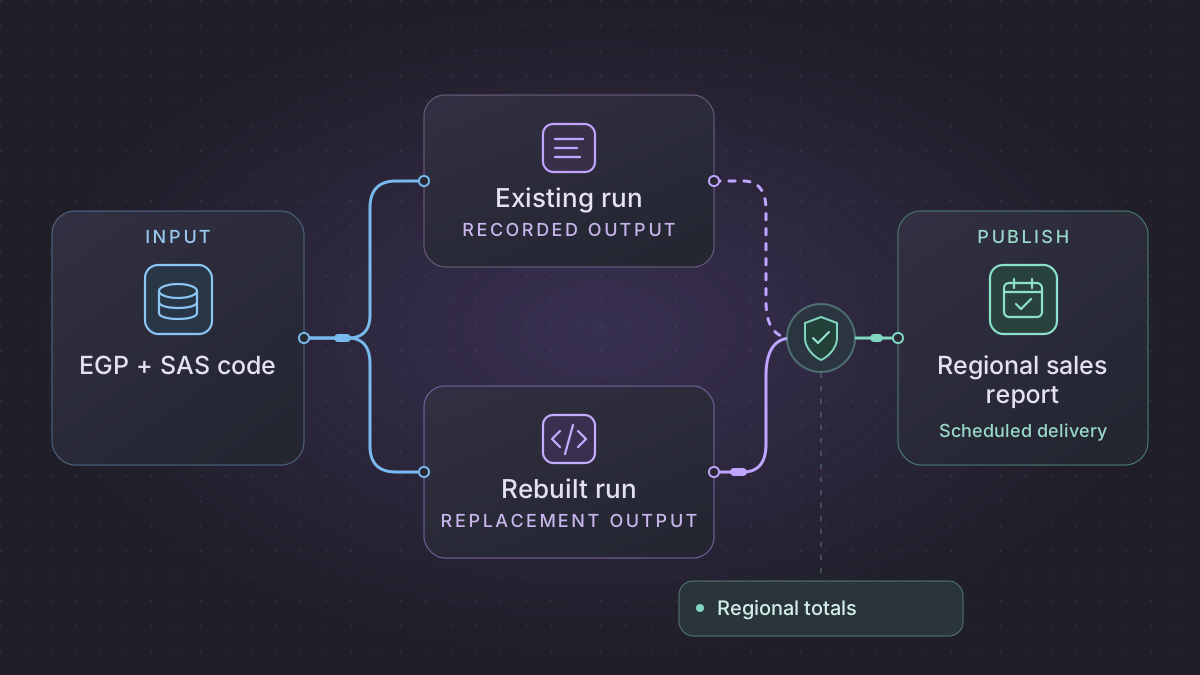
Migrate a SAS Enterprise Guide report by preserving the project, exporting the selected process flow's code, and capturing a trusted result for the same source snapshot. Move a stable recurring refresh to SQL and a scheduler. Leave specialized SAS analysis in place where its semantics or output have yet to be reproduced.
Why can a migrated SAS report have the right total and wrong regional subtotals?
The SQL workbook matches the SAS grand total but a regional subtotal differs. Compare the same pre-export rows, regional keys, missing-value rules and reporting-period boundary before deciding that the report is ready.
Recovery. Fix and rerun the affected mapping against the frozen source when the regional rows differ. Keep the Unassigned bucket if the incumbent retains unmatched rows. When report content matches but delivery is interrupted, resume only the published workbook version; hold a possible send if the provider cannot confirm it.
Cutover check. Compare SAS and SQL totals by region, disposition counts, and workbook sheet, column and format details. The January fixture must yield 12,500 East, 6,000 West and 1,000 Unassigned cents, one rejection and one out-of-period row. Require workbook and delivery parity before moving the schedule.
Rebuild and validate a month-end workbook from the exact source snapshot
Pick one scheduled project and one workbook, such as Regional Sales for January. Keep the legacy sender enabled only for its current route. Run the replacement with an isolated output directory and a sandbox recipient. Export a comparison table from the old project just before the workbook task, since identical source totals can still produce different worksheets or recipient lists.
Build the adapter contract
| Legacy step and evidence | Replacement input and output | Check |
|---|---|---|
| Scheduled project script and prompt settings | Scheduler passes period_start=2026-01-01, period_end=2026-02-01, timezone, source snapshot ID, report version and recipient-list version. | A February retry for January uses the original period and snapshot. |
| Imported SAS dataset and libref | Land sales.csv as raw bytes. Parse sale_id,sas_day,region,amount and retain original row number. Produce sales_typed and sales_reject. | SAS numeric dates are calendar days since 1960-01-01. Normalize them before filtering. A datetime field uses seconds and needs its own declared conversion. |
| User format and DATA step | Keep a versioned region_raw → region_code → display_label lookup. Apply blank and special missing rules before aggregation. | A region labeled Unknown in a custom format remains distinguishable from a missing region where the business report requires it. |
| PROC SQL summary and sort | Group by region code. Sum integer cents, count contributing rows, and sort by the recorded workbook order. | If the old flow relies on FIRST. or LAST. logic, record the within-group sort keys and tie-breakers before using a SQL window function. |
| Export task, workbook and delivery log | Write the approved sheet names, column order, widths, formats and chart or formula settings to a versioned workbook. Record report_id,period,version,output_uri,sha256,delivery_receipt. | Compare cells, column order and consumer-facing formats with the old output. Ignore timestamps embedded by the workbook library when comparing content. |
Set policy before coding. In this example, a blank region enters UNASSIGNED, a missing amount goes to MISSING_AMOUNT, and dates outside the report period count as filtered. Use decimal parsing and integer cents at the aggregation boundary. Preserve any stronger SAS format or monetary rounding requirement found in the observed project. SAS date and datetime values
Compare the old and new report at its actual grain
Create two SAS comparison datasets, work.old_regional and work.new_regional, from the canonical, typed exports. Keep the same types and names. Test duplicate region codes separately because the intended grain is one row per region. In a licensed SAS comparison environment, sort by the chosen key and run this read-only comparison.
proc sort data=work.old_regional;
  by region_code;
run;
proc sort data=work.new_regional;
  by region_code;
run;
proc compare base=work.old_regional compare=work.new_regional method=exact;
  id region_code;
  var row_count amount_cents;
run;
%put NOTE: regional_report_compare_sysinfo=&sysinfo;
Check the comparison listing and return information. Compare labels, format codes, recipient version and report layout separately. If the replacement retains SAS as the computation runtime, use the same comparison against its new launch command. PROC COMPARE documentation
Prove a month-boundary and delivery failure
Use six synthetic sales rows. January 1 East 100.00, January 31 East 25.00, January 31 West 60.00, January 31 blank region 10.00, January 31 West missing amount, and February 1 West 99.00. Expected counts are six read, four accepted, one rejected, and one filtered. Regional cents are East 12,500, West 6,000, and Unassigned 1,000. Grand total is 19,500 cents. Load the same source and mapping snapshot for both versions. A report with matching grand total and a different region allocation fails.
Run this job after the source closes for the period. Use a lock per report and period. Publish the immutable workbook first, then let a delivery worker send the approved report version with an operation key derived from report, period, version and destination. If the file publishes and the worker stops before sending, retry sends that file without regenerating it. If sending may have succeeded and the provider cannot confirm a receipt, hold the delivery for review. Accept cutover after a regular month, a close with missing or late inputs, and a signed correction run. Assign the first new period to one publisher and reconcile any earlier delivery before reopening the old schedule.
Export the report and its runtime context
Save the .egp project and export the code for the relevant process flow to a .sas file. SAS documents exporting code for projects and process flows, and notes that some tasks have no exported code. Export or record the flow's non-code steps separately, especially file delivery and export nodes. Capture the task filters, prompt values, librefs, format catalogs, macro dependencies, SAS server, time zone, and schedule from a successful run. SAS Enterprise Guide user guide · Tasks without exported code
Save the trusted report output and the SAS log, then list the source snapshot, reporting period, expected row counts, and delivery deadline. Inspect generated code for implicit conversions, missing values, and date bucketing. SAS numeric missing values sort ahead of numbers. A direct translation to SQL can change filter results because SQL comparisons with NULL evaluate differently. Use the current report to decide whether to preserve that behavior or make an approved correction. SAS SQL Procedure User's Guide
Rebuild the recurring refresh
- Load an immutable sales extract and a pinned region lookup into temporary tables. Pass the business date explicitly to the report so a rerun uses the same period.
- Translate the selected filters, joins, regional groupings, and totals to SQL. Match money precision, custom formats, and the treatment of missing region or amounts. Keep a written mapping from each selected task to its replacement.
- Write a dated result and manifest with source count, filtered count, regional totals, and output path. Publish the report only after checks pass. If a workbook is the contract, compare tabs, ordering, and display formats as well as source data.
Implementation runbook
Recover the executable program and the work around it
Keep the .egp, SAS version, application server, scheduler identity and process-flow dependency graph. In SAS Enterprise Guide use Share → Export all code in project where supported, or the release's File → Export → Export All Code. Save each manually written program, included macro file and generated task code. SAS documents that some Enterprise Guide tasks cannot be exported as code and that generated code can require edits before Base SAS can run it. Record each omitted export, file transfer, email, link, task prompt and human action as a separate requirement. SAS code export · SAS tasks that cannot be exported · SAS Base SAS compatibility note
If the old project was scheduled, capture its generated .vbs and Windows task definition. Record working directory, run-as user, SAS server, librefs, autoexec, %INCLUDE, macros, formats and destinations. Keep batch logs and validate which flows actually run. If you use SAS as a bridge, validate the extracted .sas against your licensed SAS runtime and approved libraries. Use an isolated data set and check the log and output as well as the process exit status. SAS Enterprise Guide automation examples
Translate a month-end report with explicit comparison rules
- Parameterize the report period (inclusive start, exclusive next-month start), refresh date and destination. Run as a fixed service account. Capture time zone, query extraction timestamp, source file manifest and reference data version.
- Build a worksheet-level map for each export. Save stable keys and expected table names, totals, rounding rules, labels, column order and sort direction. For each SAS DATA step identify BY-group first/last logic, LAG queues, SAS date origins and user formats. Recreate special missing values or explicitly document how they collapse into null. PROC SQL joins and grouping must be tested for missing keys because translating them to ordinary SQL NULL semantics can change results.
- Build versioned intermediate tables and validated report outputs. Use deterministic sort and decimal rounding, generate the workbook to a private version, check sheets/columns/cell formats and publish through a single durable delivery receipt per report and period. For a failed report, restart from the persisted sources and runtime parameters. A revised period has an explicit report version and authorized resend.
Concrete fixture. For January report start 2026-01-01 and end 2026-02-01, include amounts 12.25 and 7.75, one missing group, and a Feb 1 row worth 99.00. Expect January total 20.00, one missing-group warning or bucket according to the current business rule, and no February amount. Check formatted display and exported column order, then simulate crash after upload and before notification. Re-run from the same input snapshot and assert an identical report content digest after excluding nondeterministic workbook metadata, one publication receipt and no duplicate notification.
Run the acceptance logic locally
Run this self-contained fixture with Python 3. It uses synthetic inputs and no vendor connection. For migration signoff, repeat the same checks against a sandbox on your selected replacement.
from collections import defaultdict
from decimal import Decimal

records = [
    ("2026-01-10", "West", "12.25"),
    ("2026-01-25", None, "7.75"),
    ("2026-02-01", "West", "99.00"),
]
totals = defaultdict(Decimal)
missing_groups = 0
for day, group, amount in records:
    if not "2026-01-01" <= day < "2026-02-01":
        continue
    if group is None:
        missing_groups += 1
        group = "UNASSIGNED"  # only if this is the approved report rule
    totals[group] += Decimal(amount)

assert totals == {"West": Decimal("12.25"), "UNASSIGNED": Decimal("7.75")}
assert sum(totals.values()) == Decimal("20.00") and missing_groups == 1
Check regional totals with a fixture
Use four rows for a single month. Give East amounts 100 and 25, West amount 60, and a blank region amount 10. Define the fixture rule to label the blank region Unassigned. Expect East 125, West 60, and Unassigned 10, for 195 overall. Add a record with a missing amount and assert it follows the documented report rule. Run both the SAS project and the replacement against the same fixture. Compare selected detail rows before concluding that matching grand totals prove parity.
Prompts you can copy
Review these redacted SAS statements and the process-flow notes. List inputs, librefs, prompts, date boundaries, grouping behavior, and export steps. For every SQL translation, flag any difference in missing values or formats.
Draft a regional totals query using an explicit report date and generate fixtures for a blank region, missing amount, and late sales row. Separate tests for table results from workbook presentation.
Schedule the report and switch
Schedule the replacement after data arrival. Lock by report date, retry only temporary source failures, and publish an atomic report version after validation. Compare a normal period, a boundary date, and a rerun in parallel. When the report owner approves, transfer the delivery schedule and retain the previous project, input snapshot, and published output for rollback.
Need help with the migration?
Explore SAS Enterprise Guide migration services or browse all DIY migration guides.