How to migrate a Pentaho Data Integration job with Python, SQL, and AI
TLDR
Export the Pentaho job and transformations, rebuild the supplier load, and compare file accounting, rejected rows, and target results before moving the schedule.
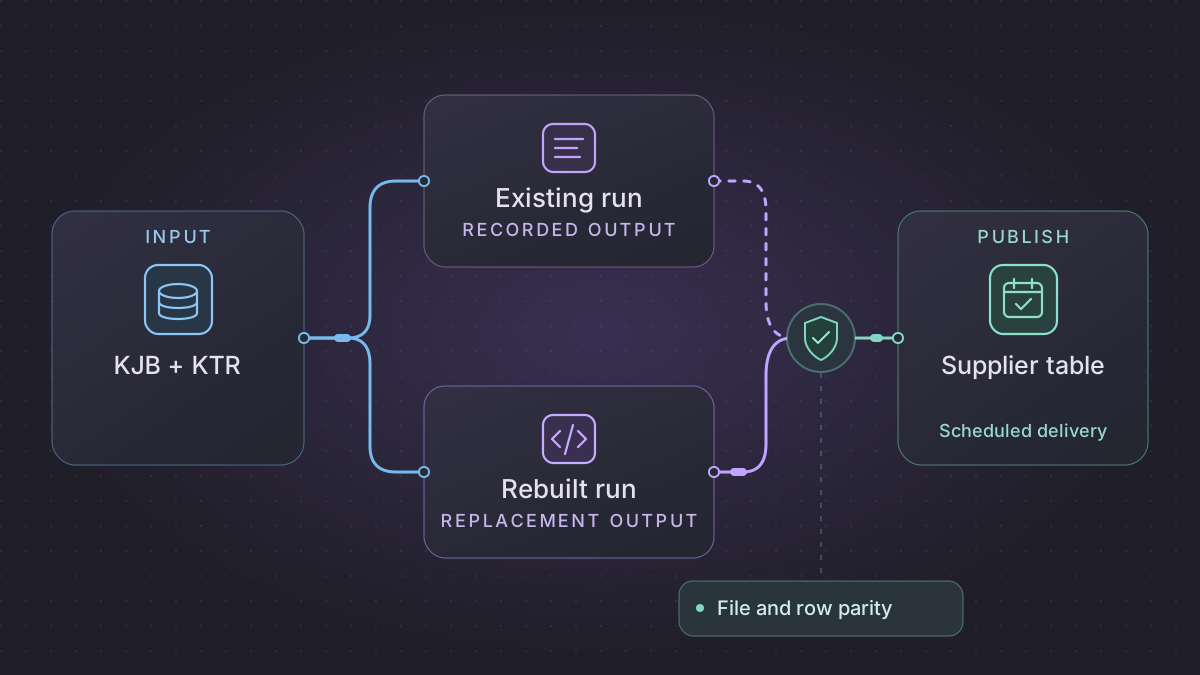
Migrate a Pentaho Data Integration (PDI or Kettle) job by separating its scheduling and file-handling rules from its row transformations. Rebuild one feed with Python for file intake and SQL for row rules. Test an ordinary load, a missing file, and a replay before the replacement writes to the production supplier table.
How do you recover a Pentaho load when a supplier file was left behind?
A supplier CSV remains in the landing folder after a failed PDI job. Inspect the ready signal, source digest and target receipt to distinguish a partial upload from a committed file awaiting archive.
Recovery. Wait for an incomplete upload. Load a complete uncommitted file against its frozen manifest, or finish only the archive step when its target receipt exists. Route a changed digest for the same source ID to the correction process.
Cutover check. Compare old and new KJB branch outcomes, accepted invoice-line keys, totals by currency and reject ordinal. F001 must preserve the quoted comma, produce two lines totaling 2,000 USD minor units, reject data row 3 and leave one matching archive after the interrupted retry.
Replace the supplier file job using one durable file manifest
The sample inputs and expected results in this walkthrough are synthetic.
Inspect the deployed KJB job hops from the file wait through the archive or notification. Open each referenced KTR's Text File Input settings and reproduce the delimiter, enclosure, escape, character encoding, header count, strict widths, row numbering and error outputs. Inspect transformation steps that set filenames or copy rows to the job result, then check how each child step uses those results. Distinguish the child transformation's accepted and rejected rows from the job hop that decides whether the file advances. Pentaho Text File Input and error handling · Pentaho 10.2 transformation steps
| Legacy boundary | Replacement contract | How to compare |
|---|---|---|
| File-ready job hop | partner, source_id, filename, size, sha256, readiness_evidence, business_date | A partial file with no ready marker stays unread. A changed digest for an existing source ID enters the correction path. |
| Text File Input | row_ordinal, invoice_id, line_no, description, currency, amount plus parsing result | Compare a quoted comma, invalid decimal, unexpected header and encoding marker. Retain original logical row ordinal in every error record. |
| Business transform and target | partner, invoice_id, line_no, currency, amount_minor, batch_id | Compare keys and exact minor-unit totals by currency. Test a duplicate with the same data and a duplicate with conflicting values separately. |
| Commit → archive | manifest_id, target_receipt, archive_key, archive_receipt | Kill the worker after target commit, restart and verify one target effect and one archive object with the expected hash. |
Use a read-only landing location, a staging table and a manifest receipt. Bind the parser configuration, mapping revision and business date to the manifest before parsing. Parse decimal amounts with a fixed scale and check row accounting parsed = applied + duplicate + rejected. Stage conflicting duplicate keys for review before touching the target. Write accepted lines and one durable receipt transactionally, then archive to a digest-specific destination. If archive succeeds but the receipt write fails, compare the existing digest before marking the item archived. Run the scheduler as one worker per partner and business date, with separate outcomes for no expected file, expected file missing, rejected file, committed file and archival pending. Compare old and new on isolated sinks before routing a partner's file to the replacement.
A file to pass through both implementations
Use a UTF-8 fixture named F001.csv with the agreed header, then rows INV-12,1,"Gasket, large",USD,12.30, INV-12,2,Clamp,USD,7.70, and INV-13,1,Valve,USD,N/A. Expect two target lines for INV-12, 2000 USD minor units, and one invalid-amount reject on the third data row. Replay the identical bytes and require the original receipt. Submit the same partner/source ID with corrected bytes and require an approved correction manifest before replacing anything. At cutover use the last committed source ID and archive digest, then account for any additional files that reached the landing location before moving ownership.
Inventory the job and transformations
Export the selected job as a .kjb file and each referenced transformation as a .ktr file. Pentaho documents both file types and how a Transformation job entry passes parameters to a child transformation. Record nested job and transformation references, their resolved parameters, and connection names. Also collect one normal run log and one failed run log. Keep an untouched copy of the artifacts and redact paths, endpoints, account names, and credentials before sharing excerpts. Managing transformations and jobs · Transformation job entry
Trace each successful and failed job hop. Check when a supplier file is considered complete, when it is moved to archive, and whether errors stop the batch or redirect individual records. Within the transformation, write down the lookup key, normalization rules, null defaults, and duplicate handling. Verify those rules on observed results. A diagram alone may omit values supplied by the scheduler at runtime.
Rebuild one supplier load
- Write a Python intake command that takes a business date and a manifest of expected suppliers. Land the complete files in a read-only staging directory and save the filename, checksum, and supplier for each.
- Parse each file with an explicit delimiter, encoding, and column schema. Stage raw rows with filename and line number, then use SQL to normalize codes and join the approved supplier reference table. Emit rejected rows with a stable reason and source line.
- Publish accepted rows with a unique business key and a batch ledger. Commit the target change and batch success together. Run archive moves after commit and track those moves separately so a failed move can be retried without another load.
Implementation runbook
Capture both the .kjb and .ktr execution graph
For file-based projects collect the top-level job (.kjb), every invoked transformation (.ktr) and child job (.kjb) from source control or the deployed files. Use Spoon's repository export for repository-based designs, or run a configured PDI repository export job with Kitchen. The PDI 10.2 reference documents a sample job that takes rep_name, rep_user, rep_password, rep_folder and target_filename. Those names are parameters of the export job. They are separate from the actual execution parameters of your supplier job. PDI repository export through Kitchen
Pin the deployed version, effective kettle.properties variable names, actual scheduler/service account, run configuration and plugin versions. In a safe workspace use the following Windows examples to list named parameters without running the input job. Confirm the paths and options against your installed PDI version.
Kitchen.bat /file:C:\pdi\supplier_daily.kjb /listparam
Pan.bat /file:C:\pdi\normalize_supplier.ktr /listparam
Inventory each job hop's success/failure/unconditional condition and separately each transformation step's row flow and error handling. Read the evaluated child file paths and variable scope because a job can pass a different value than the default. Save any CSV templates, user-defined Java, stored procedures and plugin dependencies. Compare sort and row-distribution settings at branch/join points instead of assuming a visual hop means SQL ordering. Kitchen command reference · Pan command reference
Rebuild supplier files from arrival through archive
- Register a file only after its documented ready marker or atomic rename. Record partner, source file ID, checksum, byte count, business date and encoding in an immutable manifest. Use a unique key on partner plus source ID. Same ID and same digest is a replay. Changed digest is an explicit correction.
- Parse rows with a strict configured dialect and column positions. Preserve input ordinal for rejected lines. Validate typed decimals, currency and required keys. Upsert the valid set into a private staging partition using partner plus invoice plus line number. Quarantine rejected rows with row-level reasons. Compare fixed-point currency totals separately by currency.
- Recreate job-level gating in the scheduler. Only publish after successful parsing, row accounting and target commit. Archive using a persistent receipt, so a crash after publish but before archive resumes archive. Fail and hold on checksum/ID conflict.
- Cut over at a recorded manifest and partner schedule boundary. Scan source and legacy archive for files between the last receipt and pause. On rollback reconcile receipt IDs before re-enabling the Kettle job so it does not consume them twice.
Fixture. Feed one UTF-8 file with a quoted description containing a comma, line amounts 12.30 and 7.70, and a row with amount N/A. Expect two staged lines totaling 20.00 and one reject with input ordinal. Terminate after the merge and before archive. Restart and expect no duplicate lines and one archive receipt. Now supply a same-name file with different content and assert it takes the correction path. Test a half-uploaded file with no ready marker and assert there is no manifest or delivery until complete.
Run the acceptance logic locally
Run this self-contained fixture with Python 3. It uses synthetic inputs and no vendor connection. For migration signoff, repeat the same checks against a sandbox on your selected replacement.
import csv
import hashlib
import io

target, commits = {}, {}

def load(source):
    if source is None:
        return "missing"
    digest = hashlib.sha256(source.encode()).hexdigest()
    if digest in commits:
        return commits[digest]
    accepted, rejects, duplicates = {}, [], 0
    for ordinal, row in enumerate(csv.DictReader(io.StringIO(source)), 2):
        try:
            qty = int(row["quantity"])
        except ValueError:
            rejects.append((ordinal, "invalid quantity"))
            continue
        item = row["item"]
        if item in accepted:
            if accepted[item] != qty:
                raise ValueError("Conflicting quantity for one item")
            duplicates += 1
        else:
            accepted[item] = qty
    target.update(accepted)
    commits[digest] = (len(accepted), duplicates, rejects)
    return commits[digest]

fixture = "item,quantity\nP01,5\nP01,5\nP02,bad\n"
assert load(fixture) == load(fixture) == (1, 1, [(4, "invalid quantity")])
assert load(None) == "missing"
assert target == {"P01": 5} and len(commits) == 1
Prove the replacement with a fixture
Create a CSV with item,quantity and rows P01,5, P01,5, and P02,bad. Give the test only one expected supplier file and use a fixture rule that collapses identical duplicates. Expect one target row with quantity 5, one duplicate count, and one invalid-quantity reject. Replay the same checksum and assert the target still holds one row. Remove the file and confirm the batch reports a missing input without publishing an empty result. Compare file and row counts separately because a correct-looking supplier table can hide a skipped file.
Prompts you can copy
Given the redacted KJB and KTR excerpts, produce a table of job hops, child parameters, row transforms, failure paths, and post-commit file actions. Cite object and step names. Mark each uncertain rule for owner review.
Draft a Python CSV intake and SQL staging plan for these fixtures. Add tests for incomplete file delivery, repeated checksums, and archive failure after commit. Use only the temporary paths and sample schema provided.
Schedule it and switch
Run the replacement at the old job’s business-date boundary. Use a lock per feed and date. Retry transient file access after a short delay and quarantine malformed files. Log expected, received, accepted, rejected, and archived counts with run IDs. Run old and new jobs against the same inputs using separate targets, then switch the sole publisher after operations approves the comparisons. If rollback is needed, restore the original schedule and resume from the last committed batch ledger entry.
Need help with the migration?
Explore Pentaho migration services or browse all DIY migration guides.