How to migrate an Informatica PowerCenter workflow yourself
TLDR
Rebuild a PowerCenter invoice load from workflow, mapping, and session behavior. Use AI to draft the replacement SQL, then reconcile both runs and prove the watermark advances only after a successful load.
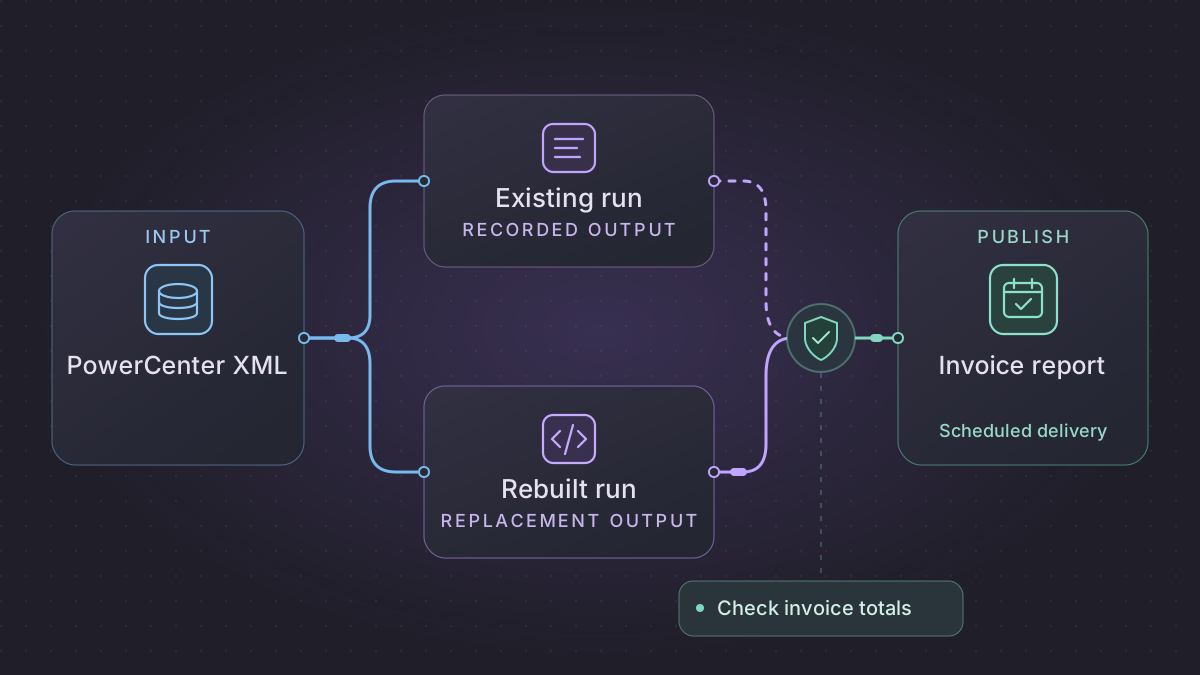
To migrate an Informatica PowerCenter workflow, collect the workflow and mapping XML, the session configuration, and the saved state used by real runs. Rebuild one output in SQL or Python. Compare the same inputs through both paths, then test a failed run and a replay before changing the production schedule.
How do you retry a migrated PowerCenter invoice job safely?
An invoice load failed before delivery. Read the durable source-position checkpoint and publication receipt to distinguish a rolled-back target transaction from a committed batch with an undelivered result.
Recovery. If the checkpoint is still at the start and no target commit exists, replay the pinned window and lookup. If the checkpoint and batch committed but the receipt is missing, publish only the stored result. If those records disagree, hold the retry and reconcile the target and receiver first.
Cutover check. Compare the actual old session and shadow run on frozen inputs using invoice keys, amounts by currency, rejects and saved state. In the lab, pre-commit failure leaves checkpoint 100, while post-commit failure leaves 106 and six dispositions before delivery resumes.
Run the PowerCenter invoice replay lab with Python 3. Start a fresh lab and run the failure and recovery commands with the same --through 106 window. Before commit, the lab reports checkpoint 100, zero dispositions and no receipt. After commit, it reports checkpoint 106, six dispositions and no receipt. A retry publishes the recorded result, and another retry produces identical receipt bytes. This is a synthetic SQLite and file example. Compare your actual session output and receiver receipts before production cutover.
Reconstruct a session from deployed evidence
Pick one workflow, session and run instance in Workflow Monitor. Use a read-only copy of the source and the lookup inputs at that run's cutoff. Record the workflow, mapping and session names and versions, parameter file location, source SQL after overrides, start and end watermark, session result, and target rows applied and rejected. Save the lookup snapshot used by the run and inspect its cache policy. An XML export alone cannot tell you the runtime connection, reference-data version or exact last successful watermark.
| PowerCenter artifact | Transfer it into the replacement | Verify before replacing the workflow |
|---|---|---|
| Source Qualifier and session SQL override | Name the effective SELECT, bind variables, source transaction snapshot and ordering column. Preserve the raw source primary key plus immutable event identity. | Extracting the same window from the same snapshot returns the same source keys, including tied timestamps. |
| Expression and mapping variable | Record the actual parameter value, function (SETMAXVARIABLE, SETVARIABLE, etc.), aggregate type, stage placement and saved end value. | Compare the observed start and saved end values for a normal run and a run ending with a delete or reject. For SETVARIABLE, only rows marked insert or update change the current value. |
| Lookup and Router | Pin reference data, effective date and key normalization. Write an explicit result for a miss or multiple matches. Preserve the ordering and predicates of route groups and document rows allowed to enter multiple outputs. | A missing account and two eligible matches have distinct reasons. If the incumbent takes a first or last match, prove how the deployed lookup chooses it before substituting a join. |
| Update Strategy and session target settings | Preserve the operation actually applied to the row. Inspect Treat Source Rows As, insert/delete enablement, update mode, target key and reject handling. | Show the result for an update with a missing target, a duplicate insert, and a delete. An Update Strategy flag alone does not determine every target outcome. |
| Pre- and post-session command tasks | List archive, publish, SQL cleanup and notification effects in execution order. Assign each irreversible effect a stable idempotency key or a receipt lookup. | A worker killed after target commit and before job success skips the completed write and resumes only the missing effect. |
The PowerCenter function documentation and session target properties explain why copying the mapping graph alone can change the cursor or target outcome. Informatica SETVARIABLE · Update Strategy and pushdown · Workflow Basics Guide
Reproduce the invoice handoff with files and a persistent database
Run the PowerCenter invoice replay lab with Python 3. The lab creates a synthetic source CSV, account lookup, SQLite target and separately specified expected outputs. Each command is a new process so the retry has to recover its state from disk. Use it to exercise the replacement's behavior before wiring your real extract. Real PowerCenter comparison requires the same frozen source inputs and receiver evidence from an actual session.
| Field | Meaning in this example |
|---|---|
position | Source commit sequence used for extraction and checkpointing. It is independent of the event's business timestamp. |
invoice and revision | Target key and source-issued version. An older revision can arrive later without overwriting the current invoice. |
account, currency, and amount | Lookup key, native currency and decimal amount. The pinned lookup maps the account to a company. Bad accounts and amounts receive explicit row dispositions. |
operation | An approved upsert or tombstone. The lab expects a valid account on both. Carry forward the last accepted account for deletes only if the source and target contract allows it. |
Download the script to a working folder, then create a fresh lab.
LAB="$(mktemp -d)/powercenter"
python3 powercenter-invoices.py "$LAB" init
python3 powercenter-invoices.py "$LAB" inspect
The initial checkpoint is 100. Positions 101 and 102 have the same business timestamp. Position 103 deletes invoice A, 104 has an unknown account, 105 corrects B with a backdated event, and 106 repeats an older revision. Position 107 fixes the rejected invoice C as a new source event.
First simulate a process failure after applying the changes but before committing. The run command should exit nonzero.
python3 powercenter-invoices.py "$LAB" run --through 106 --fail before-commit
python3 powercenter-invoices.py "$LAB" inspect
The staged manifest is still present. The checkpoint remains at 100 and there are no committed row dispositions. The manifest stores the source rows and lookup snapshot so a resumed run does not silently pick up a changed reference table.
Now simulate a process failure after commit and before delivery. This run also exits nonzero.
python3 powercenter-invoices.py "$LAB" run --through 106 --fail after-commit
python3 powercenter-invoices.py "$LAB" inspect
The checkpoint is now 106 and six events have a recorded disposition. The publication receipt is still missing. Resume the same window to publish its stored result, then run the correction window.
python3 powercenter-invoices.py "$LAB" run --through 106
python3 powercenter-invoices.py "$LAB" compare --through 106
python3 powercenter-invoices.py "$LAB" run --through 107
python3 powercenter-invoices.py "$LAB" compare --through 107
| Window | Active keys and total | Other expected results |
|---|---|---|
| Positions 101–106 | B only, 1,750 USD cents | A is tombstoned. C is rejected at position 104. B's older revision at 106 is stale. |
| Position 107 | B and C, 2,650 USD cents | C's correction is applied. The earlier reject and A's tombstone remain in the audit history. |
The lab uses a file as the final receipt. With SFTP or an API, use the destination's idempotency contract or a remote receipt lookup and verify the result before retrying. Use a bounded interval, one active publisher per feed, and alert on staged windows that age past the agreed cutoff. Replace the fixture’s expected output with a verified PowerCenter export before enabling production delivery.
Export the workflow and capture runtime state
In PowerCenter Client, export the repository objects to XML. Include the workflow, sessions, mappings, mapplets, source and target definitions, and referenced transformations for the selected load. Collect sanitized copies of the parameter files and session logs separately. Review source SQL overrides, lookup conditions, target update behavior, partitioning, and pre-session or post-session commands. Informatica PowerCenter XML export
Check what an incremental mapping does with the previous saved variable. PowerCenter can save a mapping variable in the repository after a successful session. A parameter file or pre-session assignment can affect the value used by a particular run. Capture the effective starting value from a known production run, then record where the next value comes from. Informatica mapping variable persistence and mapping variable overrides
Make the load boundary explicit
For an invoice feed, write a source query that takes an explicit checkpoint and cutoff. Stage the selected invoices before applying lookups, expressions, rounding, update strategies, and reject rules. Use fixed decimal precision for financial fields, and specify the behavior when a lookup returns no match or more than one match. Confirm which target key represents an invoice and whether a change updates that row or creates another version.
Store the checkpoint alongside the target commit if both can share a transaction. If they cannot, make the write idempotent and record a reconciliation receipt before advancing the checkpoint. Preserve the old definition of success. If PowerCenter excludes rejected records or allows partial success under specific settings, get the data owner's decision on how the replacement handles that case before the schedule changes.
Implementation runbook
Export the workflow, mapping and effective parameter state
From an authenticated PowerCenter pmrep session, export a workflow with its dependent objects as XML. Replace the illustrative repository folder and workflow name. Open the XML and cross-check each SESSION, MAPPING, transformation, reusable task or mapplet called by the workflow. A shared shortcut may require its owning folder or repository as well. Include pre- and post-session SQL, scheduler commands, connection names and mapping parameter declarations. Use Workflow Monitor logs to pin the deployed run and its session overrides.
pmrep ObjectExport -n wf_invoice_delta -o workflow -f Finance -m -s -b -r -u invoice-workflow.xml
The repository XML describes the design. Collect the active parameter file supplied by the scheduler and capture effective mapping variables and current boundary separately. In PowerCenter's CDC integrations, capture actual recovery/restart tokens from the relevant state mechanism if applicable. A timestamp watermark is only a replacement for a timestamp-driven source, not a substitute for a CDC commit position or an explicit delete feed. Separate approved run parameters from secrets before using an assistant. Informatica ObjectExport example · Locate the active PowerCenter parameter file · PowerCenter CDC recovery
Rebuild an incremental invoice extract end to end
- Lock one cursor row for this feed. Record its committed low cursor and choose a high cursor from a stable source snapshot. Persist both in the run manifest before extraction. For strictly append-only event sequences use monotonic source position. For an ordered timestamp feed with deterministic unique tie-breaker, use the predicate
(updated_at > :lo_ts OR (updated_at = :lo_ts AND event_id > :lo_id)) AND (updated_at < :hi_ts OR (updated_at = :hi_ts AND event_id <= :hi_id)). A source that can commit an older timestamp requires a source commit cursor or a bounded overlap with dedupe and an explicit late-data policy. - Load immutable staged rows under this manifest ID, then translate each Expression, Router and Lookup. Keep Informatica update strategy flags as explicit insert/update/delete/reject operations. Record lookup cache refresh policy, key normalization and default values. Preserve explicit source deletes as tombstones or target deletes according to the original contract.
- Compare key counts, currency totals by company and currency, rejects by reason, latest row per invoice and deletions. In a transaction lock the cursor again, verify it still equals the run's low cursor, apply accepted changes and save reject disposition and the completed high cursor. Keep archive delivery separate with a durable manifest and delivery receipt.
- Use the scheduler's business date and an overlap lock. A retry resumes the same low/high window and immutable staged rows. A backfill takes explicit cursor bounds with a separate checkpoint. On cutover record the last committed low boundary from PowerCenter, disable its active trigger at the boundary and start the first replacement from that exact cursor. Restore the original only after reconciling both target changes and cursor.
Concrete fixture. Last cursor is (2026-09-30T00:00:00Z,40). Events 41 and 42 at that same timestamp add USD 10.00 and USD 15.00, event 43 at 00:01 tombstones the first invoice. Expect three events, no duplicate at the timestamp boundary, one active invoice totaling USD 15.00 and one tombstone. Simulate a transaction abort before cursor commit and replay. Simulate a worker crash after commit and verify restart sees the committed manifest and leaves total and cursor unchanged. Add a late event 44 with an earlier timestamp to test the explicitly chosen overlap or source-position rule.
Run the PowerCenter failure and recovery commands
This example uses Python 3 and its standard library to exercise a bounded cursor, a tombstone, and a crash before commit. It uses synthetic data and does not call the incumbent service.
"""Python 3. Run with python3 powercenter_cursor.py."""
import sqlite3

db = sqlite3.connect(":memory:")
db.executescript("""
CREATE TABLE feed_state (feed TEXT PRIMARY KEY, ts TEXT, event_id INTEGER);
INSERT INTO feed_state VALUES ('invoice', '2026-09-30T00:00:00Z', 40);
CREATE TABLE invoice (id TEXT PRIMARY KEY, cents INTEGER, deleted INTEGER);
CREATE TABLE run (id TEXT PRIMARY KEY, events INTEGER);
""")

# In production retrieve from a stable source snapshot and persist a manifest.
source = [
    ("2026-09-30T00:00:00Z", 40, "old", 999, 0),
    ("2026-09-30T00:00:00Z", 41, "A", 1000, 0),
    ("2026-09-30T00:00:00Z", 42, "B", 1500, 0),
    ("2026-09-30T00:01:00Z", 43, "A", 0, 1),
]
low = ("2026-09-30T00:00:00Z", 40)
high = ("2026-09-30T00:01:00Z", 43)
events = sorted(row for row in source if low < row[:2] <= high)
run_id = "invoice:40-43"

def apply(fail_before_commit=False):
    db.execute("BEGIN IMMEDIATE")  # SQLite's write lock covers the cursor check.
    with db:
        if db.execute("SELECT 1 FROM run WHERE id = ?", (run_id,)).fetchone():
            return
        cursor = db.execute(
            "SELECT ts, event_id FROM feed_state WHERE feed = 'invoice'"
        ).fetchone()
        if cursor != low:
            raise RuntimeError("Cursor advanced since manifest was created")
        db.executemany("""
            INSERT INTO invoice VALUES (?, ?, ?)
            ON CONFLICT(id) DO UPDATE SET
                cents = excluded.cents, deleted = excluded.deleted
        """, [row[2:] for row in events])
        if fail_before_commit:
            raise RuntimeError("Simulated loss before commit")
        db.execute("UPDATE feed_state SET ts = ?, event_id = ?", high)
        db.execute("INSERT INTO run VALUES (?, ?)", (run_id, len(events)))

try:
    apply(fail_before_commit=True)
except RuntimeError as error:
    assert str(error) == "Simulated loss before commit"
else:
    raise AssertionError("The failure should roll back")
assert db.execute("SELECT count(*) FROM invoice").fetchone() == (0,)
assert db.execute("SELECT ts, event_id FROM feed_state").fetchone() == low

apply()
apply()  # Scheduler lost the success response and repeats the same manifest.
assert db.execute("SELECT ts, event_id FROM feed_state").fetchone() == high
assert db.execute("SELECT count(*), sum(cents) FROM invoice WHERE deleted = 0").fetchone() == (1, 1500)
assert db.execute("SELECT id FROM invoice WHERE deleted = 1").fetchall() == [("A",)]
assert db.execute("SELECT events FROM run").fetchall() == [(3,)]
print("3 events, 1 active invoice, 1500 cents, 1 tombstone")
Ask AI to trace the mapping and draft tests
Use this redacted workflow and mapping XML, session settings, and synthetic rows. List each transformation from source to target with its conditions, lookup defaults, update strategy, and unknowns. Trace the invoice watermark from parameter resolution to its saved value. Cite each object name and setting.
Draft a SQL or Python implementation for a checkpointed invoice merge. Include a fixture with repeated modification timestamps, a missing lookup, and a simulated crash after the target write but before checkpoint update. Show the expected target rows, reject rows, and state after replay.
Compare two runs and cut over
Start with invoice I10 totaling 30.00 in the target. Put an updated I10 for 35.00 and a new I11 for 20.00 in the next window. Give them the same modification timestamp. With a unique invoice key and an update policy, expect two target invoices totaling 55.00. Rerun the same window and expect the same keys and total. Add a record at the checkpoint boundary and verify it appears in exactly the intended run under the chosen tie-breaking rule.
Run both implementations on the same input and compare exact invoice keys, amounts by currency, rejected rows, and saved state after each run. Schedule the replacement with one active run per workflow and alert on missing completion, unexpected rejects, or mismatched totals. At cutover, wait for the old run to complete and seed the new job with its verified checkpoint. To roll back, restore the old schedule only after reconciling the last window the replacement published.
Need help with the migration?
Explore Informatica PowerCenter migration services or browse all DIY migration guides.