How to migrate an IBM DataStage nightly load
TLDR
Move one IBM DataStage load by tracing its sequence, parameter sets, match stages, and reject links. Rebuild the agreed warehouse writes and verify restart behavior before cutover.
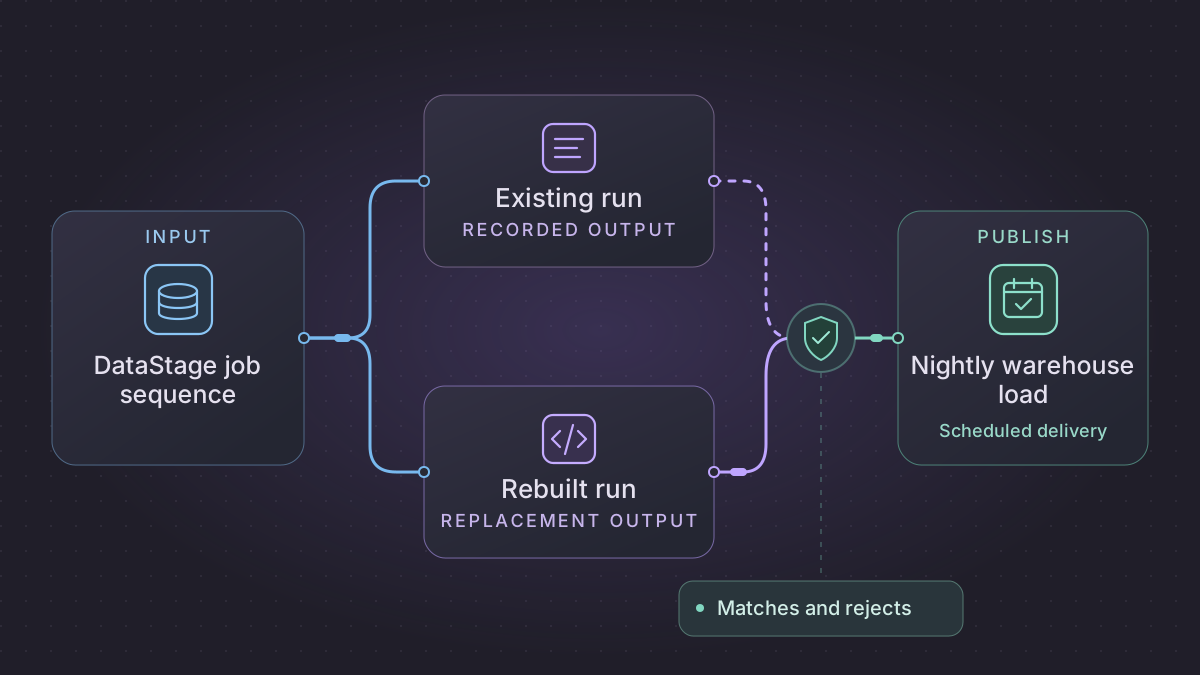
To migrate an IBM DataStage job, start with a nightly load and capture the sequence that starts it, the jobs it calls, and the parameters that drive the run. Rebuild the selected transformation and matching rules in SQL or Python, then compare both accepted and rejected records. Test a restart after a partial write before you change the scheduler.
How do you check DataStage lookup parity when row counts match?
A restarted nightly customer sequence produces different matches. Compare its input manifest and effective lookup snapshot with the original run, then check for a committed batch and outbox record.
Recovery. For the same manifest and lookup, resume any pending delivery from the committed receipt or rerun only unfinished work. A changed reference snapshot requires a separately reviewed correction.
Cutover check. Compare legacy and replacement source-row classifications, accepted warehouse keys and delivery effects. The five-row fixture requires one W101, one duplicate, three distinct review or reject outcomes and one logical delivery after restart.
Rebuild the overnight customer sequence from link contracts
The sample inputs and expected results in this walkthrough are synthetic.
Use the sequence, child parallel jobs and runtime files from one deployed InfoSphere run. Save a row-count report by link from a normal run and a restart. Inspect Lookup → Conditions for both lookup-condition failure and lookup failure. IBM allows one selected in-memory reference link to return multiple rows. A warehouse join without a uniqueness rule can turn the same fact into two writes. Record job parameters resolved at each Job Activity, reject-link schema and the stage's partition key, sort order and comparison/collation assumptions. IBM Lookup Stage Conditions · IBM sequence restart
| Sequence boundary | Handoff contract | How to check it |
|---|---|---|
| File arrival → parser | batch_date, source_id, file_sha256, expected_rows, lookup_revision | Resolve the business date from the scheduled invocation. Reject a partial manifest or a changed digest on the same file ID. |
| Parser → Transformer | source_row_id, external_customer_id, updated_at, region | Preserve physical source row ID. Distinguish empty, whitespace-only and null keys according to the deployed Transformer. |
| Transformer → Lookup | Normalized customer key plus pinned as-of timestamp | Implement the same case, space and collation behavior. If the reference is effective dated, use a half-open interval at the scheduled business date. Report reference ambiguity explicitly. |
| Lookup → warehouse | source_row_id, warehouse_customer_id, status, reason, mapping_revision | Assert an accepted row, ambiguity, unmatched row, invalid key or intentional duplicate for each input. Check both link counts and actual accepted keys. |
| Warehouse → file distributor | batch_id, target_digest, accepted, rejected, duplicates, output_delivery_id | Place the outbox record in the target transaction. Retry checks receiver receipt before sending a file again. |
For the rebuild, implement the keyed stage as a left join followed by a grouped match count by source row. An inner join silently discards unmatched rows. A direct left join can fan out an ambiguous reference. Partition and sort by a stable deduplication key before accepting the newest update. Use both event time and an explicit tie-breaker where the business rule requires one.
Start the scheduler with an explicit business_date, manifest location and lookup revision, and enforce one active run per target partition. A completed batch is identified by the manifest digest rather than the latest attempt timestamp. When the scheduler loses the success response after the warehouse transaction, reload that completed batch receipt and resume the outbox. If a restart is operator-initiated after a rule or lookup change, stage a new correction with a new manifest. Keep the old run's evidence available for rollback.
Use this comparator for the first shadow run
The source contains five row IDs. R1 and R5 repeat the same C01 event. R2 has two active lookup rows for C02, R3 is C03 without a match, and R4 is blank. The reference provides C01 → W101. Expect source rows 5, accepted 1, duplicate 1, rejected or review 3, and target keys [W101]. Record the reasons ambiguous_reference, missing_reference and blank_key separately. Compare those result sets to a verified legacy run. If its lookup continues with a null result instead of rejecting, resolve the difference before enabling delivery.
Inventory the sequence and its dependencies
For InfoSphere DataStage, use your approved Designer export or the version-appropriate istool export procedure to retain the job designs. IBM documents archive paths for parallel jobs, sequence jobs, routines, table definitions, and parameter sets. Use the export options suited to your version and capture dependent metadata. For newer DataStage flows, follow the documented flow and dependency export workflow for your edition. IBM InfoSphere export command · DataStage flow export
Open the sequence and follow each job activity to the child job and the actual parameter set used in production. Note conditional triggers, routine calls, checkpoint or restart behavior, scheduler inputs, and sequence exceptions. At the stage level, record source queries, lookup keys, default and null rules, partition and sort assumptions, reject links, and destination write modes. Include the approved matching or survivorship rules. Capture a successful and a failed job log, redact identities and connection values, and prepare synthetic samples for an assistant.
Rebuild one customer load
- Split extraction, standardization, matching, and warehouse loading into separately observable steps. Save the reference key snapshot used for each run so you can repeat matching decisions.
- Implement the existing normalization and lookup rules with SQL or Python. Treat ambiguous keys as a separate outcome when the original process requires review. Compare per-field matches and duplicates before declaring parity.
- Stage the accepted records and store rejects with source key, stage, and reason. Check the accepted and rejected totals against source count, including any recorded filters.
- Apply the warehouse update under a stable batch ID. Use transactional merge or an approved replacement strategy, then update the completion ledger. Separate temporary outages from business rule failures so the sequence only retries work that is safe to repeat.
Implementation runbook
Export the job that actually ran
This procedure is for InfoSphere DataStage 11.5/11.7. In Designer find the sequence and each Job Activity's child, record folder paths and job types, then use the DataStage option of the IBM istool export client to collect an ISX archive. Example for one server, project and folder. Set DS_DOMAIN to the services tier host and port and DS_AUTH_FILE to a restricted istool encrypted credential file. Keep the original archive in restricted storage and share only reviewed extracts.
istool export -domain "$DS_DOMAIN" -authfile "$DS_AUTH_FILE" \
  -archive customer-load.isx \
  -datastage '"ds-engine/CustomerProject/Jobs/*.qjb" "ds-engine/CustomerProject/Jobs/*.pjb" -includedependent'
A qjb is a sequence job and a pjb is a parallel job. Use asset paths from your Designer inventory instead of broad folder wildcards when possible. Export dependent table definitions, parameter sets and routines and check the manifest against the Job Activity list. Also copy external scripts, reference files and effective environment settings that are maintained outside the project. For newer DataStage on Software Hub use its flow and dependency download workflow separately. IBM istool export syntax · IBM istool authentication parameters · IBM asset paths
In Director compare a normal run to one with warnings, an error-handler diversion and a checkpoint restart. Record invocation ID, actual parameter names and values with secrets removed, link-level counts, stages visited and log timestamps. An InfoSphere restartable sequence can resume at its checkpoint with the original job parameters. IBM says it stops recording additional checkpoint information after diversion to an error-handling stage. Reusing a newly computed date at restart would change the input partition. IBM sequence restart · IBM dsjob run modes
Replace the matching sequence with explicit state
Write an activity map with columns for predecessor, trigger condition (success, warning, failure, custom), effective parameters, input reference, output, side effect and restart policy. A source row may produce one accepted row, one reject, one review record or an intentional filter. Give each a reason code and preserve the raw source ID. Translate Transformer constraints in their original order and preserve the original sorted/partitioned assumptions before combining parallel-stage logic. Pin the lookup snapshot used by each business date. Keep null, blank and multiple lookup matches distinct.
Create a unique batch key from sequence, business date and source manifest hash. Separate the run attempt from its batch key. In one warehouse transaction merge accepted customers by the agreed natural key, insert rejects keyed by batch and source row, write a completion row for the batch and commit. If the workflow sends a separate file or notification, insert one outbox record in that transaction and let a dispatcher complete it using a stable delivery ID. A restarted scheduler should compare the manifest hash to the original, then skip already committed steps with matching output digests. A manifest mismatch creates a reviewed correction batch.
Concrete fixture. Five source row IDs yield one accepted W101, one ambiguous C2, one unmatched C3, one blank and one repeated input row. Assert counts of 1 accepted, 3 rejects/review, 1 duplicate with these exact reasons, even if you rerun with shuffled source order. Force exit after the warehouse transaction and before scheduler success, then restart with the same manifest and lookup digest. Assert the same five classifications, one W101 row, one outbox record and one logical delivery. Change a lookup snapshot between attempts and require an explicit correction rather than silently changing the match.
Try a customer matching fixture
Run this Python 3 case to test the stated rules. Trim and uppercase each key. An unknown key is rejected. When two candidates match, the row needs review.
lookup = {"C1": ["W101"], "C2": ["W102", "W202"]}
input_keys = [" c1 ", "c2", "c3"]
results = []
for raw_key in input_keys:
    key = raw_key.strip().upper()
    matches = lookup.get(key, [])
    outcome = matches[0] if len(matches) == 1 else "ambiguous" if matches else "unmatched"
    results.append((key, outcome))
assert results == [("C1", "W101"), ("C2", "ambiguous"), ("C3", "unmatched")]
Extend the fixture with a blank key and a repeated source row. Compare the expected warehouse keys and each reject reason. Restart after a simulated warehouse commit and check the batch ledger prevents a second delivery.
Copy these prompts into your AI assistant
Read this sanitized DataStage sequence, stage inventory, and effective parameter names. Map job order, trigger conditions, reject links, lookup rules, and restart points. Cite the stage or sequence activity that supports each item. List dependencies I still need to retrieve.
Write a staging-only SQL draft for this customer load and a Python fixture for the matching decisions. Include ambiguous and missing keys, duplicate source rows, and a replay after the warehouse commit. Record the input, accepted, and reject counts in a run manifest.
Schedule the replacement and cut over
Use a single active writer for each nightly partition. Preserve the batch date on retries and limit retry count for temporary failures. Stop and alert when a schema, count, or matching check fails. A scheduled chatbot can summarize unmatched keys and late loads from logs without changing the warehouse.
Shadow the old sequence through ordinary and high-volume nights. Compare accepted keys, changed fields, and reject details. Finish or account for active jobs before switching triggers at the agreed batch boundary. On rollback, check the last successful warehouse batch before restoring the original schedule.
References
Need help with the migration?
Explore IBM DataStage migration services or browse all DIY migration guides.