How to migrate a BizTalk Server integration yourself
TLDR
Move one BizTalk Server receive-to-send path by capturing its bindings, schema, map, and routing. Build a small order worker with AI, then prove it delivers one accepted ERP order per input.
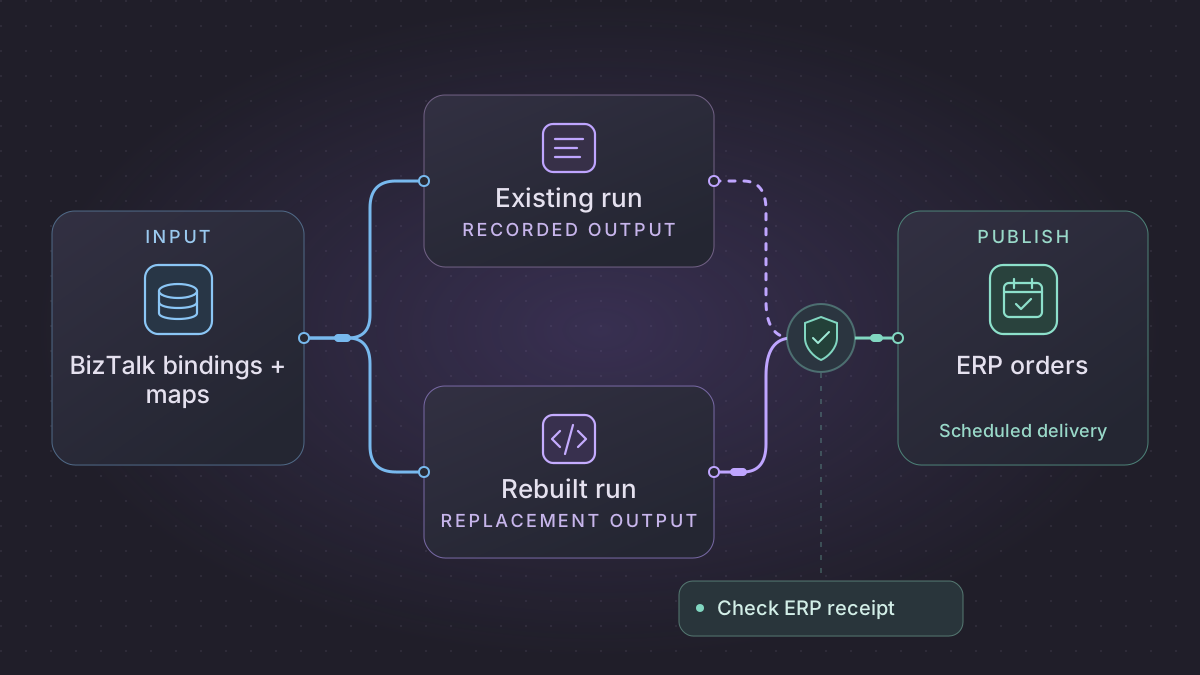
To migrate a BizTalk Server integration, start with one receive-to-send path. Export its bindings, collect the schemas and maps, and trace which orchestration or subscription determines delivery. Rebuild the handoff in a worker with a durable receipt store. Switch traffic only after the ERP accepts the same order fields and you have accounted for in-flight messages.
How do you verify BizTalk order routing before retrying delivery?
An order passes parsing but is routed differently. Compare the tracked namespace-qualified message type, receive-port context and promoted partner value with the deployed subscription filter.
Recovery. Create one ERP action per accepted partner/order revision only when the verified filter matches. Reject or hold an unexpected route before any ERP call, and reconcile a lost response against the ERP's receipt or idempotency contract.
Cutover check. Compare typed send fields, routing outcome and ERP business acceptance with tracked legacy messages. The worked case requires one receipt each for partners A and B with the same order number and zero ERP calls for the wrong namespace.
Translate one order route from inbound bytes to an ERP receipt
Start with the selected receive location and one successful tracked message. Follow its actual map order and record the message context used by the MessageBox subscription. In this synthetic route the route uses the namespace-qualified message type, receive-port context and an approved partner identifier promoted by the original pipeline. Verify the property namespace, type and presence using actual tracked message context. A value embedded in the body does not establish that the original pipeline promoted it. BizTalk message processing · Subscription details
<PurchaseOrder xmlns="urn:example:order:v1">
  <Partner>A</Partner><OrderId>O17</OrderId><Revision>1</Revision>
  <Line><Sku>0017</Sku><Quantity>2</Quantity></Line>
</PurchaseOrder>
| Old route evidence | Replacement behavior |
|---|---|
| Adapter and receive pipeline | Store immutable inbound bytes, source delivery ID and arrival time. Use a parser with external entity fetching disabled. Resolve the trusted schema and envelope behavior before disassembling. |
| Receive map and typed promotions | Preserve Sku as text to retain leading zeroes. Record message type urn:example:order:v1#PurchaseOrder, receive-port label and the approved partner value with explicit types. |
| MessageBox subscription and orchestration | Evaluate the verified filter before a side effect. Build an inbox key (partner, message_type, order_id, revision) plus input digest. Retain an explicit unknown-route reason. |
| Send map and adapter | Convert to the ERP's field and units contract and write one outbox action per accepted order revision. Maintain destination and route identity. |
| Transport confirmation and business receipt | Record HTTP/SFTP/queue acceptance and ERP order acceptance separately. For an ambiguous result use the receiver's actual lookup or idempotency contract. |
Build a path a support operator can replay
Record each accepted order and its outbound action atomically. An exact repeat of A O17 v1 becomes a replay of the same order, while B O17 v1 is separate. Changing the content under A O17 v1 is a conflict. Apply a new revision only if the ERP supports the original amendment semantics. When an incoming file contains multiple orders, keep per-order identities and compare the old envelope's actual partial acceptance policy. Do not infer it from a clean single order.
If the old route uses ordered delivery, scope ordering by the same route/key, such as partner A. Persist the approved next-sequence state or predecessor, and block later A items while a required A predecessor is unconfirmed. A B route can proceed when it has an independent order scope. Technical retry and business rejection need distinct states. Persist one outbox receipt and the destination reference so an operator can reconcile a lost response without submitting a second ERP order. BizTalk ordered delivery · Failed-message routing
Reproduce the old route with accepted, suspended and replayed messages
Send A O17 v1 twice and B O17 v1 once, all valid. Expect two ERP receipts. Send the same XML body under an incorrect namespace and expect a schema or route failure before any call. Send an accepted first delivery whose ERP response is lost, restart the worker and look up the original receipt. If A sequence 2 has a permanent failure, A sequence 3 remains parked under the ordered policy and an independent B sequence can complete. Compare typed mapped fields and final ERP acknowledgment separately from adapter successes.
Before switching, inventory active, suspended, dehydrated and undelivered instances in Group Hub and relate each to the exact partner/order revision. Use a sandbox ERP for initial shadow testing. Turn off or reroute the old receive location at an agreed source boundary, then transfer outstanding work only after confirming the destination status. Rollback sends only unaccepted orders after the replacement stops accepting new ones.
Export and trace the handoff
Use the BizTalk Server Administration console to export application bindings to XML. Obtain the versioned project if available, or request the deployed application package from its owner. An application MSI can contain artifacts such as schemas, maps, pipelines, orchestrations, and associated configuration. A binding export documents configuration, including receive locations and send ports. Read the bindings and the deployed artifacts together. Microsoft's application bindings export guide · BizTalk application packages
Trace which receive pipeline decodes and validates each file, which promoted properties and subscription filters choose the route, and whether the map runs before or after orchestration. Write down XML namespaces, map functoids or referenced assemblies, envelope handling, batching, acknowledgments, and suspended-message procedures. For each rule, save a sanitized input and the actual output from a known run. Keep partner keys and any endpoint credentials out of the assistant's context.
Rebuild the order delivery in stages
Start with an input reader, schema validation, a pure transformation, a routing step, and a destination adapter. Use the original XSD and approved field mapping to derive a fixture. A team can keep a portable XSLT map if the replacement engine supports its features. Replace custom assembly calls with named functions only after testing their outputs and handling of blank fields.
Keep a durable ledger keyed by partner and order ID, or by the versioned message identity if amended orders are legitimate. Record the inbound hash, map version, selected route, attempt state, and ERP receipt. Define what constitutes an accepted order. A queued file or successful HTTP response may still need a separate business acknowledgment. Preserve the partner's agreed ordering and acknowledgment behavior.
Implementation runbook
Export bindings and deployed artifacts from the selected application
Run the Windows BizTalk administration CLI on an authorized BizTalk host against the correct management database. Alternatively use the application's Export Bindings and Export Application actions in the Administration console. Capture the source revision and Visual Studio projects where available.
BTSTask ExportBindings /Destination:"C:\Migration\OrderBindings.xml" /ApplicationName:"Orders" /Server:BizTalkSql /Database:BizTalkMgmtDb
BTSTask ListApp /ApplicationName:"Orders" /ResourceSpec:"C:\Migration\OrderArtifacts.xml" /Server:BizTalkSql /Database:BizTalkMgmtDb
BTSTask ExportApp /ApplicationName:"Orders" /Package:"C:\Migration\OrderArtifacts.msi" /Server:BizTalkSql /Database:BizTalkMgmtDb
An MSI may include artifacts and deployment scripts. Inventory them and obtain matching source. The bindings and package alone may omit runtime state, credentials and external custom code. Capture schemas, maps, custom pipeline components, orchestrations, assemblies, BRE rules, party agreements, certificates/SSO references, adapter settings, and linked application dependencies. Use approved credentials and configuration references in the replacement. Passwords are removed from exported application bindings, but still redact sensitive settings and URLs. ExportBindings · ListApp · ExportApp
Trace receive and routing behavior before writing the worker
- Start at the adapter and receive location. Capture native transport and actual payloads, decoder and receive pipeline, XML/flat-file schema, namespace and envelope, disassembly, validation, and each split message's business identity. Test what happens when one child in a batch is malformed.
- Follow receive-port map, MessageBox publish/subscribe, orchestration and send-port map/pipeline in the order the selected path actually applies them. Match subscriptions using promoted properties with full namespace and type. A field in XML or a non-promoted context property alone does not establish a route. Inspect runtime instance subscriptions and correlation sets for orchestrations. Message processing · Subscription details
- Compile or inspect the source map and preserve XSLT semantics where portable. Confirm extensions/functoids, custom assemblies, XML namespaces, decimal formatting and what happens on an absent required node. Compare partner-specific maps, send adapters and settings. Identify retry interval, ordered delivery, stop-on-error, and failure route or suspension. Reproduce each partner's contract for technical acknowledgement and application/ERP acceptance separately. Ordered delivery · Failed-message routing
Implement a sandbox order adapter
- Decode, validate against the approved XSD, normalize to an order model, apply the map, choose a destination from typed routing properties, then send. Configure the parser for trusted schemas and no unneeded external entity access. Use a queue and per-partner route workers if ordering is required. Record one durable
partner,message_type,order_id,revisionkey and input hash. If partners reuse IDs, don't scope it only by order ID. - In the same durable inbox transaction store a pending outbound record. The worker marks it delivered only after it receives or reconciles the business receipt. An SFTP delivery or HTTP response can be transport acceptance without order acceptance. Implement destination dedupe or a lookup on timeout. If no receipt can distinguish an accepted write, queue it for reconciliation and avoid blind resends.
- Store original message identity, sanitized mapping/reject evidence, attempts, route, adapter receipt and application receipt. Preserve suspension or automated failure routing as explicit error queues. Reproduce the source's decision on whether subsequent messages can proceed after an ordered message fails. Test the receiving side's acknowledgement and timeout with a fake ERP before moving traffic.
Worked XML routing and restart test
Send partner A order O17 rev1 twice with a valid SKU. Send partner A O18 rev1 with a missing SKU. Send partner B O17 rev1 with a different valid SKU and route. Expect two distinct accepted ERP receipts and one validation reject, with no effect for the duplicate. Add A O17 rev1 with different content and expect a hash conflict. If the contract accepts changes, A O17 rev2 follows its defined amendment path. Simulate a lost response after ERP acceptance and confirm that the recovered worker queries the original receipt before sending. Force a failure on A sequence 2, verify A sequence 3 waits when order/stop-on-failure is configured, and confirm B may proceed when order is scoped per partner. Compare actual XML or normalized typed fields, route property and receipts with old traced samples.
During cutover stop the selected receive location or route new inbound files after a shared boundary. Query the Group Hub for active, dehydrated, suspended and undelivered instances and reconcile them to the receipt ledger before resuming, retiring or replaying any. Keep an approved old artifact bundle and list only unaccepted orders for rollback. Service/message states
Prompt for a bounded translation
Read these redacted binding XML, source schemas/maps, promoted property schema and one traced route. Build a table of decode, namespace, validation, promotion, subscription, map, send port and business receipt. Then implement a stub ERP adapter with the captured ordering policy. Test identical duplicate, same ID with changed body, wrong partner/namespace, missing SKU, ordered failure and timeout after commit. Cite a source artifact for each mapping and flag any compiled behavior still requiring the BizTalk operator.
Run the acceptance logic locally
Run this self-contained fixture with Python 3. It uses synthetic inputs and no vendor connection. For migration signoff, repeat the same checks against a sandbox on your selected replacement.
from xml.etree import ElementTree as ET

order_ns = "{urn:partner:orders}"

def map_order(partner, order_xml):
    # The miniature fixture uses trusted literal XML. Validate the deployed XSD
    # and disable external resolution before parsing actual partner messages.
    doc = ET.fromstring(order_xml)
    if doc.tag != f"{order_ns}Order":
        raise ValueError("unexpected order namespace")
    order_id, sku = [doc.findtext(f"{order_ns}{field}") for field in ("ID", "SKU")]
    if not order_id or not sku:
        raise ValueError("missing ID or SKU")
    return ("erp-" + partner, order_id), sku

receipts = {}
def dispatch(partner, raw_xml):
    receipt_key, sku = map_order(partner, raw_xml)
    if receipt_key in receipts:
        if receipts[receipt_key] != sku:
            raise ValueError("same partner/order ID with changed SKU")
        return "duplicate"
    receipts[receipt_key] = sku
    return "accepted"

order = '<Order xmlns="urn:partner:orders"><ID>O17</ID><SKU>S1</SKU></Order>'
assert dispatch("A", order) == "accepted"
assert dispatch("A", order) == "duplicate"
assert dispatch("B", order.replace("S1", "S2")) == "accepted"
for invalid in (order.replace("<SKU>S1</SKU>", ""), order.replace("urn:partner:orders", "urn:wrong")):
    try:
        dispatch("A", invalid)
    except ValueError:
        pass
    else:
        raise AssertionError("invalid order was accepted")
assert receipts == {("erp-A", "O17"): "S1", ("erp-B", "O17"): "S2"}
print("PASS: route scope, duplicates, missing SKU and wrong namespace")
Use AI to inspect and implement
Read these redacted BizTalk bindings, schema, map, and test messages. For each receive location, list its pipeline, promoted properties, subscription filters, mapping order, send port, and acknowledgment. Mark unresolved orchestration or assembly behavior and name the fixture needed to check it.
Draft a local order worker that accepts fixture XML, validates it against the provided schema, transforms it, and sends it only to a fake ERP. Add cases for a duplicate order, a missing required field, and a timeout after acceptance. Keep receipt and routing decisions visible in the test output.
Run a fixture and drain the old route
Use partner A's orders O17 and O18. Send O17 twice with identical content and omit the required SKU on O18. Expect exactly one ERP receipt for O17, one duplicate decision, and one validation rejection. Add a fixture with the same order ID from partner B if the ID is only unique within each partner. Simulate a timeout after the mock ERP commits and prove replay queries or deduplicates against the existing order.
Run the worker when files arrive or poll an inbox at an agreed interval. Cap parallel sends if the partner needs ordering, and retry transient errors with the same identity. At cutover, stop the selected receive location, account for active and suspended instances, and establish a clear file or message boundary. Keep the old route and reconciliation ledger available so you can resume from the last accepted order without dispatching twice.
Need help with the migration?
Explore BizTalk migration services or browse all DIY migration guides.