
4.11 Practical exercise
Scenario
You're working as a data engineer for NYC's Performance Analytics team. Your task is to build a daily data pipeline that ingests NYC 311 service request data. You need to create a data loader block that fetches yesterday's complete dataset of service requests to ensure you capture all daily activity for analysis.
Exercise Requirements
Create a data loader block that will:
Input: NYC Open Data API (Socrata)
Output: Raw DataFrame with all NYC 311 service request data
Date Range: Previous day from 12:00:01 AM to 11:59:59 PM
Goal: Fetch all available columns for complete daily batch processing
Step-by-Step Implementation
Step 1: Add Data Loader Block
In your Mage pipeline, click the "Blocks" button
Hover over "Data loader" and select "API"
Name the block:
load_daily_nyc_311_dataClick "Save and add"
Step 2: Replace Template Code
Clear the template code and implement the following:
import requests
import pandas as pd
from datetime import datetime, timedelta

if 'data_loader' not in globals():
    from mage_ai.data_preparation.decorators import data_loader
if 'test' not in globals():
    from mage_ai.data_preparation.decorators import test

@data_loader
def load_nyc_311_data(*args, **kwargs) -> pd.DataFrame:
    """
    Load NYC 311 service request data from the Socrata Open Data API.
    Fetches data from the previous day with essential columns only.

    Returns:
        pd.DataFrame: A pandas DataFrame containing core NYC 311 fields
    """

    # NYC 311 Service Requests API endpoint
    base_url = "https://data.cityofnewyork.us/resource/fhrw-4uyv.json"

    # Calculate previous day date range
    today = datetime.now().date()
    yesterday = today - timedelta(days=1)

    # Set time ranges
    start_time = datetime.combine(yesterday, datetime.min.time().replace(second=1))
    end_time = datetime.combine(yesterday, datetime.max.time().replace(microsecond=0))

    # Format for API
    start_str = start_time.strftime("%Y-%m-%dT%H:%M:%S.000")
    end_str = end_time.strftime("%Y-%m-%dT%H:%M:%S.000")

    # Capture extraction timestamp for downstream processing
    extraction_timestamp = datetime.now()

    # Select only the most essential columns
    essential_columns = [
        'unique_key',
        'created_date',
        'agency',
        'complaint_type',
        'descriptor',
        'status',
        'borough',
        'incident_zip',
        'incident_address',
        'latitude',
        'longitude',
        'resolution_action_updated_date',
        'closed_date',
        'resolution_description'
    ]

    # Parameters with expanded date filter and column selection
    params = {
        '$where': f"created_date between '{start_str}' and '{end_str}' OR resolution_action_updated_date between '{start_str}' and '{end_str}' OR closed_date between '{start_str}' and '{end_str}'",
        '$order': 'created_date DESC',
        '$select': ','.join(essential_columns),
        '$limit': 5000
    }

    print(f"Fetching NYC 311 records for {yesterday} with essential columns only")
    print(f"Date range: {start_str} to {end_str}")

    try:
        response = requests.get(base_url, params=params, timeout=60)
        response.raise_for_status()

        data = response.json()

        if not data:
            print("No data returned from API")
            return pd.DataFrame()

        df = pd.DataFrame(data)

        # Add extraction metadata for downstream processing
        df['loaded_at'] = extraction_timestamp

        # Remove duplicates by unique_key
        df_deduped = df.drop_duplicates(subset=['unique_key'], keep='first')

        print(f"Successfully loaded {len(df_deduped)} unique records with {len(df_deduped.columns)} columns")
        print(f"Data extracted at: {extraction_timestamp}")
        return df_deduped

    except requests.exceptions.RequestException as e:
        print(f"Error fetching data: {e}")
        raise

@test
def test_output(output, *args) -> None:
    """
    Test the output of the NYC 311 data loader block.
    """
    assert output is not None, 'The output is undefined'
    assert isinstance(output, pd.DataFrame), 'Output should be a pandas DataFrame'

    if not output.empty:
        # Test core columns exist
        assert 'unique_key' in output.columns, 'Missing unique_key column'
        assert 'created_date' in output.columns, 'Missing created_date column'
        assert 'agency' in output.columns, 'Missing agency column'
        assert 'complaint_type' in output.columns, 'Missing complaint_type column'
        assert 'loaded_at' in output.columns, 'Missing extraction timestamp column'

        print(f"Test passed! Loaded {len(output)} records with {len(output.columns)} columns")
    else:
        print("DataFrame is empty")
Step 3: Run and Test
Click the Run button (▶️) to execute your data loader
Review the console output to confirm:
The date range being fetched
Number of records loaded
Number of columns returned
Check that the test passes successfully
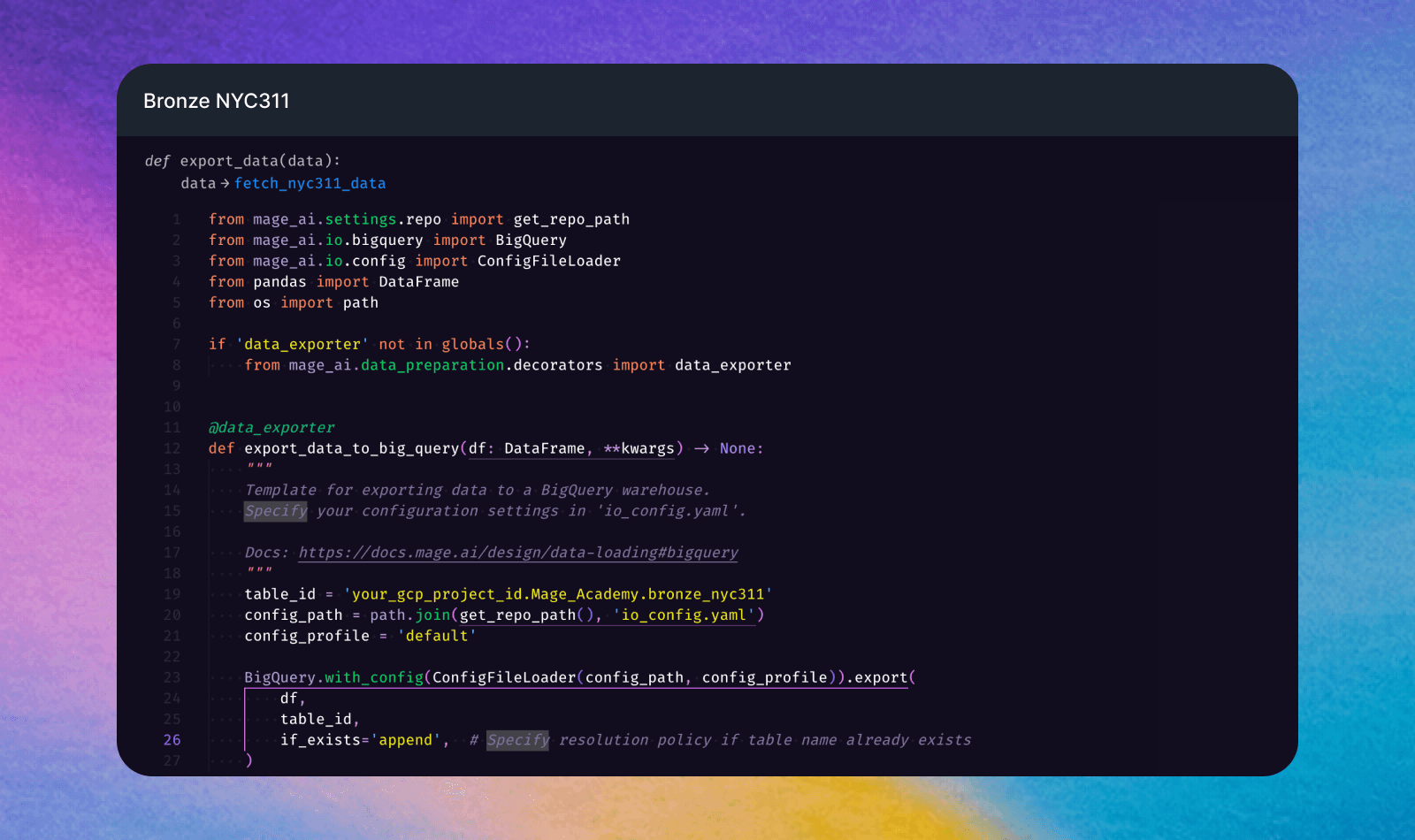
Step 4: Add data exporter block
In your Mage pipeline, click the "Blocks" button
Hover over "Data exporter" then “data warehouses” and select "API"
Name the block:
bronze_nyc311Click "Save and add"
Change the
table_idto your BigQuery table id and the resolution policy toappend
Expected Results
Console Output: Date range confirmation and record count
DataFrame: Raw NYC 311 data
Test Results: ✅ Successful validation of core columns
Daily Coverage: Complete dataset for the previous 24-hour period
Why This Approach?
This data loader design follows best practices for daily batch processing:
Consistent Daily Batches: Always processes complete days of data
No Data Cleaning: Keeps raw data intact for bronze layer
All Columns: Preserves complete dataset structure for downstream analysis
Reliable Date Logic: Works regardless of when the pipeline runs